[{"name":"Tepa","comment":" This module provides core functionality for TEPA.\n\n\n# Overview of the application structure\n\nTEPA application is written in the [Elm language](https://elm-lang.org/), and is converted to JavaScript, so you import it to use in your JavaScript (or TypeScript) file.\nIf you are a [Parcel](https://parceljs.org/) user, you can load the Elm file that contains the `main` function built with `application` as follows:\n\n`index.html`:\n\n \n \n \n \n \n\n`index.js`:\n\n // Specify your file that contains `main` function here.\n import { Elm } from \"./Main.elm\"\n\n Elm.Main.init({\n // Pass some JSON value to TEPA upon initialization.\n flags: {\n \"loaded-at\": Date.now()\n }\n })\n\n`Main.elm` (Details will be explained later):\n\n import Json.Decode (Value)\n import Tepa exposing (AppUrl, NavKey, Program, Promise)\n import Tepa.Time as Time\n\n main : Program Memory\n main =\n Tepa.application\n { init = init\n , view = view\n , initView = initView\n , onLoad = onLoad\n , onUrlRequest = onUrlRequest\n , onUrlChange = onUrlChange\n }\n\n {- Data type for representing your application state.\n -}\n type alias Memory =\n { ...\n , ...\n }\n\n {- Data type for representing _Flags_.\n -}\n type alias Flags =\n { ...\n , ...\n }\n\n {-| Your implementation for `init`.\n -}\n init : Value -> Promise () (Flags, Memory)\n init =\n Debug.todo \"\"\n\n {-| Your implementation for `onLoad`.\n -}\n onLoad : Flags -> AppUrl -> NavKey -> Promise Memory ()\n onLoad flags url key =\n Debug.todo \"\"\n\n {-| Your implementation for `onUrlRequest`.\n -}\n onUrlRequest : Flags -> UrlRequest -> NavKey -> Promise memory ()\n onUrlRequest flags url key =\n Debug.todo \"\"\n\n {-| Your implementation for `onUrlChange`.\n -}\n onUrlChange : Flags -> AppUrl -> NavKey -> Promise memory ()\n onUrlChange flags url key =\n Debug.todo \"\"\n\n {-| Your implementation for `initView`.\n -}\n initView : Document\n initView layer =\n Debug.todo \"\"\n\n {-| Your implementation for `view`.\n -}\n view : Layer Memory -> Document\n view layer =\n Debug.todo \"\"\n\nIf you are not familiar with Elm language, we recommend you to check [Core Language](https://guide.elm-lang.org/core_language), [Types](https://guide.elm-lang.org/types/), and [Error Handling](https://guide.elm-lang.org/error_handling/) section of the Elm guide.\nAPI documentation for the core libraries of the language can be found on the [package site](https://package.elm-lang.org/packages/elm/core/latest/).\nAmong the core libraries, `Platform`, `Platform.Cmd`, `Platform.Sub`, `Process`, and `Task` modules are not used by TEPA, so you can just ignore them.\n\n_For TEA users: If you have an existing TEA application, you can use the [low level API](#connect-to-tea-app) to partially integrate TEPA into your TEA application._\n\n@docs application\n@docs ApplicationProps\n@docs Program\n@docs Document\n\n\n# Key Concepts of TEPA\n\n\n## Memory\n\nTEPA has a single _Memory_ that holds all of the application state.\n\n {-| Your own type that represents your application state.\n\n It is common to declare [type alias](https://guide.elm-lang.org/types/type_aliases) for [record](https://guide.elm-lang.org/core_language#records).\n\n -}\n type alias Memory =\n { pageState : PageState\n }\n\n\n## Flags\n\nYou can pass a JSON value, called _Flags_, to the TEPA application upon initialization.\nCommon uses are passing in API keys, environment variables, and user data.\n\nThe sample `index.js` in the `application` document passes `{ \"loaded-at\": Data.now() }` as flags.\n\n Elm.Main.init({\n // Pass some JSON value to TEPA upon initialization.\n flags: {\n \"loaded-at\": Date.now()\n }\n\nOn the Elm side, the JSON object is converted to `Value` type which you can _decode_ with the [Json.Decode](https://package.elm-lang.org/packages/elm/json/latest/Json-Decode) module.\n\n\n## Procedure\n\nIn TEPA, you describe application behaviour as _Procedure_, the time sequence of proccessing.\n\n\n### Promise\n\nTo build your procedure, you combine some _Promises_ that represent the eventual completion of an operation and its resulting value. Similar to [Promise in JavaScript](https://developer.mozilla.org/en-US/docs/Web/JavaScript/Reference/Global_Objects/Promise).\n\n@docs Promise\n\nThe main difference from Promise in JavaScript is that Promise in TEPA does not be rejected. When you represent rejected state, just return [`Result`](https://package.elm-lang.org/packages/elm/core/latest/Result#Result) value as its result.\nThe rejection of JavaScript Promise is a sort of Exception, which drops context.\n\n\n#### Primitive Promises\n\n@docs sequence\n@docs modify\n@docs none\n@docs currentState\n@docs neverResolved\n\n\n#### Bind results\n\n`currentState` is resolved with the current state, but how to retrieve the value? You can use `bind` to pass the result into another sequence of procedures.\n\n@docs bind, bind2, bind3, bindAll\n@docs succeed, sync\n\n\n#### Recursive procedures\n\nIt is common technique to call procedures recursively.\n\n formProcedure : Promise Memory ()\n formProcedure =\n Tepa.bind submit <|\n \\result ->\n case result of\n Err error ->\n [ Tepa.modify <|\n \\m ->\n { m | error = error }\n , formProcedure\n ]\n\n Ok body ->\n [ Debug.todo \"\"\n ]\n\nHowever, this code may cause run out of stack memory. To optimize memory usage, you can use `lazy`.\n\n formProcedure : Promise Memory ()\n formProcedure =\n Tepa.bind submit <|\n \\result ->\n case result of\n Err error ->\n [ Tepa.modify <|\n \\m ->\n { m | error = error }\n , Tepa.lazy <|\n \\_ ->\n formProcedure\n ]\n\n Ok body ->\n [ Debug.todo \"\"\n ]\n\n@docs lazy\n\n\n#### Common helpers\n\n@docs void\n@docs when\n@docs unless\n@docs withMaybe\n@docs syncAll\n\n\n#### DOM events\n\nTo request DOM related operations, you can use [`Tepa.Dom`](./Tepa-Dom) module.\n\n\n#### Page navigation\n\nTo navigate to another page, you can use [`Tepa.Navigation`](./Tepa-Navigation) module.\n\n\n#### Random values\n\nTo request random values, you can use [`Tepa.Random`](./Tepa-Random) module.\n\n\n#### Handle time\n\nTo request time related operations, you can use [`Tepa.Time`](./Tepa-Time) module.\n\n\n#### HTTP requests\n\nTo send HTTP request to the backend server, you can use [`Tepa.Http`](./Tepa-Http) module.\n\n\n#### Port requests\n\n@docs portRequest\n@docs PortRequest, PortResponse\n@docs portStream\n\n\n#### Streams\n\nSome Promises are resolved with `Stream`, which is an advanced technique for controlling Promises precisely.\nSee [Tepa.Stream](./Tepa-Stream) for details.\n\n\n#### Lower level functions\n\n@docs map\n@docs liftMemory, maybeLiftMemory\n@docs andThen, bindAndThen, bindAndThen2, bindAndThen3, bindAndThenAll\n\n\n### Application Procedures\n\nThere are four types of procedures that you specify as the `application` property.\n\n\n### `init`\n\nThe `init` Procedure is executed on page load to decode your Flags and set the initial Memory state.\nIt takes a raw `Value` which you can _decode_ to your Flags using the [Json.Decode](https://package.elm-lang.org/packages/elm/json/latest/Json-Decode) module.\n\n init : Value -> Promise () ( flags, memory )\n\nNote that its type has `()` as a Memory type, so you cannot access memory state during initialization process.\n\n\n### `onLoad`\n\nThe `onLoad` is the main Procedure that is executed on every page load right after `init`.\nIt takes three arguments:\n\n onLoad : flags -> AppUrl -> NavKey -> Promise memory ()\n\n - Flags: Flags value decoded by the `init` Procedure.\n\n - Application URL: The initial URL requested by a user.\n\n TEPA uses the [`AppUrl`](https://package.elm-lang.org/packages/lydell/elm-app-url/latest/AppUrl) type to represent internal URLs.\n\n - Navigation Key: Required by functions exposed by `Tepa.Navigation`.\n\n@docs NavKey\n\n\n### `onUrlRequest`\n\nYou specify the `onUrlRequest` Procedure for handling page transition requests.\nIt takes three arguments:\n\n onUrlRequest : flags -> UrlRequest -> NavKey -> Promise memory ()\n\n - Flags: Flags value decoded by the `init` Procedure.\n - Requested URL: [`UrlRequest`](#UrlRequest) value that indecates requested URL.\n - Navigation Key: Required by functions exposed by `Tepa.Navigation`.\n\n@docs UrlRequest\n\nIn most cases, you will declare the function as follows:\n\n onUrlRequest : Flags -> Tepa.UrlRequest -> NavKey -> Promise Memory ()\n onUrlRequest _ urlRequest key =\n case urlRequest of\n Tepa.InternalPath url ->\n Nav.pushPath key url\n\n Tepa.ExternalPage href ->\n Nav.load href\n\n\n### `onUrlChange`\n\nImmediately after the URL is changed, `onUrlChange` Procedure is evaluated.\nA common use case is to change the page state based on the new URL.\n\nIt takes three arguments:\n\n onUrlChange : flags -> AppUrl -> NavKey -> Promise memory ()\n\n - Flags: Flags value decoded by the `init` Procedure.\n - New URL: Loaded new URL.\n - Navigation Key: Required by functions exposed by `Tepa.Navigation`.\n\nIn [sample application](https://github.com/arowM/tepa-sample), the `onUrlChange` function retrieves the session information, such as the logged-in user data, and then calls the main procedure.\n\n\n## Layer\n\n\n### Motivation\n\nThe _Layer_ is the concept of an isolated space. You can create a new layer with the `newLayer` function, execute a procedure on a layer with the `onLayer` function, delete or overwrite the existing layer with `modify`.\n\nA main use of the layer is to manage page transition. See that you have the following `Page` type to represent your page state.\n\n import MyApp.Profile exposing (Profile)\n import Page.Home\n import Page.Users\n import Tepa exposing (Layer)\n\n type alias Memory =\n { page : Page\n , session :\n { mprofile : Maybe Profile\n }\n }\n\n type Page\n = PageNotFound\n | PageHome Page.Home.Memory\n | PageUsers Page.Users.Memory\n\nThis approach may seem to work well at first, but it may exhibit unexpected behavior, such as\n\n1. A user opens the home page.\n - The `init` Procedure initializing the `page` in Memory to `PageHome param` (where `param` is the initial value of `PageHome.Memory`).\n - The `onLoad` Procedure is called, and it execute the Procedure for the home page.\n - The Procedure for the home page is executed to replace the top image to be displayed every 20 seconds (process A).\n2. The user is redirected to the user list page.\n - The `onChangeUrl` Procedure is called and the `page` in memory is replaced with `PageUsers param` (`param` is the initial value of `PageUsers.Memory`).\n - At this point, process A is asleep.\n3. The user immediately changes to the home page.\n - The `onChangeUrl` Procedure is called, and the `page` in memory is again replaced with the `PageHome param` (`param` is the initial value of `PageHome.Memory`).\n - The `onChangeUrl` Procedure continues to execute a new Procedure for the home page.\n - A new process (Process B) runs to update the display image every 20 seconds, overlapping with Process A.\n - Now it is time for Process A to refresh the image.\n - Because the memory state is still `PageHome`, Process A cannot detect that the page has changed in the middle of the process.\n - Process B also refreshes images periodically, so the slideshow now refreshes images at odd times!\n\nThe reason for this unexpected behavior is that the process cannot determine that the page state has changed in the middle of a page based only on the memory state. To solve this problem, you can use _Layer_.\n\n type Page\n = PageNotFound\n | PageHome (Layer Page.Home.MemoryBody)\n | PageUsers (Layer Page.Users.MemoryBody)\n\nThe new `Page` definition above uses `Layer` to wrap each page memory state. A procedure executed on a Layer will be aborted when the Layer has expired by being overwritten by another Layer. This allows you to avoid running duplicate procedures.\n\n@docs Layer\n@docs layerStateOf, layerIdOf\n@docs mapLayer\n@docs newLayer\n@docs currentLayerId\n\n\n### Layer Memory\n\nOn each Layer you define Memory with `LayerMemory`.\n\n@docs LayerMemory\n\nThe `LayerMemory` has two parameters:\n\n - `link`: External Memory state which this Layer depends on.\n - `body`: The Memory body for the Layer.\n\nFor example, you can declare `Memory` for the home page as follows:\n\n module Page.Home exposing\n ( Memory\n , MemoryBody\n )\n\n import MyApp.Profile exposing (Profile)\n import Tepa exposing (LayerMemory, Promise)\n\n {-| Memory structure for home page.\n -}\n type alias Memory =\n LayerMemory\n MemoryLink\n MemoryBody\n\n {-| Link to the external memory spaces.\n The main use is to share the application state between pages.\n -}\n type alias MemoryLink =\n { profile : Profile\n }\n\n {-| Memory body\n -}\n type alias MemoryBody =\n { clicked : Bool\n }\n\nNow you can declare your Procedures.\n\n init : Promise m MemoryBody\n init =\n Tepa.succeed\n { clicked = False\n }\n\n onLoad : Promise Memory ()\n onLoad =\n Tepa.bind\n (Tepa.awaitViewEvent\n { key = \"myButton\"\n , type_ = \"click\"\n }\n )\n <|\n \\() ->\n [ Tepa.bodySequence\n [ Tepa.modify <| \\m -> { m | clicked = True }\n ]\n\n -- This operation affects other pages.\n , Tepa.linkSequence\n [ Tepa.modify <|\n \\({ profile } as m) ->\n { m\n | profile =\n { profile | hasClickedHomeButton = True }\n }\n ]\n ]\n\n@docs onLink, onBody\n@docs linkSequence, bodySequence\n@docs modifyLink, modifyBody\n\nTo call Procedures for `LayerMemory` on the Procedures for the parent Memory, you can use `onLayer`.\n\n@docs onLayer, onEachLayer, ResultOnLayer\n\n\n## View\n\nThe _View_ determines how your application is rendered in the web browser, based only on the current Layer state.\nYou use [Tepa.Html](Tepa-Html) and [Tepa.Mixin](Tepa-Mixin) to tell the web browser how to render the page.\n\n@docs Html\n@docs Mixin\n\nThe `application` function takes two types of Views: `initView` for the View during the initialization on page load, and `view` for Views after the initialization process.\n\n\n### Define `view`\n\nTo define `view` function, you use `layerView`.\n\n@docs layerView\n@docs ViewContext\n@docs mapViewContext\n\n import Tepa exposing (Document, Layer)\n\n view : Layer Memory -> Document\n view =\n Tepa.layerView <|\n \\{ state } ->\n { title = \"Sample App\"\n , body =\n [ case state.page of\n PageNotFound ->\n pageNotFoundView\n\n PageLogin pageLogin ->\n PageLogin.view pageLogin\n\n PageHome pageHome ->\n PageHome.view pageHome\n ]\n }\n\nThe `state` field of the `ViewContext` indicates current memory state of the Layer.\n\n\n### Keys\n\nKey is used to specify a specific View element.\n\n import Tepa exposing (Layer, Msg)\n import Tepa.Html as Html exposing (Html)\n import Tepa.Mixin as Mixin\n\n formView : Layer Memory -> Html\n formView =\n Tepa.layerView <|\n \\{ setKey, values } ->\n Html.node \"form\"\n [ Mixin.attribute \"novalidate\" \"true\"\n ]\n [ Html.node \"label\"\n []\n [ Html.text \"Name: \"\n , Html.node \"input\"\n [ setKey \"form_name\"\n , Mixin.attribute \"type\" \"text\"\n , Mixin.attribute \"placeholder\" \"Sakura-chan\"\n ]\n []\n ]\n , Html.button\n [ setKey \"form_submit\"\n ]\n [ Html.text \"Submit\"\n ]\n , errors values\n ]\n\n errors : Dict String String -> Html\n errors formValues =\n case Dict.get \"form_name\" formValues of\n Just \"\" ->\n Html.text \"Name is required.\"\n\n _ ->\n Html.text \"\"\n\nThis example uses the `setKey` of the `ViewContext` to set the Key named \"form\\_name\" to the name input, and \"form\\_submit\" to the submit button. In this way, you can retrieve the user input value with the `values` field of the `ViewContext`.\n\nNote that Keys on the same Layer must be unique.\n\n_For TEA users: You can use `setKey` alternative for `Html.Attribute` that elm/html expose. It means you can use layout libraries such as neat-layout or elm-ui._\n\n\n### Handle form value on Procedure\n\nThe key is also used to communicate View and Procedure. If you want to get user inputs on the Procedure side, you can use `getValue` or `getValues`.\n\n@docs getValue, getValues\n\nThe `setValue` is used to overwrite or initiate the input value from the Procedure side.\n\n@docs setValue\n\nNote that the Procedure can only get/set values in Views on the same Layer that the Procedure is executed.\n\n\n### Handle form check state on Procedure\n\nYou can get/set `checked` property values of radio/checkbox elements.\n\n@docs getCheck, getChecks, setCheck\n\nNote that the Procedure can only get/set check state in Views on the same Layer that the Procedure is executed.\n\n\n### Helpers to handle form state\n\n@docs getFormState, FormState\n\n\n### Handle View events on Procedure\n\nTo capture View events on Procedure, you can use `awaitViewEvent` or `awaitCustomViewEvent`.\n\n@docs awaitViewEvent, awaitCustomViewEvent\n\nFor more precise control, you can use [`Stream`](./Tepa-Stream) versions.\n\n@docs viewEventStream, customViewEventStream\n\nNote that the Procedure can only capture events in Views on the same Layer that the Procedure is executed.\n\n\n### Freshness of input values\n\nThe user input values obtained by the `value` field of the `ViewContext` and `getValue` / `getValues` in the Procedure are updated whenever the `change` event of the target element occurs. So if you want to implement something like an incremental search, getting values in this ways will not give you the latest input values.\nUse [search type of input element](https://developer.mozilla.org/docs/Web/HTML/Element/input/search) or capture the `input` event with `awaitCustomViewEvent` to handle this situation.\n\n\n# Assertion\n\nYou may have a situation where you do not want a Promise to result in a certain result, such as when your `onLayer` result in `LayerNotExists` on a Layer that should exist at that moment. Assertion is a good practice to detect such logic bugs.\n\n@docs assertionError\n\nAssertion has no effect while the TEPA code is running as an application, but if the same code is used for scenario testing, the test will fail when an Assertion Error occurs.\n\n\n# Scenario\n\nTo create user scenarios and generate tests for them, see the [`Tepa.Scenario`](./Tepa-Scenario) module.\n\n\n# Headless\n\n@docs headless\n\n\n# Connect to TEA app\n\n_For TEA users: If you have an existing application built with TEA, you can partially replace it with TEPA._\n\n@docs init\n@docs view\n@docs update\n@docs subscriptions\n@docs onUrlRequest\n@docs onUrlChange\n@docs Msg\n@docs Model\n\n\n# Unsafe functions\n\n@docs unsafePush\n\n","unions":[{"name":"LayerMemory","comment":" Memory structure for accessing external Memory space from within Layer.\n","args":["link","body"],"cases":[]},{"name":"ResultOnLayer","comment":" Represents result for `onLayer`.\n\n - `SucceedOnLayer`: The Promise has been successfully resolved.\n - `BodyExpired`: The layer has been expired during execution.\n - `LinkExpired`: The link which the layer depends on has been expired during execution.\n\n","args":["a"],"cases":[["SucceedOnLayer",["a"]],["BodyExpired",[]],["LinkExpired",[]]]},{"name":"UrlRequest","comment":" All links in an [`application`](#application) create a `UrlRequest`. So\nwhen you click `Home`, it does not just navigate! It\nnotifies `onUrlRequest` that the user wants to change the URL.\n\n_This is the TEPA version of [Browser.UrlRequest](https://package.elm-lang.org/packages/elm/browser/latest/Browser#UrlRequest). Refer to the documentation for more detailed notes._\n\n","args":[],"cases":[["InternalPath",["AppUrl.AppUrl"]],["ExternalPage",["String.String"]]]}],"aliases":[{"name":"ApplicationProps","comment":" Property values for your application.\n","args":["flags","memory"],"type":"{ init : Json.Encode.Value -> Tepa.Promise () ( flags, memory ), onLoad : flags -> AppUrl.AppUrl -> Tepa.NavKey -> Tepa.Promise memory (), onUrlRequest : flags -> Tepa.UrlRequest -> Tepa.NavKey -> Tepa.Promise memory (), onUrlChange : flags -> AppUrl.AppUrl -> Tepa.NavKey -> Tepa.Promise memory (), initView : Tepa.Document, view : flags -> memory -> Tepa.Document }"},{"name":"Document","comment":" This data specifies the `` and all of the nodes that should go in the `<body>`. This means you can update the title as your application changes. Maybe your \"single-page app\" navigates to a \"different page\", maybe a calendar app shows an accurate date in the title, etc.\n\n_This is the TEPA version of [Browser.Document](https://package.elm-lang.org/packages/elm/browser/latest/Browser#Document)._\n\n","args":[],"type":"{ title : String.String, body : List.List Tepa.Html }"},{"name":"FormState","comment":" Helper type alias representing a form state.\n","args":[],"type":"{ values : Dict.Dict String.String String.String, checks : Dict.Dict String.String Basics.Bool }"},{"name":"Html","comment":" ","args":[],"type":"Html.Html Tepa.Msg"},{"name":"Layer","comment":" _Layer_ is a concept that deals with a part of the application. It can successfully represent elements that are created or removed during the application runtime. Especially, it matches well with Pages in SPAs. The application itself is also a Layer.\n","args":["m"],"type":"Internal.Core.Layer m"},{"name":"Mixin","comment":" ","args":[],"type":"Mixin.Mixin Tepa.Msg"},{"name":"Model","comment":" ","args":["flags","m"],"type":"Internal.Core.Model (Internal.Core.AppState flags m)"},{"name":"Msg","comment":" ","args":[],"type":"Internal.Core.Msg"},{"name":"NavKey","comment":" A navigation key is needed to create navigation procedures exposed by the [Tepa.Navigation](./Tepa-Navigation) module.\n\nYou only get access to a `NavKey` when you create your program with `application`, guaranteeing that your program is equipped to detect these URL changes. If `NavKey` values were available in other kinds of programs, unsuspecting programmers would be sure to run into some [annoying bugs](https://github.com/elm/browser/blob/1.0.2/notes/navigation-in-elements.md) and learn a bunch of techniques the hard way!\n\n_This is the TEPA version of [Browser.Navigation.Key](https://package.elm-lang.org/packages/elm/browser/latest/Browser-Navigation#Key)._\n\n","args":[],"type":"Internal.Core.NavKey"},{"name":"PortRequest","comment":" ","args":["msg"],"type":"Json.Encode.Value -> Platform.Cmd.Cmd msg"},{"name":"PortResponse","comment":" ","args":["msg"],"type":"(Json.Encode.Value -> msg) -> Platform.Sub.Sub msg"},{"name":"Program","comment":" A `Program` describes an TEPA program.\n\n_An alias for [Platform.Program](https://package.elm-lang.org/packages/elm/core/latest/Platform#Program)._\n\n","args":["flags","memory"],"type":"Platform.Program Json.Encode.Value (Tepa.Model flags memory) Tepa.Msg"},{"name":"Promise","comment":" ","args":["memory","result"],"type":"Internal.Core.Promise memory result"},{"name":"ViewContext","comment":"\n\n - `state`: Current Memory state.\n\n - `setKey`: Set a key to the element.\n\n - `values`: Current values of the control elements, keyed by its key strings set with `setKey`.\n\n - `checks`: Current check state of the radio/check elements, keyed by its key strings set with `setKey`.\n\n - `layerId`: Unique string that identifies current Layer.\n The string consists of characters in the code point range U+0020 to U+D7FF.\n Because it contains no ASCII whitespace, it is safe to use as a part of the ID attribute value in [HTML5](https://html.spec.whatwg.org/multipage/dom.html#the-id-attribute).\n\n - `setKey_`: _(Only for TEA users) TEA version of `setKey`._\n\n","args":["m"],"type":"{ state : m, setKey : String.String -> Tepa.Mixin, values : Dict.Dict String.String String.String, checks : Dict.Dict String.String Basics.Bool, layerId : String.String, setKey_ : String.String -> List.List (Html.Attribute Tepa.Msg) }"}],"values":[{"name":"andThen","comment":" Build a new Promise that evaluate two Promises sequentially.\n","type":"(a -> Tepa.Promise m b) -> Tepa.Promise m a -> Tepa.Promise m b"},{"name":"application","comment":" Entry point for building your applications.\n","type":"Tepa.ApplicationProps flags memory -> Tepa.Program flags memory"},{"name":"assertionError","comment":" Cause the scenario test to fail.\n\n import Tepa\n\n sampleProcedure =\n Tepa.bind\n (Tepa.onLayer\n { getLink = getMyLink\n , setLink = setMyLink\n , getBody = getMyBody\n , setBody = setMyBody\n }\n promiseOnLayer\n )\n <|\n \\result ->\n case result of\n Tepa.SucceedOnLayer a ->\n [ procedureOnSuccess\n ]\n\n _ ->\n [ Tepa.assertionError \"Layer error on sampleProcedure\"\n , sendErrorLog \"Layer error on sampleProcedure\"\n , handleError\n ]\n\n","type":"String.String -> Tepa.Promise memory ()"},{"name":"awaitCustomViewEvent","comment":" Advanced version of `awaitViewEvent`.\n\nThe `decoder` field is the [Decoder](https://package.elm-lang.org/packages/elm/json/latest/Json-Decode#Decoder) for the target [event object](https://developer.mozilla.org/en-US/docs/Web/API/Event). If the returned `stopPropagation` value is `True`, it calls the `Event.stopPropagation()` method. If the returned `preventDefault` value is `True`, it calls the `Event.preventDefault()` method.\n\n","type":"{ key : String.String, type_ : String.String, decoder : Json.Decode.Decoder { stopPropagation : Basics.Bool, preventDefault : Basics.Bool, value : a } } -> Tepa.Promise m a"},{"name":"awaitViewEvent","comment":" Wait for an event of the [type](https://developer.mozilla.org/docs/Web/API/Event/type) specified by `type_` to occur for the element specified by `key`.\n","type":"{ key : String.String, type_ : String.String } -> Tepa.Promise m ()"},{"name":"bind","comment":" Helper function to _bind_ the result of a promise.\n\n import Tepa exposing (Promise)\n\n procedure : Promise m ()\n procedure =\n Tepa.bind Tepa.currentState <|\n \\state ->\n if state.noGoats then\n [ Tepa.modify <|\n \\m ->\n { m | message = \"Oh my Goat!\" }\n , unfortunatelyNoGoatsProcedure\n ]\n\n else\n [ youAreLuckyProcedure\n ]\n\n","type":"Tepa.Promise m a -> (a -> List.List (Tepa.Promise m ())) -> Tepa.Promise m ()"},{"name":"bind2","comment":" Run two Promises concurrently, and bind the results to variables when both are complete.\n\n import Tepa exposing (Promise)\n import Tepa.Time as Time\n\n sample : Promise m ()\n sample =\n Tepa.bind2 Time.now Time.here <|\n \\now here ->\n [ yourProcedure now here\n ]\n\n","type":"Tepa.Promise m a -> Tepa.Promise m b -> (a -> b -> List.List (Tepa.Promise m ())) -> Tepa.Promise m ()"},{"name":"bind3","comment":" Run three Promises concurrently, and bind the results to variables when all are complete.\n\nIf you need to bind more Promises, use `bindAll` or `sync`.\n\n","type":"Tepa.Promise m a -> Tepa.Promise m b -> Tepa.Promise m c -> (a -> b -> c -> List.List (Tepa.Promise m ())) -> Tepa.Promise m ()"},{"name":"bindAll","comment":" Run Promises concurrently, and bind the results to variables when all are complete.\n","type":"List.List (Tepa.Promise m a) -> (List.List a -> List.List (Tepa.Promise m ())) -> Tepa.Promise m ()"},{"name":"bindAndThen","comment":" Flipped version of `andThen`.\n\nYou can use `bindAndThen` to bind some Promise result to a variable:\n\n bindAndThen somePromise <|\n \\result ->\n anotherPromise result\n\n","type":"Tepa.Promise m a -> (a -> Tepa.Promise m b) -> Tepa.Promise m b"},{"name":"bindAndThen2","comment":" Run two Promises concurrently, and bind the results to variables when both are complete.\n\n import Tepa exposing (Promise)\n import Tepa.Time as Time\n\n sample : Promise m ( Time.Zone, Time.Posix )\n sample =\n Tepa.bindAndThen2 Time.now Time.here <|\n \\now here ->\n Tepa.succeed ( here, now )\n\n","type":"Tepa.Promise m a -> Tepa.Promise m b -> (a -> b -> Tepa.Promise m c) -> Tepa.Promise m c"},{"name":"bindAndThen3","comment":" Run three Promises concurrently, and bind the results to variables when all are complete.\n\nIf you need to bind more Promises, use `bindAndThenAll` or `sync`.\n\n","type":"Tepa.Promise m a -> Tepa.Promise m b -> Tepa.Promise m c -> (a -> b -> c -> Tepa.Promise m d) -> Tepa.Promise m d"},{"name":"bindAndThenAll","comment":" Run Promises concurrently, and bind the results to variables when all are complete.\n","type":"List.List (Tepa.Promise m a) -> (List.List a -> Tepa.Promise m b) -> Tepa.Promise m b"},{"name":"bodySequence","comment":" Helper function to run Procedures for body part sequentially.\n","type":"List.List (Tepa.Promise body ()) -> Tepa.Promise (Tepa.LayerMemory link body) ()"},{"name":"currentLayerId","comment":" Request unique string for current Layer.\nThe value is equivalent to the `layerId` value of the `ViewContext`.\n","type":"Tepa.Promise m String.String"},{"name":"currentState","comment":" Promise that requests current Memory state.\n","type":"Tepa.Promise m m"},{"name":"customViewEventStream","comment":" ","type":"{ key : String.String, type_ : String.String, decoder : Json.Decode.Decoder { stopPropagation : Basics.Bool, preventDefault : Basics.Bool, value : a } } -> Tepa.Promise m (Internal.Core.Stream a)"},{"name":"getCheck","comment":" Get whether the checkbox/radio specified by the key string is checked.\n\n`Nothing` means that the checkbox/radio element with the key does not exist or that the `checked` property value of the element specified by the key has not been changed since the element was rendered.\n\n","type":"String.String -> Tepa.Promise m (Maybe.Maybe Basics.Bool)"},{"name":"getChecks","comment":" Get all the check states in the Layer as `Dict`.\n\n sample : Promise Memory ()\n sample =\n Tepa.bind Tepa.getChecks <|\n \\formChecks ->\n let\n targetCheck =\n Dict.get \"form_name\" formChecks\n |> Maybe.withDefault \"\"\n in\n [ handleCheck targetCheck\n ]\n\n","type":"Tepa.Promise m (Dict.Dict String.String Basics.Bool)"},{"name":"getFormState","comment":" Helper function to run `getValues` and `getChecks` concurrently.\n","type":"Tepa.Promise m Tepa.FormState"},{"name":"getValue","comment":" Get the user's input value for the view element identified by the key string.\n\n`Nothing` means that the key does not exist or that the value of the element specified by the key has not been changed since the element was rendered.\n\n","type":"String.String -> Tepa.Promise m (Maybe.Maybe String.String)"},{"name":"getValues","comment":" Get all the user input values in the Layer as `Dict`.\n\n sample : Promise Memory ()\n sample =\n Tepa.bind Tepa.getValues <|\n \\formValues ->\n let\n targetValue =\n Dict.get \"form_name\" formValues\n |> Maybe.withDefault \"\"\n in\n [ handleValue targetValue\n ]\n\n","type":"Tepa.Promise m (Dict.Dict String.String String.String)"},{"name":"headless","comment":" Build headless application.\nYou can use `headless` to save your scenario document as a markdown file.\n","type":"{ init : Json.Encode.Value -> Tepa.Promise () ( flags, memory ), onLoad : flags -> Tepa.Promise memory () } -> Tepa.Program flags memory"},{"name":"init","comment":" Construct the initial TEA data from Procedures.\n","type":"{ init : Json.Encode.Value -> Tepa.Promise () ( flags, memory ), onLoad : flags -> AppUrl.AppUrl -> Tepa.NavKey -> Tepa.Promise memory (), onUrlRequest : flags -> Tepa.UrlRequest -> Tepa.NavKey -> Tepa.Promise memory (), onUrlChange : flags -> AppUrl.AppUrl -> Tepa.NavKey -> Tepa.Promise memory () } -> Json.Encode.Value -> Url.Url -> Browser.Navigation.Key -> ( Tepa.Model flags memory, Platform.Cmd.Cmd Tepa.Msg )"},{"name":"layerIdOf","comment":" Takes the unique ID for the Layer.\nOne of the use cases is to find the target element from the list of layers.\n\nSee [`Widget.Toast`](https://github.com/arowM/tepa-sample/blob/main/src/Widget/Toast.elm) in the sample application for detail.\n\n","type":"Tepa.Layer m -> String.String"},{"name":"layerStateOf","comment":" Takes the current Memory state of the Layer.\n","type":"Tepa.Layer m1 -> m1"},{"name":"layerView","comment":" ","type":"(Tepa.ViewContext m -> view) -> Tepa.Layer m -> view"},{"name":"lazy","comment":" ","type":"(() -> Tepa.Promise m ()) -> Tepa.Promise m ()"},{"name":"liftMemory","comment":" Transform the Promise Memory.\n","type":"{ get : m0 -> m1, set : m1 -> m0 -> m0 } -> Tepa.Promise m1 a -> Tepa.Promise m0 a"},{"name":"linkSequence","comment":" Helper function to run Procedures for link part sequentially.\n","type":"List.List (Tepa.Promise link ()) -> Tepa.Promise (Tepa.LayerMemory link body) ()"},{"name":"map","comment":" Transform a resulting value produced by a Promise.\n","type":"(a -> b) -> Tepa.Promise m a -> Tepa.Promise m b"},{"name":"mapLayer","comment":" ","type":"(a -> b) -> Tepa.Layer a -> Tepa.Layer b"},{"name":"mapViewContext","comment":" ","type":"(m -> m1) -> Tepa.ViewContext m -> Tepa.ViewContext m1"},{"name":"maybeLiftMemory","comment":" Similar to `liftMemory`, but for the memory which may not exist.\nWhen the memory part is unreachable during execution, it resolved to `Nothing`.\n","type":"{ get : m0 -> Maybe.Maybe m1, set : m1 -> m0 -> m0 } -> Tepa.Promise m1 a -> Tepa.Promise m0 (Maybe.Maybe a)"},{"name":"modify","comment":" Construct a Promise that modifies the Memory state.\n\nNote that the update operation, passed as the second argument, is performed atomically; it means that the state of the Memory is not updated by another process during it is read and written by the `modify`.\n\n","type":"(m -> m) -> Tepa.Promise m ()"},{"name":"modifyBody","comment":" Helper function to modify link part.\n","type":"(body -> body) -> Tepa.Promise (Tepa.LayerMemory link body) ()"},{"name":"modifyLink","comment":" Helper function to modify link part.\n","type":"(link -> link) -> Tepa.Promise (Tepa.LayerMemory link body) ()"},{"name":"neverResolved","comment":" Promise that never be resolved.\nYou can use `neverResolved` to prevent the current _Layer_ (See [Layer](#layer)) from expiring.\n","type":"Tepa.Promise m a"},{"name":"newLayer","comment":" ","type":"m1 -> Tepa.Promise m (Tepa.Layer m1)"},{"name":"none","comment":" Procedure that does nothing.\n","type":"Tepa.Promise m ()"},{"name":"onBody","comment":" Run Procedures for body part of `LayerMemory`\n","type":"Tepa.Promise body a -> Tepa.Promise (Tepa.LayerMemory link body) a"},{"name":"onEachLayer","comment":" Helper function to run Promises on the specified Layers concurrently.\n","type":"{ getLink : memory -> Maybe.Maybe link, setLink : link -> memory -> memory, getBodies : memory -> List.List (Tepa.Layer body), setBodies : List.List (Tepa.Layer body) -> memory -> memory } -> Tepa.Promise (Tepa.LayerMemory link body) a -> Tepa.Promise memory (List.List (Tepa.ResultOnLayer a))"},{"name":"onLayer","comment":" Run Promise on the specified Layer.\nFor example, consider the following situation:\n\n Tepa.bind\n (PageLogin.init msession\n |> Tepa.andThen Tepa.newLayer\n )\n <|\n \\newLayer ->\n [ Tepa.modify <| \\m -> { m | page = PageLogin newLayer }\n , PageLogin.procedure key url\n |> Tepa.onLayer\n { getLink =\n \\m ->\n Maybe.map\n (\\profile ->\n { profile = profile\n }\n )\n m.session.mprofile\n , setLink =\n \\link ({ session } as m) ->\n { m\n | session =\n { session\n | mprofile = Just link.profile\n }\n }\n , getBody =\n \\m ->\n case m.page of\n PageLogin layer ->\n Just layer\n\n _ ->\n Nothing\n , setBody =\n \\layer m ->\n { m | page = PageLogin layer }\n }\n ]\n\nIf the target layer disappears during the execution of a given Promise, the rest of the process for the body part is aborted, and returns `BodyExpired`.\nIf the link becomes to be unreachable during the execution of a given Promise, the rest of the process for the link part is aborted, and returns `LinkExpired`.\n\n","type":"{ getLink : memory -> Maybe.Maybe link, setLink : link -> memory -> memory, getBody : memory -> Maybe.Maybe (Tepa.Layer body), setBody : Tepa.Layer body -> memory -> memory } -> Tepa.Promise (Tepa.LayerMemory link body) a -> Tepa.Promise memory (Tepa.ResultOnLayer a)"},{"name":"onLink","comment":" Run Procedures for link part of `LayerMemory`\n","type":"Tepa.Promise link a -> Tepa.Promise (Tepa.LayerMemory link body) a"},{"name":"onUrlChange","comment":" TEA `onUrlChange` property value.\n","type":"Url.Url -> Tepa.Msg"},{"name":"onUrlRequest","comment":" TEA `onUrlRequest` property value.\n","type":"Browser.UrlRequest -> Tepa.Msg"},{"name":"portRequest","comment":" Build a Promise to send a _port_ request and receive a single response for it.\nThe _port_ is an concept to allow communication between Elm and JavaScript (or TypeScript).\nPorts are probably most commonly used for WebSockets and localStorage. You can see WebSocket examples in the [sample application](https://github.com/arowM/tepa-sample).\n\nHere, we use `portRequest` to get localStorage value safely.\n\nIn JavaScript side:\n\n```js\nconst app = Elm.Main.init({\n flags: {\n \"loaded-at\": Date.now()\n};\n\napp.ports.requestGetLocalName.subscribe((req) => {\n // It is a good practice to surround your code with `requestAnimationFrame` and `try`.\n requestAnimationFrame(() => {\n try {\n app.ports.receiveGetLocalName.send({\n // The `requestId` value, generated by TEPA, links\n // the subscribe port to the relevant send port.\n \"id\": req.id,\n \"body\": {\n name: localStorage.getItem(`Name.${req.body.userId}`),\n },\n });\n } catch {\n app.ports.receiveGetLocalName.send({\n \"id\": req.id,\n \"body\": {\n name: null,\n },\n });\n }\n });\n});\n```\n\nIn Elm side:\n\n import Json.Decode as JD\n import Json.Encode as JE exposing (Value)\n import Tepa exposing (PortRequest, PortResponse, Promise)\n\n port page_foo_get_local_name_request : PortRequest a\n\n port page_foo_get_local_name_response : PortResponse a\n\n type alias LocalNameResponse =\n { name : Maybe String\n }\n\n requestLocalName : String -> Promise Memory Event LocalNameResponse\n requestLocalName userId =\n Tepa.portRequest\n { request = page_foo_get_local_name_request\n , response = page_foo_get_local_name_response\n\n -- Port identifier for testing and debugging which must be\n -- unique among its layer.\n , portName = \"get_local_name\"\n , requestBody =\n JE.object\n [ ( \"userId\"\n , JE.string userId\n )\n ]\n }\n\nAs you can see, port is a mechanism for requesting a task to the JavaScript server running on the client machine.\nIt is the same structure as requesting a task to the backend server via HTTP Web API.\n\n","type":"{ request : Tepa.PortRequest Tepa.Msg, response : Tepa.PortResponse Tepa.Msg, portName : String.String, requestBody : Json.Encode.Value } -> Tepa.Promise m Json.Encode.Value"},{"name":"portStream","comment":" Similar to `portRequest`, but `portStream` can receive many responses.\nOne of the use cases is to receive WebSocket messages.\n\n - `request`: Request JavaScript port server for some tasks.\n - `response`: Receive responses for the request from JavaScript port server.\n - `cancel`: Called on the current Layer expires or the Stream ends. The main use is to free resources, such as closing WebSocket connections.\n\nKeep in mind that this Promise blocks subsequent Promises, so it is common practice to call asynchronously with the main Promise when you create a new layer. If you call `portStream` in recursive Promise, it spawns listeners many times!\n\n","type":"{ request : Tepa.PortRequest Tepa.Msg, response : Tepa.PortResponse Tepa.Msg, cancel : Tepa.PortRequest Tepa.Msg, portName : String.String, requestBody : Json.Encode.Value } -> Tepa.Promise m (Internal.Core.Stream Json.Encode.Value)"},{"name":"sequence","comment":" Sequentially process Procedures.\n\n sample : Promise m ()\n sample =\n sequence\n [ executedFirst\n , executedAfterFirstIsResolved\n ]\n\n","type":"List.List (Tepa.Promise m ()) -> Tepa.Promise m ()"},{"name":"setCheck","comment":" Set the user's check state for the radio/checkbox element identified by the key string.\n\nNote that it only sets initial state, but does not **overwrite** actual check state on DOM.\nIt is due to a slightly awkward behavior of the Elm runtime.\nWe plan to improve this behavior in the near future, but for most applications,\njust setting the default values should be fine.\n\n","type":"String.String -> Basics.Bool -> Tepa.Promise m ()"},{"name":"setValue","comment":" Set the user's input value for the view element identified by the key string.\n\nNote that it only sets initial value, but does not **overwrite** user input value.\nIt is due to a slightly awkward behavior of the Elm runtime.\nWe plan to improve this behavior in the near future, but for most applications,\njust setting the default values should be fine.\n\nYou can see [`Page.Chat` module](https://github.com/arowM/tepa-sample/blob/main/src/Page/Chat.elm) of sample application for a real example of resetting user input.\n\n","type":"String.String -> String.String -> Tepa.Promise m ()"},{"name":"subscriptions","comment":" TEA subscriptions function to execute your Procedures.\n","type":"Tepa.Model flags memory -> Platform.Sub.Sub Tepa.Msg"},{"name":"succeed","comment":" Build a Promise that is always completed with the given value immediately.\n\nThis is usefull for building Promise for concurrent operations with `sync`.\n\n","type":"a -> Tepa.Promise memory a"},{"name":"sync","comment":" Run many Promises concurrently to reduce all results.\n\n type alias Response =\n { resp1 : Resp1\n , resp2 : Resp2\n }\n\n request1 : Promise Memory Event Resp1\n request1 =\n Debug.todo \"\"\n\n request2 : Promise Memory Event Resp2\n request2 =\n Debug.todo \"\"\n\n -- Returns `Response` value when both Promises has been completed.\n batched : Promise Memory Event Response\n batched =\n succeed Response\n |> sync request1\n |> sync request2\n\n","type":"Tepa.Promise m a -> Tepa.Promise m (a -> b) -> Tepa.Promise m b"},{"name":"syncAll","comment":" Run Procedures concurrently, and await all to be completed.\n","type":"List.List (Tepa.Promise m ()) -> Tepa.Promise m ()"},{"name":"unless","comment":" Evaluate the sequence of Procedures only if the first argument is `False`, otherwise same as `none`.\n","type":"Basics.Bool -> List.List (Tepa.Promise m ()) -> Tepa.Promise m ()"},{"name":"unsafePush","comment":" Lower level function to push TEA Commands.\n\nFor detailed documentation and testing, do not use this. We recommend using special functions like `Tepa.Http.Request`.\n\nIf you think you need to use this function, please check the following points:\n\n1. Check to see if there is an alternative function for TEPA that does what you want to do\n2. If not, report it in an issue on GitHub.\n3. If you still want to use it, use it at your own risk and do not ask any questions or bother the TEPA developers.\n\n","type":"(m -> Platform.Cmd.Cmd Tepa.Msg) -> Tepa.Promise m ()"},{"name":"update","comment":" TEA update function to execute your Procedures.\n","type":"Tepa.Msg -> Tepa.Model flags memory -> ( Tepa.Model flags memory, Platform.Cmd.Cmd Tepa.Msg )"},{"name":"view","comment":" ","type":"{ initView : Tepa.Document, view : flags -> memory -> Tepa.Document } -> Tepa.Model flags memory -> Tepa.Document"},{"name":"viewEventStream","comment":" Tepa.Stream\n","type":"{ key : String.String, type_ : String.String } -> Tepa.Promise m (Internal.Core.Stream ())"},{"name":"void","comment":" Wait for a promise to be resolved and just ignore the result.\n","type":"Tepa.Promise m a -> Tepa.Promise m ()"},{"name":"when","comment":" Evaluate the sequence of Procedures only if the first argument is `True`, otherwise same as `none`.\n","type":"Basics.Bool -> List.List (Tepa.Promise m ()) -> Tepa.Promise m ()"},{"name":"withMaybe","comment":" Evaluate the sequence of Procedures returned by the callback function only if the first argument is `Just`, otherwise same as `none`.\n","type":"Maybe.Maybe a -> (a -> List.List (Tepa.Promise m ())) -> Tepa.Promise m ()"}],"binops":[]},{"name":"Tepa.Dom","comment":" This module allows you to manipulate the DOM in various ways.\n\nIt covers:\n\n - Focus and blur input elements.\n - Get the width and height of elements.\n - Get the x and y coordinates of elements.\n - Figure out the scroll position.\n - Change the scroll position!\n\nSee the `Browser.Dom` documentation for more detailed notes.\n\n\n# Focus\n\n@docs focus, blur, Error\n\n\n# Get Viewport\n\n@docs currentViewport, Viewport, currentViewportOf\n\n\n# Set Viewport\n\n@docs setViewport, setViewportOf\n\n\n# Position\n\n@docs element, Element\n\n","unions":[{"name":"Error","comment":" Many functions in this module look up DOM nodes up by their `id`. If you\nask for an `id` that is not in the DOM, you will get this error.\n\n_This is the TEPA version of [`Browser.Dom.Error`](https://package.elm-lang.org/packages/elm/browser/latest/Browser-Dom#Error)._\n\n","args":[],"cases":[["NotFound",["String.String"]]]}],"aliases":[{"name":"Element","comment":" Same as [Browser.Dom.Element](https://package.elm-lang.org/packages/elm/browser/latest/Browser-Dom#Element)\n\nA bunch of information about the position and size of an element relative\nto the overall scene.\n\n\n\n(Source: [Browser.Dom module document](https://package.elm-lang.org/packages/elm/browser/latest/Browser-Dom))\n\n","args":[],"type":"{ scene : { width : Basics.Float, height : Basics.Float }, viewport : { x : Basics.Float, y : Basics.Float, width : Basics.Float, height : Basics.Float }, element : { x : Basics.Float, y : Basics.Float, width : Basics.Float, height : Basics.Float } }"},{"name":"Viewport","comment":" Same as [Browser.Dom.Viewport](https://package.elm-lang.org/packages/elm/browser/latest/Browser-Dom#Viewport)\n\nAll the information about the current viewport.\n\n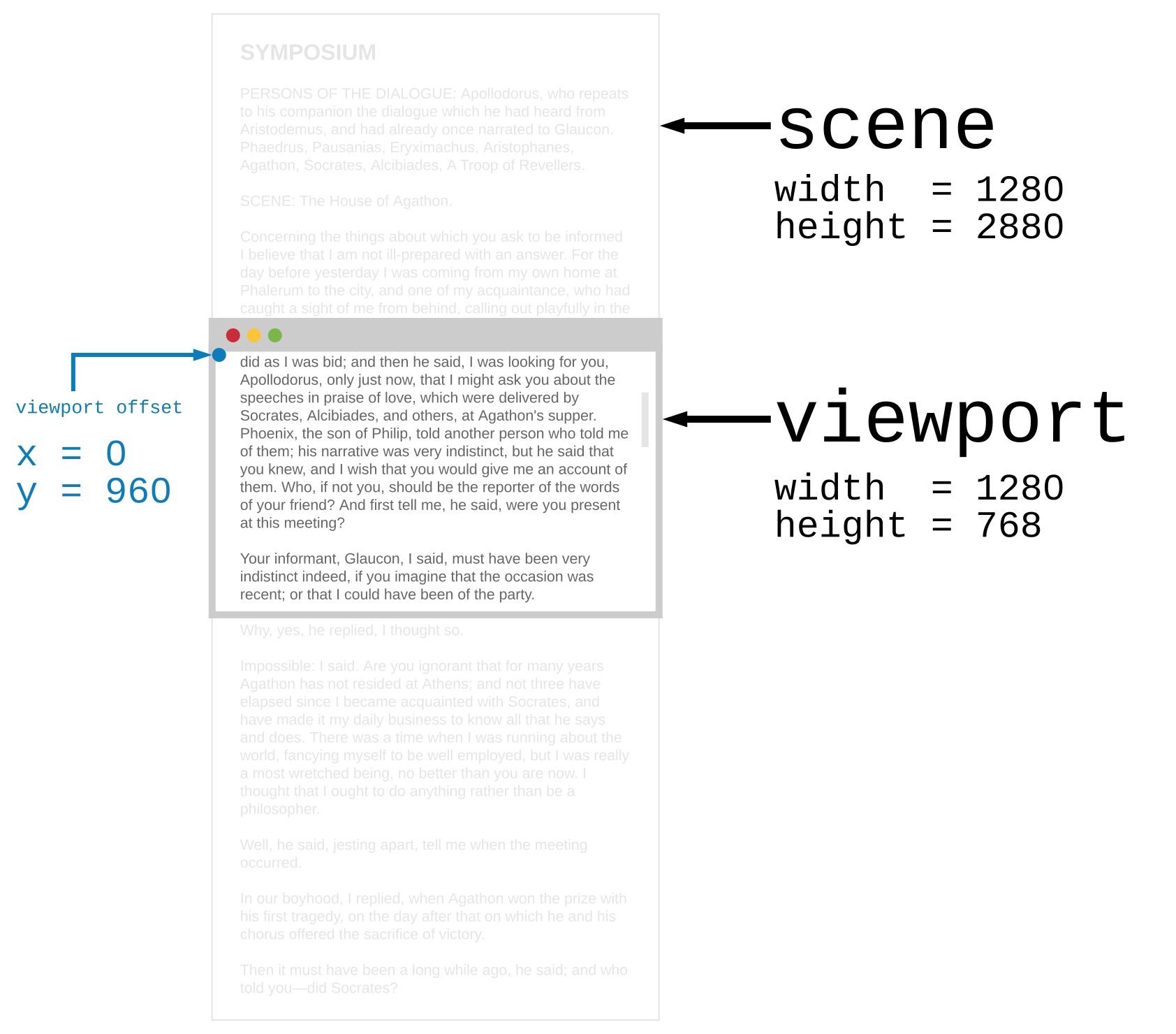\n\n(Source: [Browser.Dom module document](https://package.elm-lang.org/packages/elm/browser/latest/Browser-Dom))\n\n","args":[],"type":"{ scene : { width : Basics.Float, height : Basics.Float }, viewport : { x : Basics.Float, y : Basics.Float, width : Basics.Float, height : Basics.Float } }"}],"values":[{"name":"blur","comment":" Find a DOM node by `id` and make it lose focus. So if you wanted a node\nlike `<input type=\"text\" id=\"search-box\">` to lose focus you could say:\n\n import Tepa exposing (Promise)\n import Tepa.Dom as Dom\n\n unfocusSearchBox : Promise m (Result Dom.Error ())\n unfocusSearchBox =\n Dom.blur \"search-box\"\n\nIn scenario testing, it also simulates the blur event with an empty event object.\n\n_This is the TEPA version of [`Browser.Dom.blur`](https://package.elm-lang.org/packages/elm/browser/latest/Browser-Dom#blur)._\n\n","type":"String.String -> Tepa.Promise m (Result.Result Tepa.Dom.Error ())"},{"name":"currentViewport","comment":" Get information on the current viewport of the browser.\n\n\n\n(Source: [Browser.Dom module document](https://package.elm-lang.org/packages/elm/browser/latest/Browser-Dom))\n\nIf you want to move the viewport around (i.e. change the scroll position) you\ncan use [`setViewport`](#setViewport) which change the `x` and `y` of the\nviewport.\n\nIn scenario testing, it always resolves to Viewport of all values zero.\n\n_This is the TEPA version of [`Browser.Dom.getViewport`](https://package.elm-lang.org/packages/elm/browser/latest/Browser-Dom#getViewport)._\n\n","type":"Tepa.Promise m Tepa.Dom.Viewport"},{"name":"currentViewportOf","comment":" Just like `currentViewport`, but for any scrollable DOM node.\n\nSee [`Browser.Dom.getViewportOf`](https://package.elm-lang.org/packages/elm/browser/latest/Browser-Dom#getViewportOf) for detail and real use cases.\n\n_This is the TEPA version of [`Browser.Dom.getViewportOf`](https://package.elm-lang.org/packages/elm/browser/latest/Browser-Dom#getViewportOf)._\n\n","type":"String.String -> Tepa.Promise m (Result.Result Tepa.Dom.Error Tepa.Dom.Viewport)"},{"name":"element","comment":" Get position information about specific elements.\n\nSee [`Browser.Dom.getElement`](https://package.elm-lang.org/packages/elm/browser/latest/Browser-Dom#getElement) for detail and real use cases.\n\nIn scenario testing, it always resolves to Element of all values zero.\n\n_This is the TEPA version of [`Browser.Dom.getElement`](https://package.elm-lang.org/packages/elm/browser/latest/Browser-Dom#getElement)._\n\n","type":"String.String -> Tepa.Promise m (Result.Result Tepa.Dom.Error Tepa.Dom.Element)"},{"name":"focus","comment":" Find a DOM node by `id` and focus on it. So if you wanted to focus a node like `<input type=\"text\" id=\"search-box\">` you could say:\n\n import Tepa exposing (Promise)\n import Tepa.Dom as Dom\n\n focusSearchBox : Promise m (Result Dom.Error ())\n focusSearchBox =\n Dom.focus \"search-box\"\n\nIn scenario testing, it also simulates the focus event with an empty event object.\n\n_This is the TEPA version of [`Browser.Dom.focus`](https://package.elm-lang.org/packages/elm/browser/latest/Browser-Dom#focus)._\n\n","type":"String.String -> Tepa.Promise m (Result.Result Tepa.Dom.Error ())"},{"name":"setViewport","comment":" Change the `x` and `y` offset of the browser viewport immediately. For\nexample, you could make a command to jump to the top of the page:\n\n import Tepa exposing (Promise)\n import Tepa.Dom as Dom\n\n resetViewport : Promise m ()\n resetViewport =\n Dom.setViewport 0 0\n\nThis sets the viewport offset to zero.\n\nIn scenario testing, it has no effects.\n\n_This is the TEPA version of [`Browser.Dom.setViewport`](https://package.elm-lang.org/packages/elm/browser/latest/Browser-Dom#setViewport)._\n\n","type":"Basics.Float -> Basics.Float -> Tepa.Promise m ()"},{"name":"setViewportOf","comment":" Change the `x` and `y` offset of a DOM node’s viewport by ID. This\nis common in text messaging and chat rooms, where once the messages fill the\nscreen, you want to always be at the very bottom of the message chain. This\nway the latest message is always on screen! You could do this:\n\n import Tepa exposing (Promise)\n import Tepa.Dom as Dom\n\n jumpToBottom : String -> Promise m (Result Dom.Error ())\n jumpToBottom id =\n Tepa.bindAndThen (Dom.currentViewportOf id) <|\n \\res ->\n case res of\n Err err ->\n Tepa.succeed res\n\n Ok info ->\n Dom.setViewportOf id 0 info.scene.height\n\nSo you could call `jumpToBottom \"chat-box\"` whenever you add a new message.\n\nSee [`Browser.Dom.setViewportOf`](https://package.elm-lang.org/packages/elm/browser/latest/Browser-Dom#setViewportOf) for more detailed notes.\n\nIn scenario testing, it also simulates the scroll event with an empty event object on the target node.\n\n_This is the TEPA version of [`Browser.Dom.setViewportOf`](https://package.elm-lang.org/packages/elm/browser/latest/Browser-Dom#setViewportOf)._\n\n","type":"String.String -> Basics.Float -> Basics.Float -> Tepa.Promise m (Result.Result Tepa.Dom.Error ())"}],"binops":[]},{"name":"Tepa.Html","comment":" Quickly render HTML in Elm.\n\n\n# Examples\n\nThe HTML part of a TEPA application looks something like this:\n\n import Tepa.Html as Html exposing (Html)\n import Tepa.Mixin as Mixin\n\n view : Layer Memory -> Html\n view =\n Tepa.layerView <|\n \\{ state, setKey, values } ->\n Html.div []\n [ Html.button\n [ Mixin.attribute \"type\" \"button\"\n , setKey \"button-decrement\"\n ]\n [ Html.text \"-\"\n ]\n , Html.div []\n [ Html.text (String.fromInt state.count)\n ]\n , Html.button\n [ Mixin.attribute \"type\" \"button\"\n , setKey \"button-increment\"\n ]\n [ Html.text \"+\"\n ]\n ]\n\n type alias Memory =\n { count : Int\n }\n\nIf you call `view` you get something like this:\n\n```html\n<div>\n <button type=\"button\">-</button>\n <div>42</div>\n <button type=\"button\">+</button>\n</div>\n```\n\n\n# Primitives\n\n@docs Html\n@docs text\n@docs node\n@docs keyed\n\n\n# Super Common Tags\n\n@docs div\n@docs span\n@docs p\n@docs a\n@docs button\n@docs input\n@docs textarea\n@docs select\n@docs option\n\n","unions":[],"aliases":[{"name":"Html","comment":" The core building block used to build up HTML. Here we create an `Html`\nvalue with no attributes and one child:\n\n hello : Html\n hello =\n div [] [ text \"Hello!\" ]\n\n","args":[],"type":"Tepa.Html"}],"values":[{"name":"a","comment":" Represents a hyperlink, linking to another resource.\n\nSee [MDN document](https://developer.mozilla.org/en-US/docs/Web/HTML/Element/a) for details.\n\n","type":"List.List Tepa.Mixin.Mixin -> List.List Tepa.Html.Html -> Tepa.Html.Html"},{"name":"button","comment":" Represents a button.\n\nSee [MDN document](https://developer.mozilla.org/en-US/docs/Web/HTML/Element/button) for details.\n\n","type":"List.List Tepa.Mixin.Mixin -> List.List Tepa.Html.Html -> Tepa.Html.Html"},{"name":"div","comment":" Represents a generic container with no special meaning.\n\nSee [MDN document](https://developer.mozilla.org/en-US/docs/Web/HTML/Element/div) for details.\n\n","type":"List.List Tepa.Mixin.Mixin -> List.List Tepa.Html.Html -> Tepa.Html.Html"},{"name":"input","comment":" Represents a typed data field allowing the user to edit the data.\n\nSee [MDN document](https://developer.mozilla.org/en-US/docs/Web/HTML/Element/input) for details.\n\n","type":"List.List Tepa.Mixin.Mixin -> List.List Tepa.Html.Html -> Tepa.Html.Html"},{"name":"keyed","comment":" Works just like `node`, but you add a unique identifier to each child node.\nYou want this when you have a list of nodes that is changing: adding\nnodes, removing nodes, etc. In these cases, the unique identifiers help make\nthe DOM modifications more efficient.\n\n_This is the TEPA version of [`Html.Keyed.node`](https://package.elm-lang.org/packages/elm/html/latest/Html-Keyed#node)._\n\n","type":"String.String -> List.List Tepa.Mixin.Mixin -> List.List ( String.String, Tepa.Html.Html ) -> Tepa.Html.Html"},{"name":"node","comment":" General way to create HTML nodes. It is used to define all of the helper\nfunctions in this library.\n\n div : List Mixin -> List Html -> Html\n div mixins children =\n node \"div\" mixins children\n\nYou can use this to create custom nodes if you need to create something that\nis not covered by the helper functions in this library.\n\nThe `Mixin` is bunch of attributes on your `Html`. Learn more in the\n[`Tepa.Mixin`](Tepa-Mixin) module.\n\n","type":"String.String -> List.List Tepa.Mixin.Mixin -> List.List Tepa.Html.Html -> Tepa.Html.Html"},{"name":"option","comment":" Represents an option in a `select` element or a suggestion of a `datalist`\nelement.\n\nSee [MDN document](https://developer.mozilla.org/en-US/docs/Web/HTML/Element/option) for details.\n\n","type":"List.List Tepa.Mixin.Mixin -> List.List Tepa.Html.Html -> Tepa.Html.Html"},{"name":"p","comment":" Defines a portion that should be displayed as a paragraph.\n\nSee [MDN document](https://developer.mozilla.org/en-US/docs/Web/HTML/Element/p) for details.\n\n","type":"List.List Tepa.Mixin.Mixin -> List.List Tepa.Html.Html -> Tepa.Html.Html"},{"name":"select","comment":" Represents a control allowing selection among a set of options.\n\nSee [MDN document](https://developer.mozilla.org/en-US/docs/Web/HTML/Element/select) for details.\n\n","type":"List.List Tepa.Mixin.Mixin -> List.List Tepa.Html.Html -> Tepa.Html.Html"},{"name":"span","comment":" Represents text with no specific meaning.\n\nSee [MDN document](https://developer.mozilla.org/en-US/docs/Web/HTML/Element/span) for details.\n\n","type":"List.List Tepa.Mixin.Mixin -> List.List Tepa.Html.Html -> Tepa.Html.Html"},{"name":"text","comment":" Just put plain text in the DOM. It will escape the string so that it appears\nexactly as you specify.\n","type":"String.String -> Tepa.Html.Html"},{"name":"textarea","comment":" Represents a multiline text edit control.\n\nSee [MDN document](https://developer.mozilla.org/en-US/docs/Web/HTML/Element/textarea) for details.\n\n","type":"List.List Tepa.Mixin.Mixin -> List.List Tepa.Html.Html -> Tepa.Html.Html"}],"binops":[]},{"name":"Tepa.HtmlSelector","comment":" Selecting HTML elements for testing.\n\n_This is TEPA-friendly version of [Test.Html.Selector](https://package.elm-lang.org/packages/elm-explorations/test/latest/Test-Html-Selector)._\n\n@docs Selector\n\n\n## General Selectors\n\n@docs tag, text, exactText, containing, attribute, boolAttribute, all\n\n\n## Attributes\n\n@docs id, class, classes, exactClassName, disabled\n\n","unions":[],"aliases":[{"name":"Selector","comment":" A selector used to filter sets of elements.\n","args":[],"type":"Test.Html.Selector.Selector"}],"values":[{"name":"all","comment":" Combine the given selectors into one which requires all of them to match.\n\n import Tepa.Html\n import Tepa.Mixin as Mixin\n import Tepa.HtmlSelector exposing (class, text, all, Selector)\n import Test.Html.Query as Query\n import Test exposing (test)\n\n\n replyBtnSelector : Selector\n replyBtnSelector =\n all [ class \"btn\", text \"Reply\" ]\n\n\n test \"Button has the class 'btn' and the text 'Reply'\" <|\n \\() ->\n Html.button [ Mixin.class \"btn btn-large\" ] [ Html.text \"Reply\" ]\n |> Query.fromHtml\n |> Query.has [ replyBtnSelector ]\n\n","type":"List.List Tepa.HtmlSelector.Selector -> Tepa.HtmlSelector.Selector"},{"name":"attribute","comment":" Matches elements that have the given attribute in a way that makes sense\ngiven their semantics in `Html`.\n\nSpecify attribute name and its value as string. e.g.,:\n\n attribute \"type_\" \"button\"\n\n","type":"String.String -> String.String -> Tepa.HtmlSelector.Selector"},{"name":"boolAttribute","comment":" Helper function for boolean attributes.\n\n boolAttribute key p =\n attribute key <|\n if p then\n \"true\"\n\n else\n \"false\"\n\n","type":"String.String -> Basics.Bool -> Tepa.HtmlSelector.Selector"},{"name":"class","comment":" Matches elements that have the given class (and possibly others as well).\n\nTo match multiple classes at once, use [`classes`](#classes) instead.\n\nTo match the element's exact class attribute string, use [`exactClassName`](#exactClassName).\n\n import Tepa.Html\n import Tepa.Mixin as Mixin\n import Tepa.HtmlSelector exposing (class)\n import Test.Html.Query as Query\n import Test exposing (test)\n\n\n test \"Button has the class btn-large\" <|\n \\() ->\n Html.button [ Mixin.class \"btn btn-large\" ] [ Html.text \"Reply\" ]\n |> Query.fromHtml\n |> Query.has [ class \"btn-large\" ]\n\n","type":"String.String -> Tepa.HtmlSelector.Selector"},{"name":"classes","comment":" Matches elements that have all the given classes (and possibly others as well).\n\nWhen you only care about one class instead of several, you can use\n[`class`](#class) instead of passing this function a list with one value in it.\n\nTo match the element's exact class attribute string, use [`exactClassName`](#exactClassName).\n\n import Tepa.Html\n import Tepa.Mixin as Mixin\n import Tepa.HtmlSelector exposing (classes)\n import Test.Html.Query as Query\n import Test exposing (test)\n\n\n test \"Button has the classes btn and btn-large\" <|\n \\() ->\n Html.button [ Mixin.class \"btn btn-large\" ] [ Html.text \"Reply\" ]\n |> Query.fromHtml\n |> Query.has [ classes [ \"btn\", \"btn-large\" ] ]\n\n","type":"List.List String.String -> Tepa.HtmlSelector.Selector"},{"name":"containing","comment":" Matches elements whose descendants match the given selectors.\n\n(You will get the element and **not** the descendant.)\n\nThis is especially useful to find elements which contain specific\ntext somewhere in their descendants.\n\n import Tepa.Html\n import Tepa.HtmlSelector exposing (class, containing, tag)\n import Tepa.Mixin as Mixin\n import Test exposing (test)\n import Test.Html.Event as Event\n import Test.Html.Query as Query\n\n test : Test\n test =\n test \"...\" <|\n Html.div []\n [ Html.button\n [ Mixin.class \"button-notMe\"\n ]\n [ Html.text \"not me\" ]\n , Html.button\n [ Mixin.class \"button-clickMe\"\n ]\n [ Html.text \"click me\" ]\n ]\n |> Query.fromHtml\n |> Query.find\n [ tag \"button\"\n , containing [ text \"click me\" ]\n ]\n |> Query.has [ class \"button-clickMe\" ]\n\n","type":"List.List Tepa.HtmlSelector.Selector -> Tepa.HtmlSelector.Selector"},{"name":"disabled","comment":" Matches elements that have a\n[`disabled`](http://package.elm-lang.org/packages/elm-lang/html/latest/Html-Attributes#disabled)\nattribute with the given value.\n","type":"Basics.Bool -> Tepa.HtmlSelector.Selector"},{"name":"exactClassName","comment":" Matches the element's exact class attribute string.\n\nThis is used less often than [`class`](#class), [`classes`](#classes) or\n[`attribute`](#attribute), which check for the _presence_ of a class as opposed\nto matching the entire class attribute exactly.\n\n import Tepa.Html\n import Tepa.Mixin as Mixin\n import Tepa.HtmlSelector exposing (exactClassName)\n import Test.Html.Query as Query\n import Test exposing (test)\n\n\n test \"Button has the exact class 'btn btn-large'\" <|\n \\() ->\n Html.button [ Mixin.class \"btn btn-large\" ] [ Html.text \"Reply\" ]\n |> Query.fromHtml\n |> Query.has [ exactClassName \"btn btn-large\" ]\n\n","type":"String.String -> Tepa.HtmlSelector.Selector"},{"name":"exactText","comment":" Matches elements that have a\n[`text`](http://package.elm-lang.org/packages/elm-lang/html/latest/Html-Attributes#text)\nattribute with _exactly_ the given value (sans leading/trailing whitespace).\n\n`Selector.exactText \"11,22\"` will _not_ match `Html.text \"11,222\"`.\n\nNote this selector is whitespace sensitive (it _doesn't_ trim strings prior to\nchecking them):\n\n`Selector.exactText \"11,22\"` will _not_ match `Html.text \"\\n 11,22 \\n\"`.\n\nIf you need a partial match, take a look at [`text`](#text).\n\n","type":"String.String -> Tepa.HtmlSelector.Selector"},{"name":"id","comment":" Matches elements that have the given `id` attribute.\n\n import Tepa.Html\n import Tepa.Mixin as Mixin\n import Tepa.HtmlSelector exposing (id, text)\n import Test.Html.Query as Query\n import Test exposing (test)\n\n\n test \"the welcome <h1> says hello!\" <|\n \\() ->\n Html.div []\n [ Html.h1 [ Mixin.id \"welcome\" ] [ Html.text \"Hello!\" ] ]\n |> Query.fromHtml\n |> Query.find [ id \"welcome\" ]\n |> Query.has [ text \"Hello!\" ]\n\n","type":"String.String -> Tepa.HtmlSelector.Selector"},{"name":"tag","comment":" Matches elements that have the given tag.\n\n import Tepa.Html\n import Tepa.Mixin as Mixin\n import Tepa.HtmlSelector exposing (tag, text)\n import Test.Html.Query as Query\n import Test exposing (test)\n\n\n test \"the welcome <h1> says hello!\" <|\n \\() ->\n Html.div []\n [ Html.h1 [ Mixin.id \"welcome\" ] [ Html.text \"Hello!\" ] ]\n |> Query.fromHtml\n |> Query.find [ tag \"h1\" ]\n |> Query.has [ text \"Hello!\" ]\n\n","type":"String.String -> Tepa.HtmlSelector.Selector"},{"name":"text","comment":" Matches elements that have a\n[`text`](http://package.elm-lang.org/packages/elm-lang/html/latest/Html-Attributes#text)\nattribute _containing_ the given value.\n\n`Selector.text \"11,22\"` will match `Html.text \"11,222\"`.\n\nIf you need an exact match, take a look at [`exactText`](#exactText).\n\n","type":"String.String -> Tepa.HtmlSelector.Selector"}],"binops":[]},{"name":"Tepa.Http","comment":" Send HTTP requests.\n\n\n# Requests\n\n@docs get\n@docs post\n@docs request\n@docs bytesRequest\n\n\n# Header\n\n@docs Header\n@docs header\n\n\n# Request Body\n\n@docs RequestBody\n@docs emptyBody\n@docs stringBody\n@docs jsonBody\n@docs fileBody\n@docs bytesBody\n\n\n# Response\n\n@docs Response\n@docs Metadata\n\n","unions":[{"name":"Header","comment":" An HTTP header for configuring requests.\n","args":[],"cases":[]},{"name":"RequestBody","comment":" Represents the body of a request.\n","args":[],"cases":[]},{"name":"Response","comment":" ","args":["body"],"cases":[["BadUrl",["String.String"]],["Timeout",[]],["NetworkError",[]],["BadResponse",["Tepa.Http.Metadata","body"]],["GoodResponse",["Tepa.Http.Metadata","body"]]]}],"aliases":[{"name":"Metadata","comment":" Extra information about the response:\n\n - `url` of the server that actually responded (so you can detect redirects)\n - `statusCode` like `200` or `404`\n - `statusText` describing what the `statusCode` means a little\n - `headers` like `Content-Length` and `Expires`\n\n**Note:** It is possible for a response to have the same header multiple times.\nIn that case, all the values end up in a single entry in the `headers`\ndictionary. The values are separated by commas, following the rules outlined\n[here](https://stackoverflow.com/questions/4371328/are-duplicate-http-response-headers-acceptable).\n\n","args":[],"type":"{ url : String.String, statusCode : Basics.Int, statusText : String.String, headers : Dict.Dict String.String String.String }"}],"values":[{"name":"bytesBody","comment":" Put some `Bytes` in the body of your request. This allows you to use `elm/bytes` to have full control over the binary representation of the data you are sending. For example, you could create an `archive.zip` file and send it along like this:\n\n import Bytes exposing (Bytes)\n\n zipBody : Bytes -> RequestBody\n zipBody bytes =\n bytesBody \"application/zip\" bytes\n\n The first argument is a [MIME type](https://developer.mozilla.org/docs/Web/HTTP/Basics_of_HTTP/MIME_types) of the body. In other scenarios you may want to use MIME types like `image/png` or `image/jpeg` instead.\n\n**Note**: Use `track` to track upload progress.\n\n","type":"String.String -> Bytes.Bytes -> Tepa.Http.RequestBody"},{"name":"bytesRequest","comment":" ","type":"{ method : String.String, headers : List.List Tepa.Http.Header, url : String.String, requestBody : Tepa.Http.RequestBody, timeout : Maybe.Maybe Basics.Int } -> Tepa.Promise m (Tepa.Http.Response Bytes.Bytes)"},{"name":"emptyBody","comment":" Create an empty body for your Request. This is useful for GET requests and POST requests where you are not sending any data.\n","type":"Tepa.Http.RequestBody"},{"name":"fileBody","comment":" Use a file as the body of your request. When someone uploads an image into the browser with `elm/file` you can forward it to a server.\n\nThis will automatically set the `Content-Type` to the MIME type of the file.\n\n**Note**: Use `track` to track upload progress.\n\n","type":"File.File -> Tepa.Http.RequestBody"},{"name":"get","comment":" Create a `GET` request.\n\n import Tepa exposing (Promise)\n import Tepa.Http as Http\n\n myProcedures : Promise m ()\n myProcedures =\n [ Debug.todo \"some procedures\"\n , Tepa.bind\n (Http.get\n { url = \"https://elm-lang.org/assets/public-opinion.txt\"\n }\n )\n <|\n \\result ->\n case result of\n Err err ->\n [ proceduresForFailure err\n ]\n\n Ok content ->\n [ proceduersForReceivingResponse content\n ]\n ]\n\nYou can use functions like [`expectString`](https://package.elm-lang.org/packages/elm/json/latest/Json-Decode#decodeString) exposed by [`elm/json`](/packages/elm/json/latest) to interpret the response as JSON value.\nIn this example, we are expecting the response body to be a `String` containing\nthe full text of _Public Opinion_ by Walter Lippmann.\n\n**Note:** Use [`elm/url`](/packages/elm/url/latest) to build reliable URLs.\n\n","type":"{ url : String.String } -> Tepa.Promise m (Tepa.Http.Response String.String)"},{"name":"header","comment":" Create a `Header`.\n\n header \"If-Modified-Since\" \"Sat 29 Oct 1994 19:43:31 GMT\"\n\n header \"Max-Forwards\" \"10\"\n\n header \"X-Requested-With\" \"XMLHttpRequest\"\n\n","type":"String.String -> String.String -> Tepa.Http.Header"},{"name":"jsonBody","comment":" Put some JSON value in the body of your request. This will automatically add the `Content-Type: application/json` header.\n","type":"Json.Encode.Value -> Tepa.Http.RequestBody"},{"name":"post","comment":" Create a `POST` request. So imagine we want to send a POST request for\nsome JSON data. It might look like this:\n\n import Json.Decode as JD\n import Tepa exposing (Promise)\n import Tepa.Http as Http\n\n myProcedures : Promise m ()\n myProcedures =\n [ Debug.todo \"some procedures\"\n , Tepa.bind\n (Http.post\n { url = \"https://elm-lang.org/assets/public-opinion.txt\"\n , requestBody = Http.EmptyRequestBody\n }\n )\n <|\n \\result ->\n case result of\n GoodResponse meta rawBody ->\n case JD.decodeString (JD.list JD.string) content of\n Err err ->\n [ proceduresForInvalidResponseBody err\n ]\n\n Ok body ->\n [ proceduresForJsonResponseBody body\n ]\n\n _ ->\n defaultHttpHandler result\n ]\n\nNotice that we are using [`decodeString`](/packages/elm/json/latest/Json-Decode#decodeString) to interpret the response\nas JSON.\n\nWe did not put anything in the body of our request, but you can use constructors for the `RequestBody` if you need to send information to the server.\n\n","type":"{ url : String.String, requestBody : Tepa.Http.RequestBody } -> Tepa.Promise m (Tepa.Http.Response String.String)"},{"name":"request","comment":" Create a custom request. For example, a PUT for files might look like this:\n\n import File exposing (File)\n import Tepa exposing (Promise)\n import Tepa.Http as Http\n\n type Msg\n = Uploaded (Result Http.Error ())\n\n upload :\n File\n ->\n Promise\n c\n m\n (Result\n Http.Error\n ( Http.Metadata, String )\n )\n upload file =\n request\n { method = \"PUT\"\n , headers = []\n , url = \"https://example.com/publish\"\n , requestBody = fileBody file\n , timeout = Nothing\n }\n\nIt lets you set custom headers as needed. The timeout is the number of milliseconds you are willing to wait before giving up.\n\n","type":"{ method : String.String, headers : List.List Tepa.Http.Header, url : String.String, requestBody : Tepa.Http.RequestBody, timeout : Maybe.Maybe Basics.Int } -> Tepa.Promise m (Tepa.Http.Response String.String)"},{"name":"stringBody","comment":" Put some string in the body of your request. Defining `jsonRequest` looks like this:\n\n import Json.Encode as JE exposing (Value)\n\n jsonBody : Value -> Body\n jsonBody value =\n stringBody \"application/json\" (JE.encode 0 value)\n\nThe first argument is a [MIME type](https://developer.mozilla.org/docs/Web/HTTP/Basics_of_HTTP/MIME_types) of the body. Some servers are strict about this!\n\n","type":"String.String -> String.String -> Tepa.Http.RequestBody"}],"binops":[]},{"name":"Tepa.Mixin","comment":"\n\n\n# Primitives\n\n@docs Mixin\n@docs batch\n@docs none\n@docs style\n@docs attribute\n\n\n# Super Common Attributes\n\n@docs class\n@docs id\n\n\n# Boolean Attributes\n\n@docs disabled\n@docs boolAttribute\n\n\n# Conditional Functions\n\n@docs when\n@docs unless\n@docs withMaybe\n\n","unions":[],"aliases":[{"name":"Mixin","comment":" `Mixin` is a set of HTML attributes.\n","args":[],"type":"Tepa.Mixin"}],"values":[{"name":"attribute","comment":" Create attributes, like saying domNode.setAttribute('class', 'greeting') in JavaScript.\n\n class : String -> Mixin\n class name =\n Mixin.attribute \"class\" name\n\n","type":"String.String -> String.String -> Tepa.Mixin.Mixin"},{"name":"batch","comment":" When you need to set a couple HTML attributes only if a certain condition is met, you can batch them together.\n\n import Tepa.Html as Html exposing (Html)\n import Tepa.Mixin as Mixin\n\n greeting : Animal -> Html\n greeting animal =\n Html.div\n [ Mixin.class \"greeting\"\n , case animal of\n Goat { horns } ->\n Mixin.batch\n [ Mixin.class \"greeting-goat\"\n\n -- CSS custom properties\n , Mixin.style \"--horns\" (String.fromInt horns)\n ]\n\n Dog ->\n Mixin.batch\n [ Mixin.class \"greeting-dog\"\n ]\n\n _ ->\n Mixin.none\n ]\n [ text \"Hello!\"\n ]\n\nNote1: `Mixin.none` and `Mixin.batch [ Mixin.none, Mixin.none ]` and `Mixin.batch []` all do the same thing.\n\nNote2: It simply flattens as each item appears; so `[ Mixin.batch [ foo, bar ], baz, Mixin.batch [ foobar, foobaz ] ]` is reduced to `[ foo, bar, baz, foobar, foobaz ]`.\n\n","type":"List.List Tepa.Mixin.Mixin -> Tepa.Mixin.Mixin"},{"name":"boolAttribute","comment":" Create arbitrary bool `attribute`.\nThe `boolAttribute` converts the `Bool` argument into the string `\"true\"` or `\"false\"`.\n\n ariaHidden : Bool -> Mixin\n ariaHidden =\n boolAttribute \"aria-hidden\"\n\n","type":"String.String -> Basics.Bool -> Tepa.Mixin.Mixin"},{"name":"class","comment":" Often used with CSS to style elements with common properties.\n\nNote: You can have as many `class` attributes as you want. They all get applied, so if you say `[ class \"notice\", class \"notice-seen\" ]` you will get both classes!\n\n","type":"String.String -> Tepa.Mixin.Mixin"},{"name":"disabled","comment":" Indicates whether the user can interact with a `button`, `fieldset`, `input`, `optgroup`, `option`, `select` or `textarea`.\n","type":"Basics.Bool -> Tepa.Mixin.Mixin"},{"name":"id","comment":" Often used with CSS to style a specific element. The value of this attribute must be unique.\n","type":"String.String -> Tepa.Mixin.Mixin"},{"name":"none","comment":" No HTML attributes.\n","type":"Tepa.Mixin.Mixin"},{"name":"style","comment":" Specify a style.\n\n import Tepa.Html as Html exposing (Html)\n import Tepa.Mixin as Mixin\n\n greeting : Html\n greeting =\n Html.div\n [ Mixin.style \"background-color\" \"red\"\n , Mixin.style \"height\" \"90px\"\n , Mixin.style \"--min-height\" \"3em\"\n , Mixin.style \"width\" \"100%\"\n ]\n [ text \"Hello!\"\n ]\n\n_For TEA users: Unlike [`Html.Attributes.style`](https://package.elm-lang.org/packages/elm/html/latest/Html-Attributes#style), this `style` can also handle [CSS custom properties](https://developer.mozilla.org/docs/Web/CSS/Using_CSS_custom_properties) well._\n\n","type":"String.String -> String.String -> Tepa.Mixin.Mixin"},{"name":"unless","comment":" Insert a `Mixin` unless conditions are met.\n","type":"Basics.Bool -> Tepa.Mixin.Mixin -> Tepa.Mixin.Mixin"},{"name":"when","comment":" Insert a `Mixin` only when conditions are met.\n","type":"Basics.Bool -> Tepa.Mixin.Mixin -> Tepa.Mixin.Mixin"},{"name":"withMaybe","comment":" Insert a `Mixin` only when the value actually exists.\n","type":"Maybe.Maybe a -> (a -> Tepa.Mixin.Mixin) -> Tepa.Mixin.Mixin"}],"binops":[]},{"name":"Tepa.Navigation","comment":" This module helps you manage the browser's URL yourself.\n\nYou should not use the `Browser.Navigation` module with TEPA because the page transitions caused by the module are not recognized by the TEPA Scenario test.\n\nRefer to the `Browser.Navigation` documentation for more detailed notes.\n\n\n# Navigate within Page\n\n@docs pushPath\n@docs replacePath\n@docs back\n@docs forward\n\n\n# Navigate to other Pages\n\n@docs load, reload, reloadAndSkipCache\n\n","unions":[],"aliases":[],"values":[{"name":"back","comment":" Go back some number of pages. So `back 1` goes back one page, and `back 2` goes back two pages.\n\nRefer to the `Browser.Navigation.back` documentation for more detailed notes.\n\n_This is the TEPA version of [back](https://package.elm-lang.org/packages/elm/browser/latest/Browser-Navigation#back)._\n\n","type":"Tepa.NavKey -> Basics.Int -> Tepa.Promise m ()"},{"name":"forward","comment":" Go forward some number of pages. So `forward 1` goes forward one page, and `forward 2` goes forward two pages. If there are no more pages in the future, this will do nothing.\n\nRefer to the `Browser.Navigation.back` documentation for more detailed notes.\n\n_This is the TEPA version of [forward](https://package.elm-lang.org/packages/elm/browser/latest/Browser-Navigation#forward)._\n\n","type":"Tepa.NavKey -> Basics.Int -> Tepa.Promise m ()"},{"name":"load","comment":" Leave the current page and load the given URL. **This always results in a\npage load**, even if the provided URL is the same as the current one.\n\n gotoElmWebsite : Promise m ()\n gotoElmWebsite =\n load \"https://elm-lang.org\"\n\nCheck out the [`lydell/elm-app-url`][app-url] package for help building URLs.\n\n[app-url]: /packages/lydell/elm-app-url/latest\n\n_This is the TEPA version of [load](https://package.elm-lang.org/packages/elm/browser/latest/Browser-Navigation#load)._\n\n","type":"String.String -> Tepa.Promise m ()"},{"name":"pushPath","comment":" Change the URL path, but do not trigger a page load. You can construct the URL path using [lydell/elm-app-url](https://package.elm-lang.org/packages/lydell/elm-app-url/latest/AppUrl).\n\nThis will add a new entry to the browser history.\n\nRefer to the `Browser.Navigation.pushUrl` documentation for more detailed notes.\n\n_This is the TEPA version of [pushUrl](https://package.elm-lang.org/packages/elm/browser/latest/Browser-Navigation#pushUrl)._\n\n","type":"Tepa.NavKey -> AppUrl.AppUrl -> Tepa.Promise m ()"},{"name":"reload","comment":" Reload the current page. **This always results in a page load!**\nThis may grab resources from the browser cache, so use\n[`reloadAndSkipCache`](#reloadAndSkipCache)\nif you want to be sure that you are not loading any cached resources.\n\n_This is the TEPA version of [reload](https://package.elm-lang.org/packages/elm/browser/latest/Browser-Navigation#reload)._\n\n","type":"Tepa.Promise m ()"},{"name":"reloadAndSkipCache","comment":" Reload the current page without using the browser cache. **This always\nresults in a page load!** It is more common to want [`reload`](#reload).\n\n_This is the TEPA version of [reloadAndSkipCache](https://package.elm-lang.org/packages/elm/browser/latest/Browser-Navigation#reloadAndSkipCache)._\n\n","type":"Tepa.Promise m ()"},{"name":"replacePath","comment":" Change the URL path, but do not trigger a page load. You can construct the URL path using [lydell/elm-app-url](https://package.elm-lang.org/packages/lydell/elm-app-url/latest/AppUrl).\n\nThis _will not_ add a new entry to the browser history.\n\nRefer to the `Browser.Navigation.replaceUrl` documentation for more detailed notes.\n\n_This is the TEPA version of [replaceUrl](https://package.elm-lang.org/packages/elm/browser/latest/Browser-Navigation#replaceUrl)._\n\n","type":"Tepa.NavKey -> AppUrl.AppUrl -> Tepa.Promise m ()"}],"binops":[]},{"name":"Tepa.Random","comment":" This library helps you request pseudo-random values.\n\nIt is an implementation of [Permuted Congruential Generators][pcg]\nby M. E. O'Neil. It is not cryptographically secure.\n\n[extra]: /packages/elm-community/random-extra/latest\n[pcg]: http://www.pcg-random.org/\n\n\n# Request\n\n@docs request, Spec\n\n\n# Primitives\n\n@docs int, float, uniform, weighted\n\n\n# Constants\n\n@docs maxInt, minInt\n\n","unions":[],"aliases":[{"name":"Spec","comment":" A `Spec` is a specifcation for requesting random values. For example,\nhere is a specification for requesting numbers between 1 and 10 inclusive:\n\n import Tepa.Random as Random\n\n oneToTen : Random.Spec Int\n oneToTen =\n Random.int 1 10\n\nNotice that we are not actually requesting any numbers yet!\nWe are just constructing the request body that describes what kind of values we want.\nTo actually get random values, you create a promise with the [`request`](#request) function:\n\n import Tepa exposing (Promise)\n import Tepa.Random as Random\n\n newNumber : Promise m Int\n newNumber =\n Random.request oneToTen\n\nEach time you run this promise, it checks the `oneToTen` specification and produces\nrandom integers between one and ten.\n\nWhen testing scenarios, you specify the target request for your response with the `Spec`:\n\n import Tepa.Scenario as Scenario exposing (Scenario)\n\n respondToRandomInt : Scenario flags m e\n respondToRandomInt =\n Scenario.randomResponse\n mySession\n (Scenario.textContent \"Respond `1` to the first unresolved `oneToTen` request.\")\n { layer = myLayer\n , spec = oneToTen\n , value = 1\n }\n\n -- If there is no unresolved `oneToTen` request at the time, the test fails.\n\n","args":["a"],"type":"Internal.Core.RandomSpec a"}],"values":[{"name":"float","comment":"\n\n import Tepa.Random as Random\n\n probability : Random.Spec Float\n probability =\n Random.float \"probability\" 0 1\n\nThe `probability` specification specifies values between zero and one with\na uniform distribution. Say it requests a value `p`. We can then check if\n`p < 0.4` if we want something to happen 40% of the time.\n\nThe string argument is the ID of the `Spec`, and is used to check the equivalence\nof the two `Specs` in scenario testing. Be sure to specify unique IDs within the\nsame layer.\n\n_This is the TEPA version of [float](https://package.elm-lang.org/packages/elm/random/latest/Random#float)._\n\n","type":"String.String -> Basics.Float -> Basics.Float -> Tepa.Random.Spec Basics.Float"},{"name":"int","comment":" Request 32-bit integers in a given range.\n\n import Tepa exposing (Promise)\n import Tepa.Random as Random\n\n singleDigit : Spec Int\n singleDigit =\n Random.int \"singleDigit\" 0 9\n\n closeToZero : Spec Int\n closeToZero =\n Random.int \"closeToZero\" -5 5\n\n anyInt : Spec Int\n anyInt =\n Random.int \"anyInt\" Random.minInt Random.maxInt\n\nThe string argument is the ID of the `Spec`, and is used to check the equivalence\nof the two `Specs` in scenario testing. Be sure to specify unique IDs within the\nsame layer.\n\nThis promise _can_ produce values outside of the range [[`minInt`](#minInt),\n[`maxInt`](#maxInt)] but sufficient randomness is not guaranteed.\n\n_This is the TEPA version of [int](https://package.elm-lang.org/packages/elm/random/latest/Random#int)._\n\n","type":"String.String -> Basics.Int -> Basics.Int -> Tepa.Random.Spec Basics.Int"},{"name":"maxInt","comment":" Alias for [`Random.maxInt`](https://package.elm-lang.org/packages/elm/random/latest/Random#maxInt).\n\nThe underlying algorithm works well in a specific range of integers.\nIt can request values outside of that range, but they are “not as random”.\n\nThe `maxInt` that works well is `2147483647`.\n\n","type":"Basics.Int"},{"name":"minInt","comment":" Alias for [`Random.minInt`](https://package.elm-lang.org/packages/elm/random/latest/Random#minInt).\n\nThe underlying algorithm works well in a specific range of integers.\nIt can request values outside of that range, but they are “not as random”.\n\nThe `minInt` that works well is `-2147483648`.\n\n","type":"Basics.Int"},{"name":"request","comment":" Send a request for random values. Say you want to request\nrandom points:\n\n import Tepa exposing (Promise)\n import Tepa.Random as Random\n\n pointX : Random.Spec Int\n pointX =\n Random.int -100 100\n\n pointY : Random.Spec Int\n pointY =\n Random.int -100 100\n\n newPoint : Promise m ( Int, Int )\n newPoint =\n Tepa.succeed Tuple.pair\n |> Tepa.sync (Random.request pointX)\n |> Tepa.sync (Random.request pointY)\n\nEach time you run the `newPoint` promise, it will resolve to a new 2D point like\n`(57, 18)` or `(-82, 6)`.\n\n","type":"Tepa.Random.Spec a -> Tepa.Promise m a"},{"name":"uniform","comment":" Request values with equal probability. Say we want a random suit for some\ncards:\n\n import Tepa.Random as Spec\n\n type Suit\n = Diamond\n | Club\n | Heart\n | Spade\n\n suit : Random.Spec Suit\n suit =\n Random.uniform \"suit\" Diamond [ Club, Heart, Spade ]\n\nThat requests all `Suit` values with equal probability, 25% each.\n\nThe string argument is the ID of the `Spec`, and is used to check the equivalence\nof the two `Specs` in scenario testing. Be sure to specify unique IDs within the\nsame layer.\n\n**Note:** Why not have `uniform : String -> List a -> Spec a` as the API? It looks\na little prettier in code, but it leads to an awkward question. What do you do\nwith `uniform identifier []`? How can it request an `Int` or `Float`? The current API\nguarantees that we always have _at least_ one value, so we never run into that\nquestion!\n\n","type":"String.String -> a -> List.List a -> Tepa.Random.Spec a"},{"name":"weighted","comment":" Request values with a _weighted_ probability. Say we want to simulate a\n[loaded die](https://en.wikipedia.org/wiki/Dice#Loaded_dice) that lands\non ⚄ and ⚅ more often than the other faces:\n\n import Tepa.Random as Random\n\n type Face\n = One\n | Two\n | Three\n | Four\n | Five\n | Six\n\n roll : Random.Sepc Face\n roll =\n Random.weighted \"roll\"\n ( 10, One )\n [ ( 10, Two )\n , ( 10, Three )\n , ( 10, Four )\n , ( 20, Five )\n , ( 40, Six )\n ]\n\nSo there is a 40% chance of getting `Six`, a 20% chance of getting `Five`, and\nthen a 10% chance for each of the remaining faces.\n\nThe string argument is the ID of the `Spec`, and is used to check the equivalence\nof the two `Specs` in scenario testing. Be sure to specify unique IDs within the\nsame layer.\n\n**Note:** I made the weights add up to 100, but that is not necessary. I always\nadd up your weights into a `total`, and from there, the probability of each case\nis `weight / total`. Negative weights do not really make sense, so I just flip\nthem to be positive.\n\n","type":"String.String -> ( Basics.Float, a ) -> List.List ( Basics.Float, a ) -> Tepa.Random.Spec a"}],"binops":[]},{"name":"Tepa.Scenario","comment":" Module for Scenario-Driven Development.\n\n\n# Core\n\n@docs Scenario\n@docs none\n@docs sequence\n@docs toTest\n@docs toMarkdown\n@docs InvalidMarkup\n@docs stringifyInvalidMarkup\n@docs Section\n@docs Dependency\n\n\n# User\n\n@docs User\n@docs defineUser\n\n\n# Session\n\n@docs Session\n@docs defineSession\n\n\n# Markup\n\n@docs Markup\n@docs markup\n@docs hide\n@docs setParam\n@docs modifyContent\n\n\n# Primitives\n\n\n## Comments\n\n@docs userComment\n@docs systemComment\n@docs comment\n\n\n## Stubs\n\n@docs todo\n@docs userTodo\n\n\n## Expectations\n\n@docs expectMemory\n@docs expectAppView\n@docs expectValues\n@docs expectCurrentTime\n@docs expectHttpRequest\n@docs expectPortRequest\n@docs expectRandomRequest\n\n\n## Helper functions to specify Layer\n\n@docs appLayer\n@docs childLayer\n@docs mapLayer\n\n\n## Event Simulators\n\n@docs loadApp\n@docs closeApp\n@docs userOperation\n@docs sleep\n\n\n## Http response Simulators\n\n@docs httpResponse\n@docs httpBytesResponse\n@docs HttpRequest\n@docs HttpRequestBody\n\n\n## Port response Simulators\n\n@docs portResponse\n@docs PortRequest\n\n\n## Random response Simulators\n\n@docs randomResponse\n\n\n## Browser Simulators\n\n@docs forward\n@docs back\n@docs pushPath\n\n\n# Conditions\n\n@docs fromJust\n@docs fromOk\n\n\n# RenderConfig\n\n@docs RenderConfig\n@docs en_US\n@docs ja_JP\n\n","unions":[{"name":"Dependency","comment":" Dependency of a Section.\n\n - `EntryPoint zone time`: Indicates that the Section has no dependencies and starts at the specified `time` in `zone`.\n - `RunAfter sectionTitle`: Indicates that the Section is after another Section specified by the `sectionTitle`.\n\n","args":[],"cases":[["EntryPoint",["Tepa.Time.Zone","Tepa.Time.Posix"]],["RunAfter",["String.String"]]]},{"name":"HttpRequestBody","comment":" ","args":[],"cases":[["EmptyHttpRequestBody",[]],["StringHttpRequestBody",["String.String","String.String"]],["JsonHttpRequestBody",["Json.Encode.Value"]],["FileHttpRequestBody",["File.File"]],["BytesHttpRequestBody",["String.String","Bytes.Bytes"]]]},{"name":"InvalidMarkup","comment":" ","args":[],"cases":[["InvalidFromJust",["String.String"]],["InvalidFromOk",["String.String"]],["NoDependentSection",["String.String"]],["DuplicatedSection",["String.String"]],["ParameterNotFound",["String.String","String.String"]]]},{"name":"Markup","comment":" Represents markup for a scenario.\n\nSuppose you have the following `Markup`, which uses [arowM/elm-markdown-ast](https://package.elm-lang.org/packages/arowM/elm-markdown-ast/latest/):\n\n sample : Markup\n sample =\n markup \"\"\"\n `content` for the list item\n\n `detail` for the list item\n\n ```json\n {\n \"code\": \"Next `detail` for the list item\"\n }\n ```\n \"\"\"\n\nThe `sample` represents the bellow markdown list item:\n\n - `content` for the list item\n\n `detail` for the list item\n\n ```json\n {\n \"code\": \"Next `detail` for the list item\"\n }\n ```\n\nYou can use `hide` to skip the item from appearing up in the document, which allows you to generate documents for various targets:\n\n type DocTarget\n = Developer\n | Manager\n | Customer\n\n docLevelDev : DocTarget -> Markup -> Markup\n docLevelDev target =\n hide <|\n case target of\n Developer ->\n False\n\n Manager ->\n True\n\n Customer ->\n True\n\n myScenario : DocTarget -> Scenario Flags Command Memory Event\n myScenario target =\n [ Debug.todo \"After some operations...\"\n , expectEvents sakuraChanMainSession\n (markup \"\"\"\n Requests user profile to the server.\n \"\"\"\n |> docLevelDev\n )\n (Debug.todo \"Expectation Here\")\n , Debug.todo \"...\"\n ]\n\n","args":[],"cases":[]},{"name":"Scenario","comment":" Scenario describes how the application reacts to the user operations along the time line.\n\nThe Scenario you built can be converted to tests with `toTest`, and to documents with `toMarkdown`.\n\n","args":["flags","memory"],"cases":[]},{"name":"Session","comment":" Session is a unit that connects one application instance and its user. Basically, it corresponds to a tab in a browser.\n\nSo, for example, if you want to create a scenario where a user opens and operates two tabs, you need to define two separate sessions for the same user:\n\n sakuraChan : User\n sakuraChan =\n defineUser\n { name = \"Sakura-chan\"\n }\n\n sakuraChanMainSession : Session\n sakuraChanMainSession =\n defineSession\n { user = sakuraChan\n , name = \"Main tab on the Sakura-chan's machine\"\n }\n\n sakuraChanSecondSession : Session\n sakuraChanSecondSession =\n defineSession\n { user = sakuraChan\n , name = \"Second tab on the Sakura-chan's machine\"\n }\n\n","args":[],"cases":[]},{"name":"User","comment":" An application user.\n","args":[],"cases":[]}],"aliases":[{"name":"HttpRequest","comment":" Http request that your web API server will receive:\n\n - `method` like `GET` and `PUT`, all in upper case\n - `headers` like `accept` and `cookie`, all names in lower case, and all values as it is\n - `url`\n - `requestBody`\n\n**Note**: It is possible for a request to have the same header multiple times. In that case, all the values end up in a single entry in the headers dictionary. The values are separated by commas.\n\n","args":[],"type":"{ method : String.String, headers : Dict.Dict String.String String.String, url : String.String, requestBody : Tepa.Scenario.HttpRequestBody }"},{"name":"PortRequest","comment":" Port request:\n\n - `name` to identify the port, which you passed as `portName` field of `portRequest` or `portStream`.\n - `requestBody`, which you passed as `requestBody` field of `portRequest` or `portStream`.\n\n","args":[],"type":"{ name : String.String, requestBody : Json.Encode.Value }"},{"name":"RenderConfig","comment":" Configuration for rendering scenario.\n\n - entryPointFirstListItem: First item on the list for an `EntryPoint` scenario.\n - argument: The time when the scenario starts and the time zone\n - dependentScenarioFirstListItem: First item on the list for a `RunAfter` scenario.\n - argument: `href` and `name` for its dependency.\n - processSessionScenario: Processor for markups associated with a session.\n - processSystemScenario: Processor for markups associated with the specific system in a session.\n - processUserScenario: Processor for markups associated with the specific user in a session.\n\n","args":[],"type":"{ entryPointFirstListItem : Tepa.Time.Zone -> Tepa.Time.Posix -> Tepa.Scenario.Markup, dependentScenarioFirstListItem : { href : String.String, name : String.String } -> Tepa.Scenario.Markup, processSessionScenario : { uniqueSessionName : String.String } -> Tepa.Scenario.Markup -> Tepa.Scenario.Markup, processSystemScenario : { uniqueSessionName : String.String } -> Tepa.Scenario.Markup -> Tepa.Scenario.Markup, processUserScenario : { uniqueSessionName : String.String, userName : String.String } -> Tepa.Scenario.Markup -> Tepa.Scenario.Markup }"},{"name":"Section","comment":" Titled sequence of Scenarios.\n\n - title: Title for the Section, which must be unique string\n - content: Sequence of Scenarios for the Section\n - dependency: Dependency of the Section\n\nYou may want to branch out in the middle of your scenario.\nIn such case, you can declare common section, and refer to the title in `dependency` parameter:\n\n import TimeZone\n\n\n -- justinmimbs/timezone-data\n myTest : Test\n myTest =\n toTest\n { props = Debug.todo \"props\"\n , sections =\n [ commonScenario\n , caseA\n , caseB\n ]\n }\n\n commonScenario : Section Flags Memory\n commonScenario =\n { title = \"Common scenario\"\n , content =\n [ Debug.todo \"Common scenarios\"\n , Debug.todo \"...\"\n ]\n , dependency =\n EntryPoint\n (TimeZone.asia__tokyo ())\n (Time.millisToPosix 1672531200000)\n }\n\n caseA : Section Flags Memory\n caseA =\n { title = \"Case A\"\n , content =\n -- After common scenario,\n [ Debug.todo \"User clicks button A\"\n , Debug.todo \"...\"\n ]\n , dependency = RunAfter commonScenario.title\n }\n\n caseB : Section Flags Memory\n caseB =\n { title = \"Case B\"\n , content =\n -- After common scenario,\n [ Debug.todo \"User clicks button B\"\n , Debug.todo \"...\"\n ]\n , dependency = RunAfter commonScenario.title\n }\n\n","args":["flags","memory"],"type":"{ title : String.String, content : List.List (Tepa.Scenario.Scenario flags memory), dependency : Tepa.Scenario.Dependency }"}],"values":[{"name":"appLayer","comment":" Specifies the application root layer, which is just an alias for `Just`.\n","type":"Tepa.Layer m -> Maybe.Maybe (Tepa.Layer m)"},{"name":"back","comment":" Simulate borwser back event.\n\nIf there are no pages to back, the test fails.\n\n","type":"Tepa.Scenario.Session -> Tepa.Scenario.Markup -> Tepa.Scenario.Scenario flags m"},{"name":"childLayer","comment":" Helper function to specify child layer.\n\n type alias Parent =\n { child : Maybe (Layer Child)\n }\n\n myParentLayer : m -> Maybe (Layer Parent)\n myParentLayer =\n Debug.todo \"parent Layer\"\n\n myChildLayer : m -> Maybe (Layer Child)\n myChildLayer =\n myParentLayer\n |> childLayer .child\n\n","type":"(m1 -> Maybe.Maybe (Tepa.Layer m2)) -> (Tepa.Layer m -> Maybe.Maybe (Tepa.Layer m1)) -> Tepa.Layer m -> Maybe.Maybe (Tepa.Layer m2)"},{"name":"closeApp","comment":" Close the app.\n","type":"Tepa.Scenario.Session -> Tepa.Scenario.Markup -> Tepa.Scenario.Scenario flags m"},{"name":"comment","comment":" Lower level function to add detailed comments.\n","type":"Tepa.Scenario.Markup -> Tepa.Scenario.Scenario flags m"},{"name":"defineSession","comment":" Define a session for your Scenario.\n","type":"{ uniqueName : String.String, user : Tepa.Scenario.User } -> Tepa.Scenario.Session"},{"name":"defineUser","comment":" Define a user for your Scenario.\n","type":"{ name : String.String } -> Tepa.Scenario.User"},{"name":"en_US","comment":" Standard configuration for en\\_US.\n","type":"Tepa.Scenario.RenderConfig"},{"name":"expectAppView","comment":" Describe your expectations for the application's view at the point.\n\nSuppose your application has a popup:\n\n import Html.Attribute exposing (attribute)\n import Test.Html.Query as Query\n import Test.Html.Selector as Selector\n\n myScenario =\n [ Debug.todo \"After some operations...\"\n , expectAppView sakuraChanMainSession\n (markup \"Show popup message.\")\n { expectation =\n \\{ body } ->\n Query.fromHtml (Html.div [] body)\n |> Query.find [ Selector.id \"popup\" ]\n |> Query.has\n [ Selector.attribute\n (attribute \"aria-hidden\" \"false\")\n ]\n }\n , Debug.todo \"...\"\n ]\n\nYou use [Expect](https://package.elm-lang.org/packages/elm-explorations/test/latest/Expect) module to describe your expectation.\n\nNote that the `expectation` field takes whole page view even if you use it in `onLayer` function.\n\n onLayer popup\n [ expectAppView sakuraChanMainSession\n (markup \"expectation about the whole application view\")\n { expectation =\n \\html ->\n Debug.todo\n \"the argument is not the partial view for the Layer, but for the whole page.\"\n }\n , Debug.todo \"...\"\n ]\n\n","type":"Tepa.Scenario.Session -> Tepa.Scenario.Markup -> { expectation : Tepa.Document -> Expect.Expectation } -> Tepa.Scenario.Scenario flags m"},{"name":"expectCurrentTime","comment":" Describe your expectations for the emulated current time of the application.\n\nSuppose you want to check current time after `sleep`.\n\n import Expect\n import Tepa.Scenario as Scenario\n import Time\n import TimeZone -- justinmimbs/timezone-data\n\n\n sample : Section Flags Memory\n sample =\n { title = \"Sample Scenario\"\n , dependency =\n Scenario.EntryPoint\n (TimeZone.asia__tokyo ())\n (Time.millisToPosix 1672531200000)\n , content =\n [ userComment sakuraChan \"I'm trying to access the Goat SNS.\"\n , Scenario.sleep (Scenario.markup \"Passing one minutes.\")\n , userComment sakuraChan \"Oops, I've slept a little.\"\n , let\n curr = Time.millisToPosix <| 1672531200000 + 1 * 60 * 1000\n in\n Scenario.expectCurrentTime\n (Scenario.markup <| \"Current time is: \" ++ formatPosix curr ++ \".\")\n { expectation =\n Expect.equal curr\n }\n ]\n\nYou use [Expect](https://package.elm-lang.org/packages/elm-explorations/test/latest/Expect) module to describe your expectation.\n\n","type":"Tepa.Scenario.Markup -> { expectation : Tepa.Time.Posix -> Expect.Expectation } -> Tepa.Scenario.Scenario flags m"},{"name":"expectHttpRequest","comment":" Describe your expectations for the unresolved HTTP requests at the time.\n\nYou use [Expect](https://package.elm-lang.org/packages/elm-explorations/test/latest/Expect) module to describe your expectation.\n\nDuring the initialization phase of the application, the `layer` parameter is ignored, so it is common to set `\\_ -> Nothing` in such case.\nAfter initialization, if no Layers are found for the query, it fails the test.\n\n","type":"Tepa.Scenario.Session -> Tepa.Scenario.Markup -> { layer : Tepa.Layer m -> Maybe.Maybe (Tepa.Layer m1), expectation : List.List Tepa.Scenario.HttpRequest -> Expect.Expectation } -> Tepa.Scenario.Scenario flags m"},{"name":"expectMemory","comment":" Describe your expectations for the application memory state at the point.\n\nSuppose your application has a counter:\n\n import Expect\n\n myScenario =\n [ Debug.todo \"After some operations...\"\n , expectMemory sakuraChanMainSession\n (markup \"The counter must be less than four.\")\n { layer =\n pageHomeLayer\n , expectation =\n \\pageHomeMemory ->\n pageHomeMemory.counter\n |> Expect.lessThan 4\n }\n , Debug.todo \"...\"\n ]\n\nYou use [Expect](https://package.elm-lang.org/packages/elm-explorations/test/latest/Expect) module to describe your expectation.\n\nDuring the initialization phase of the application, or if no Layers are found for the query, it fails the test.\n\n","type":"Tepa.Scenario.Session -> Tepa.Scenario.Markup -> { layer : Tepa.Layer m -> Maybe.Maybe (Tepa.Layer m1), expectation : m1 -> Expect.Expectation } -> Tepa.Scenario.Scenario flags m"},{"name":"expectPortRequest","comment":" Describe your expectations for the unresolved Port requests at the time.\n\nYou use [Expect](https://package.elm-lang.org/packages/elm-explorations/test/latest/Expect) module to describe your expectation.\n\nDuring the initialization phase of the application, the `layer` parameter is ignored, so it is common to set `\\_ -> Nothing` in such case.\nAfter initialization, if no Layers are found for the query, it fails the test.\n\n","type":"Tepa.Scenario.Session -> Tepa.Scenario.Markup -> { layer : Tepa.Layer m -> Maybe.Maybe (Tepa.Layer m1), expectation : List.List Tepa.Scenario.PortRequest -> Expect.Expectation } -> Tepa.Scenario.Scenario flags m"},{"name":"expectRandomRequest","comment":" Describe your expectations for the unresolved Random requests at the time.\n\nYou pass `Tepa.Random.Spec` to specify your expected request.\n\nDuring the initialization phase of the application, the `layer` parameter is ignored, so it is common to set `\\_ -> Nothing` in such case.\nAfter initialization, if no Layers are found for the query, it fails the test.\n\n","type":"Tepa.Scenario.Session -> Tepa.Scenario.Markup -> { layer : Tepa.Layer m -> Maybe.Maybe (Tepa.Layer m1), spec : Tepa.Random.Spec a } -> Tepa.Scenario.Scenario flags m"},{"name":"expectValues","comment":" Describe your expectations for the user input values in the specified Layer at the point.\n\nYou use [Expect](https://package.elm-lang.org/packages/elm-explorations/test/latest/Expect) module to describe your expectation.\n\nDuring the initialization phase of the application, or if no Layers are found for the query, it fails the test.\n\n","type":"Tepa.Scenario.Session -> Tepa.Scenario.Markup -> { layer : Tepa.Layer m -> Maybe.Maybe (Tepa.Layer m1), expectation : Dict.Dict String.String String.String -> Expect.Expectation } -> Tepa.Scenario.Scenario flags m"},{"name":"forward","comment":" Simulate borwser forward event.\n\nIf there are no pages to forward, the test fails.\n\n","type":"Tepa.Scenario.Session -> Tepa.Scenario.Markup -> Tepa.Scenario.Scenario flags m"},{"name":"fromJust","comment":" Extract `Just` value.\n\nIf the given value is `Nothing`, document generation and tests fails.\n\n import Url\n\n myScenario =\n [ Debug.todo \"After some operations...\"\n , fromJust \"Make URL\"\n (Url.fromString \"https://example.com/foo/\")\n <|\n \\url ->\n [ Debug.todo \"Scenarios that use `url`\"\n ]\n , Debug.todo \"...\"\n ]\n\n","type":"String.String -> Maybe.Maybe a -> (a -> List.List (Tepa.Scenario.Scenario flags m)) -> Tepa.Scenario.Scenario flags m"},{"name":"fromOk","comment":" Similar to `fromJust`, but extract `Ok` valur from `Result`.\n","type":"String.String -> Result.Result err a -> (a -> List.List (Tepa.Scenario.Scenario flags m)) -> Tepa.Scenario.Scenario flags m"},{"name":"hide","comment":" Hide the Markup from rendered scenario document.\n","type":"Basics.Bool -> Tepa.Scenario.Markup -> Tepa.Scenario.Markup"},{"name":"httpBytesResponse","comment":" Similar to `httpResponse`, but responds with `Bytes`.\n","type":"Tepa.Scenario.Session -> Tepa.Scenario.Markup -> { layer : Tepa.Layer m -> Maybe.Maybe (Tepa.Layer m1), response : Tepa.Scenario.HttpRequest -> Maybe.Maybe ( Http.Metadata, Bytes.Bytes ) } -> Tepa.Scenario.Scenario flags m"},{"name":"httpResponse","comment":" Simulate response to the [`Tepa.Http.request`](./Tepa-Http#request) and [`Tepa.Http.bytesRequest`](./Tepa-Http#bytesRequest).\n\nDuring the initialization phase of the application, the `layer` parameter is ignored, so it is common to set `\\_ -> Nothing` in such case.\nAfter initialization, if no Layers are found for the query, it does nothing and just passes the test.\n\n","type":"Tepa.Scenario.Session -> Tepa.Scenario.Markup -> { layer : Tepa.Layer m -> Maybe.Maybe (Tepa.Layer m1), response : Tepa.Scenario.HttpRequest -> Maybe.Maybe ( Http.Metadata, String.String ) } -> Tepa.Scenario.Scenario flags m"},{"name":"ja_JP","comment":" Standard configuration for ja\\_JP.\n","type":"Tepa.Scenario.RenderConfig"},{"name":"loadApp","comment":" Load the app. You can also reload the app by calling `loadApp`.\n\n import AppUrl exposing (AppUrl)\n import Dict\n import Json.Encode as JE\n\n myScenario =\n [ userComment sakuraChan\n \"Hi. I'm Sakura-chan, the cutest goat girl in the world.\"\n , userComment sakuraChan\n \"I'll open the home page...\"\n , loadApp sakuraChanMainSession\n (markup \"Load the home page.\")\n { path =\n { path = []\n , query = Dict.empty\n , fragment = Nothing\n }\n , flags =\n JE.object []\n }\n , systemComment sakuraChanMainSession\n \"Show home page.\"\n , userComment sakuraChan\n \"Oops, I accidentally hit the F5 button...\"\n , loadApp sakuraChanMainSession\n (markup \"Reload the page.\")\n { path =\n { path = []\n , query = Dict.empty\n , fragment = Nothing\n }\n , flags =\n JE.object []\n }\n , Debug.todo \"...\"\n ]\n\n","type":"Tepa.Scenario.Session -> Tepa.Scenario.Markup -> { path : AppUrl.AppUrl, flags : Json.Encode.Value } -> Tepa.Scenario.Scenario flags m"},{"name":"mapLayer","comment":" ","type":"(m1 -> m2) -> (Tepa.Layer m -> Maybe.Maybe (Tepa.Layer m1)) -> Tepa.Layer m -> Maybe.Maybe (Tepa.Layer m2)"},{"name":"markup","comment":" Constructor for `Markup`.\n\nMarkup:\n\n markup \"No detail\"\n\nRendered to:\n\n - No detail\n\nMarkup:\n\n markup \"\"\"\n This is **content**.\n You can also provide detail informations.\n\n ```json\n {\n \"foo\": 3\n }\n ```\n \"\"\"\n\nRendered:\n\n - This is **content**.\n\n You can also provide detail informations.\n\n ```json\n {\n \"foo\": 3\n }\n ```\n\nMarkup:\n\n markup \"\"\"\n You can interpolate value by `\\\\{{key}}` syntax.\n Here is the sample: {{message}}\n By appending `|raw`, you can avoid sanitizing: {{message|raw}}\n\n The `\\\\{{key|json}}` syntax can embed the JSON structure from a string generated by `Debug.toString`.\n Sample:\n\n {{sampleStructure|json}}\n \"\"\"\n |> setParam \"message\" \"Hello!\"\n |> setParam \"sampleStructure\"\n ( Debug.toString <|\n { \"foo\": 3\n , \"bar\": \"baz\"\n }\n )\n\nRendered:\n\n - You can interpolate value by `{{key}}` syntax.\n\n Here is the sample: Hello\\!\n By appending `|raw`, you can avoid sanitizing: Hello!\n\n The `{{key|json}}` syntax can embed the JSON structure from a string generated by `Debug.toString`.\n Sample:\n\n ```json\n {\n \"foo\": 3,\n \"bar\": \"baz\"\n }\n ```\n\n","type":"String.String -> Tepa.Scenario.Markup"},{"name":"modifyContent","comment":" Modify `Markup` content part.\n\nMarkup:\n\n markup \"\"\"\n This is **content**.\n You can also provide detail informations.\n\n ```json\n {\n \"foo\": 3\n }\n ```\n \"\"\"\n |> modifyContent (String.prepend \"(notation) \")\n\nRendered to:\n\n - (notation) This is **content**.\n\n You can also provide detail informations.\n\n ```json\n {\n \"foo\": 3\n }\n ```\n\n","type":"(String.String -> String.String) -> Tepa.Scenario.Markup -> Tepa.Scenario.Markup"},{"name":"none","comment":" A Scenario that does nothing.\n","type":"Tepa.Scenario.Scenario flags m"},{"name":"portResponse","comment":" Simulate response to the `Tepa.portRequest` or `Tepa.listenPortStream`.\n\nSuppose your application requests to access localStorage via port request named \"Port to get page.account.bio\":\n\n import Json.Encode as JE\n\n myScenario =\n [ Debug.todo \"After request to the port...\"\n , portResponse sakuraChanMainSession\n (markup \"Received response.\")\n { layer = \"Port to get page.account.bio\"\n , response =\n \\_ ->\n JE.string \"I'm Sakura-chan.\"\n }\n , Debug.todo \"...\"\n ]\n\nDuring the initialization phase of the application, the `layer` parameter is ignored, so it is common to set `\\_ -> Nothing` in such case.\nAfter initialization, if no Layers are found for the query, it does nothing and just passes the test.\n\n","type":"Tepa.Scenario.Session -> Tepa.Scenario.Markup -> { layer : Tepa.Layer m -> Maybe.Maybe (Tepa.Layer m1), response : Tepa.Scenario.PortRequest -> Maybe.Maybe Json.Encode.Value } -> Tepa.Scenario.Scenario flags m"},{"name":"pushPath","comment":" Simulate page transition.\n","type":"Tepa.Scenario.Session -> AppUrl.AppUrl -> Tepa.Scenario.Markup -> Tepa.Scenario.Scenario flags m"},{"name":"randomResponse","comment":" Simulate response to the [`Tepa.Random.request`](./Tepa-Random#request).\n\nSuppose your application requests random integer:\n\n import Tepa.Random as Random\n import Tepa.Scenario as Scenario\n\n oneToTen : Random.Spec Int\n oneToTen =\n Random.int 1 10\n\n respondToOneToTenInt : Scenario flags m\n respondToOneToTenInt =\n Scenario.randomResponse\n mySession\n (Scenario.markup \"Respond `1` to the first unresolved `oneToTen` request.\")\n { layer = myLayer\n , spec = oneToTen\n , value = 1\n }\n\n -- If there is no unresolved `oneToTen` request at the time, the test fails.\n\nDuring the initialization phase of the application, the `layer` parameter is ignored, so it is common to set `\\_ -> Nothing` in such case.\nAfter initialization, if no Layers are found for the query, it does nothing and just passes the test.\n\n","type":"Tepa.Scenario.Session -> Tepa.Scenario.Markup -> { layer : Tepa.Layer m -> Maybe.Maybe (Tepa.Layer m1), spec : Tepa.Random.Spec a, response : a } -> Tepa.Scenario.Scenario flags m"},{"name":"sequence","comment":" Return a new Scenario that evaluates given Scenarios sequentially.\n","type":"List.List (Tepa.Scenario.Scenario flags m) -> Tepa.Scenario.Scenario flags m"},{"name":"setParam","comment":" Specify values for embedded variables.\n","type":"String.String -> String.String -> Tepa.Scenario.Markup -> Tepa.Scenario.Markup"},{"name":"sleep","comment":" Wait for given micro seconds.\n\n_For TEA users: It only affects Promises defined in [Tepa.Time](./Tepa-Time), so you should not use [`Time` module](https://package.elm-lang.org/packages/elm/time/latest/Time) and [`Process.sleep`](https://package.elm-lang.org/packages/elm/core/latest/Process#sleep) with TEPA._\n\n","type":"Tepa.Scenario.Markup -> Basics.Int -> Tepa.Scenario.Scenario flags m"},{"name":"stringifyInvalidMarkup","comment":" ","type":"Tepa.Scenario.InvalidMarkup -> String.String"},{"name":"systemComment","comment":" System comment.\n\nThis Scenario only affects document generation, and is ignored for scenario test generation.\n\n","type":"Tepa.Scenario.Session -> String.String -> Tepa.Scenario.Scenario flags m"},{"name":"toMarkdown","comment":" Generate scenario document markdown text.\n","type":"{ title : String.String, sections : List.List (Tepa.Scenario.Section flags m), config : Tepa.Scenario.RenderConfig } -> Result.Result Tepa.Scenario.InvalidMarkup String.String"},{"name":"toTest","comment":" Generate scenario tests.\n","type":"{ props : Tepa.ApplicationProps flags memory, sections : List.List (Tepa.Scenario.Section flags memory), origin : { secure : Basics.Bool, hostname : String.String, port_ : Maybe.Maybe Basics.Int } } -> Test.Test"},{"name":"todo","comment":" Generates documentation, but the test always fails.\n\nYou can create a scenario first with `todo` and later replace that `todo` with an actual test, which is the scenario driven development.\n\n","type":"Tepa.Scenario.Session -> Tepa.Scenario.Markup -> Tepa.Scenario.Scenario flags m"},{"name":"userComment","comment":" User comment.\n\n myScenario =\n [ userComment sakuraChan\n \"Hi. I'm Sakura-chan, the cutest goat girl in the world.\"\n , userComment sakuraChan\n \"Today I'll try a goat management service.\"\n , Debug.todo \"...\"\n ]\n\nThis Scenario only affects document generation, and is ignored for scenario test generation.\n\nYou can start with `userComment` and `systemComment` to build the skeleton of your scenario, and gradually replace `userComment` with Event Simulator and `systemComment` with Expectation.\n\n","type":"Tepa.Scenario.User -> String.String -> Tepa.Scenario.Scenario flags m"},{"name":"userOperation","comment":" About options:\n\n - layer: Query to specify the event target element from your current page HTML.\n\n Use querying functions that [Test.Html.Query](https://package.elm-lang.org/packages/elm-explorations/test/latest/Test-Html-Query) module exports.\n\n - operation: Simulated event caused by user operation.\n\n Simulate a custom event. The String is the event name, and the Value is the event object the browser would send to the event listener callback.\n\nNote that current version does not trigger page transition on clicking anchor elements.\nAlternatively, you can check the anchor has expected `href` value with `expectAppView`,\nand `pushPath` to the path.\n\n","type":"Tepa.Scenario.Session -> Tepa.Scenario.Markup -> { query : Test.Html.Query.Single Tepa.Msg -> Test.Html.Query.Single Tepa.Msg, operation : ( String.String, Json.Encode.Value ) } -> Tepa.Scenario.Scenario flags m"},{"name":"userTodo","comment":" Similar `todo`, but for user actions.\n\nIt prepends the username to the markup.\n\n","type":"Tepa.Scenario.Session -> Tepa.Scenario.Markup -> Tepa.Scenario.Scenario flags m"}],"binops":[]},{"name":"Tepa.Stream","comment":" Handle data stream.\n\n\n# Stream\n\n@docs Stream\n@docs awaitFirst, awaitFirstWithTimeout\n@docs awaitAll, awaitAllWithTimeout\n@docs awaitWhile, awaitUnless\n@docs run\n@docs while\n@docs map\n@docs filter\n@docs filterMap\n@docs take\n@docs union\n@docs scan\n\n\n# Handle cases\n\n@docs oneOf, Case, continue, break, customCase\n\n","unions":[{"name":"Case","comment":" ","args":["m"],"cases":[]}],"aliases":[{"name":"Stream","comment":" `Stream` is a _specification_ of how to retrieve a sequence of data arriving one after another in real time until it ends.\n\nSince it is only a _specification_, it is only when it is evaluated by `run` or await functions that your actually start getting data.\n\n","args":["a"],"type":"Internal.Core.Stream a"}],"values":[{"name":"awaitAll","comment":" Run Stream and wait for all the data the Stream produces.\nMake sure that `awaitAll` is not resolved if the Stream continues to produce data indefinitely.\n","type":"Tepa.Stream.Stream a -> Tepa.Promise m (List.List a)"},{"name":"awaitAllWithTimeout","comment":" Similar to `awaitAll`, but also specifies the timeout in milliseconds.\nReturns `Nothing` if no data is produced by the timeout seconds after the Stream is run.\n","type":"Basics.Int -> Tepa.Stream.Stream a -> Tepa.Promise m (List.List a)"},{"name":"awaitFirst","comment":" Run Stream and wait for the first data.\n","type":"Tepa.Stream.Stream a -> Tepa.Promise m a"},{"name":"awaitFirstWithTimeout","comment":" Similar to `awaitFirst`, but also specifies the timeout in milliseconds.\nReturns `Nothing` if no data is produced by the timeout seconds after the Stream is run.\n","type":"Basics.Int -> Tepa.Stream.Stream a -> Tepa.Promise m (Maybe.Maybe a)"},{"name":"awaitUnless","comment":" Run Stream and continues to wait for all data as long as it does not meet the given condition.\nWhen the Stream has finished producing all data while not satisfying the condition, `awaitUnless` resolves to the all data.\n","type":"(a -> Basics.Bool) -> Tepa.Stream.Stream a -> Tepa.Promise m (List.List a)"},{"name":"awaitWhile","comment":" Run Stream and continues to wait for all data as long as it meets the given condition.\nWhen the Stream has finished producing all data while satisfying the condition, `awaitWhile` resolves to the all data.\n","type":"(a -> Basics.Bool) -> Tepa.Stream.Stream a -> Tepa.Promise m (List.List a)"},{"name":"break","comment":" Stop waiting for data immediately, and execute the given procedure.\n","type":"Tepa.Promise m (Tepa.Stream.Stream a) -> (a -> List.List (Tepa.Promise m ())) -> Tepa.Stream.Case m"},{"name":"continue","comment":" Wait for other data, and execute the given procedure asynchronously.\n","type":"Tepa.Promise m (Tepa.Stream.Stream a) -> (a -> List.List (Tepa.Promise m ())) -> Tepa.Stream.Case m"},{"name":"customCase","comment":" Create custom case.\n\n import Tepa\n import Tepa.Stream as Stream exposing (Case)\n\n breakAfterClickTwice : Case Memory\n breakAfterClickTwice =\n Stream.customCase\n (Tepa.viewEventStream\n { key = \"twoStepButton\"\n , type_ = \"click\"\n }\n )\n <|\n \\() curr ->\n if curr.counter < 2 then\n { break = False\n , procedure =\n [ Tepa.modify <|\n \\m ->\n { m | counter = m.counter + 1 }\n ]\n }\n\n else\n { break = True\n , procedure = []\n }\n\n","type":"Tepa.Promise m (Tepa.Stream.Stream a) -> (a -> m -> { break : Basics.Bool, procedure : List.List (Tepa.Promise m ()) }) -> Tepa.Stream.Case m"},{"name":"filter","comment":" ","type":"(a -> Basics.Bool) -> Tepa.Stream.Stream a -> Tepa.Stream.Stream a"},{"name":"filterMap","comment":" ","type":"(a -> Maybe.Maybe b) -> Tepa.Stream.Stream a -> Tepa.Stream.Stream b"},{"name":"map","comment":" ","type":"(a -> b) -> Tepa.Stream.Stream a -> Tepa.Stream.Stream b"},{"name":"oneOf","comment":" Execute only one `Case` that is the first of all the cases to receive data on its stream.\n\nSuppose there is a popup with a Save button and a Close button.\nWhen the Save button is pressed, the client saves the input, leaves the popup open, and waits for the user to press the Save or Close button again.\nWhen the Close button is pressed, the input is discarded and the popup is closed.\n\nFor such cases, `oneOf` and `continue` and `break` are useful.\n\n import Tepa exposing (Promise)\n import Tepa.Stream as Stream\n\n popupProcedure : Promise Memory ()\n popupProcedure =\n [ Stream.oneOf\n [ Stream.break\n (Tepa.viewEventStream\n { type_ = \"click\"\n , key = \"popup_save\"\n }\n )\n <|\n \\() ->\n -- Just stop waiting for data.\n []\n , Stream.continue\n (Tepa.viewEventStream\n { type_ = \"click\"\n , key = \"popup_close\"\n }\n )\n <|\n \\() ->\n [ closePopup\n ]\n , Stream.continue\n (Tepa.viewEventStream\n { type_ = \"click\"\n , key = \"openPopupButton\"\n }\n )\n <|\n \\() ->\n [ openPopup\n ]\n ]\n\n -- This clause is evaluated after the user clicks the \"Save\" button\n -- and all spawned procedures are completed.\n , Tepa.bind (Tepa.getValue \"popup_input\") <|\n \\str ->\n [ saveInput str\n , Tepa.lazy <| \\_ -> popupProcedure\n ]\n ]\n\n","type":"List.List (Tepa.Stream.Case m) -> Tepa.Promise m ()"},{"name":"run","comment":" Map Procedures to each Stream data asynchronously.\n\n import Tepa exposing (Promise)\n import Tepa.Time as Time\n\n sample : Promise m ()\n sample =\n Tepa.bind Time.tick <|\n \\stream ->\n run\n (\\a ->\n [ Debug.todo \"procedures for each stream data `a`\"\n ]\n )\n stream\n\n","type":"(a -> List.List (Tepa.Promise m ())) -> Tepa.Stream.Stream a -> Tepa.Promise m ()"},{"name":"scan","comment":" Scans the Stream till the _scanner_ function returns `Nothing`. The scanner function receives new Stream data `a`, and the past result `b`. If the scanner returns `Nothing`, resulting `Stream` ends.\n","type":"(a -> b -> Maybe.Maybe b) -> b -> Tepa.Stream.Stream a -> Tepa.Stream.Stream b"},{"name":"take","comment":" Take first N data from the stream, and close the Stream.\n\n import Tepa exposing (Promise)\n import Tepa.Stream as Stream\n\n sample : Promise m ()\n sample =\n Stream.bind\n (Tepa.httpRequest options\n |> Stream.take 1\n )\n <|\n \\response ->\n []\n\n","type":"Basics.Int -> Tepa.Stream.Stream a -> Tepa.Stream.Stream a"},{"name":"union","comment":" Combine two streams.\n\n import Json.Decoder as JD\n import Tepa exposing (Promise)\n import Tepa.Stream as Stream\n\n type WithTimeout\n = TimedOut\n | ClickSubmitButton\n\n withTimeout : Promise m WithTimeout\n withTimeout =\n Tepa.customViewEvent\n { key = \"submit\"\n , type_ = \"click\"\n , decoder =\n JD.succeedPromise\n { stopPropagation = False\n , preventDefault = False\n , value = ClickSubmitButton\n }\n }\n |> Stream.union\n (Time.periodic 3000\n |> Tepa.map\n (Stream.map (\\_ -> TimedOut))\n )\n |> Stream.first\n\n","type":"List.List (Tepa.Stream.Stream a) -> Tepa.Stream.Stream a"},{"name":"while","comment":" Similar to `run`, but the handler stops monitoring the Stream when it receives `Err`.\nAfter the first `Err` value is handled, `while` resolves to `()`.\n","type":"(Result.Result err a -> List.List (Tepa.Promise m ())) -> Tepa.Stream.Stream (Result.Result err a) -> Tepa.Promise m ()"}],"binops":[]},{"name":"Tepa.Time","comment":" Library for working with time and time zones.\n\nYou should not use the `Time` module with TEPA because the functions that the module exposes cannot recognize the emulated time lapse during Scenario testing.\n\n\n# Time\n\n@docs Posix, sleep, now, every, tick, posixToMillis, millisToPosix\n\n\n# Time Zones\n\n@docs Zone, utc, here\n\n\n# Human Times\n\n@docs toYear, toMonth, toDay, toWeekday, toHour, toMinute, toSecond, toMillis\n\n\n# Weeks and Months\n\n@docs Weekday, Month\n\n","unions":[{"name":"Month","comment":" Represents a `Month` so that you can convert it to a `String` or `Int`\nhowever you please. For example, if you need the Danish representation, you\ncan say:\n\n toDanishMonth : Month -> String\n toDanishMonth month =\n case month of\n Jan ->\n \"januar\"\n\n Feb ->\n \"februar\"\n\n Mar ->\n \"marts\"\n\n Apr ->\n \"april\"\n\n May ->\n \"maj\"\n\n Jun ->\n \"juni\"\n\n Jul ->\n \"juli\"\n\n Aug ->\n \"august\"\n\n Sep ->\n \"september\"\n\n Oct ->\n \"oktober\"\n\n Nov ->\n \"november\"\n\n Dec ->\n \"december\"\n\n_This is the TEPA version of [Time.Month](https://package.elm-lang.org/packages/elm/time/latest/Time#Month)._\n\n","args":[],"cases":[["Jan",[]],["Feb",[]],["Mar",[]],["Apr",[]],["May",[]],["Jun",[]],["Jul",[]],["Aug",[]],["Sep",[]],["Oct",[]],["Nov",[]],["Dec",[]]]},{"name":"Weekday","comment":" Represents a `Weekday` so that you can convert it to a `String` or `Int`\nhowever you please. For example, if you need the Japanese representation, you\ncan say:\n\n toJapaneseWeekday : Weekday -> String\n toJapaneseWeekday weekday =\n case weekday of\n Mon ->\n \"月\"\n\n Tue ->\n \"火\"\n\n Wed ->\n \"水\"\n\n Thu ->\n \"木\"\n\n Fri ->\n \"金\"\n\n Sat ->\n \"土\"\n\n Sun ->\n \"日\"\n\n_This is the TEPA version of [Time.Weekday](https://package.elm-lang.org/packages/elm/time/latest/Time#Weekday)._\n\n","args":[],"cases":[["Mon",[]],["Tue",[]],["Wed",[]],["Thu",[]],["Fri",[]],["Sat",[]],["Sun",[]]]}],"aliases":[{"name":"Posix","comment":" A computer representation of time. It is the same all over Earth, so if we\nhave a phone call or meeting at a certain POSIX time, there is no ambiguity.\n\nIt is very hard for humans to _read_ a POSIX time though, so we use functions\nlike [`toHour`](#toHour) and [`toMinute`](#toMinute) to `view` them.\n\n_This is an alias for [`Time.Posix`](https://package.elm-lang.org/packages/elm/time/latest/Time#Posix)._\n\n","args":[],"type":"Time.Posix"},{"name":"Zone","comment":" Information about a particular time zone.\n\nRefer to the `Time.utc` documentation for more detailed notes.\n\nSee [`utc`](#utc), [`here`](#here), and [`Browser.Env`][env] to learn how to\nobtain `Zone` values.\n\n[env]: /packages/elm/browser/latest/Browser#Env\n\n_This is an alias for [`Time.Zone`](https://package.elm-lang.org/packages/elm/time/latest/Time#Zone)._\n\n","args":[],"type":"Time.Zone"}],"values":[{"name":"every","comment":" Get the current time periodically at the specified interval in milliseconds (like `1000` for a second or `60 * 1000` for a minute or `60 * 60 * 1000` for an hour).\n\n_This is the TEPA version of [`Time.every`](https://package.elm-lang.org/packages/elm/time/latest/Time#every)._\n\n","type":"Basics.Int -> (Tepa.Time.Posix -> List.List (Tepa.Promise m ())) -> Tepa.Promise m ()"},{"name":"here","comment":" Produce a `Zone` based on the current UTC offset. You can use this to figure\n\nout what day it is where you are:\n\n import Tepa exposing (Promise)\n import Tepa.Time as Time\n\n whatDayIsIt : Promise m Int\n whatDayIsIt =\n Tepa.suceed Time.toDay\n |> Tepa.sync Time.here\n |> Tepa.sync Time.now\n\nRefer to the `Time.here` documentation for more detailed notes.\n\n_This is the TEPA version of [here](https://package.elm-lang.org/packages/elm/time/latest/Time#here)._\n\n","type":"Tepa.Promise m Tepa.Time.Zone"},{"name":"millisToPosix","comment":" Turn milliseconds into a `Posix` time.\n\n_This is same as [`Time.millisToPosix`](https://package.elm-lang.org/packages/elm/time/latest/Time#millisToPosix)._\n\n","type":"Basics.Int -> Tepa.Time.Posix"},{"name":"now","comment":" Get the POSIX time at the moment when this Promise is evaluated.\n\n_This is the TEPA version of [`Time.now`](https://package.elm-lang.org/packages/elm/time/latest/Time#now)._\n\n","type":"Tepa.Promise m Tepa.Time.Posix"},{"name":"posixToMillis","comment":" Turn a `Posix` time into the number of milliseconds since 1970 January 1\nat 00:00:00 UTC. It was a Thursday.\n\n_This is same as [`Time.posixToMillis`](https://package.elm-lang.org/packages/elm/time/latest/Time#posixToMillis)._\n\n","type":"Tepa.Time.Posix -> Basics.Int"},{"name":"sleep","comment":" Block progress on the current procedure for the given number of milliseconds. The JavaScript equivalent of this is `setTimeout` which lets you delay work until later.\n\n_This is the TEPA version of [`Process.sleep`](https://package.elm-lang.org/packages/elm/core/latest/Process#sleep)._\n\n","type":"Basics.Int -> Tepa.Promise m ()"},{"name":"tick","comment":" Similar to `every`, but returns `Stream`.\n\nThe Stream produces current time periodically at the specified interval in milliseconds (like `1000` for a second or `60 * 1000` for a minute or `60 * 60 * 1000` for an hour).\n\n","type":"Basics.Int -> Tepa.Promise m (Tepa.Stream.Stream Tepa.Time.Posix)"},{"name":"toDay","comment":" What day is it?! (Days go from 1 to 31)\n\n import Tepa.Time exposing (toDay, utc, millisToPosix)\n\n toDay utc (millisToPosix 0) == 1\n toDay nyc (millisToPosix 0) == 31\n\n -- pretend `nyc` is the `Zone` for America/New_York.\n\n_This is an alias for [`Time.toDay`](https://package.elm-lang.org/packages/elm/time/latest/Time#toDay)._\n\n","type":"Tepa.Time.Zone -> Tepa.Time.Posix -> Basics.Int"},{"name":"toHour","comment":" What hour is it? (From 0 to 23)\n\n import Tepa.Time exposing (toHour, utc, millisToPosix)\n\n toHour utc (millisToPosix 0) == 0 -- 12am\n toHour nyc (millisToPosix 0) == 19 -- 7pm\n\n -- pretend `nyc` is the `Zone` for America/New_York.\n\n_This is an alias for [`Time.toHour`](https://package.elm-lang.org/packages/elm/time/latest/Time#toHour)._\n\n","type":"Tepa.Time.Zone -> Tepa.Time.Posix -> Basics.Int"},{"name":"toMillis","comment":"\n\n import Tepa.Time exposing (toMillis, utc, millisToPosix)\n\n toMillis utc (millisToPosix 0) == 0\n toMillis utc (millisToPosix 1234) == 234\n toMillis utc (millisToPosix 5678) == 678\n\n_This is an alias for [`Time.toMillis`](https://package.elm-lang.org/packages/elm/time/latest/Time#toMillis)._\n\n","type":"Tepa.Time.Zone -> Tepa.Time.Posix -> Basics.Int"},{"name":"toMinute","comment":" What minute is it? (From 0 to 59)\n\n import Tepa.Time exposing (toMinute, utc, millisToPosix)\n\n toMinute utc (millisToPosix 0) == 0\n\nThis can be different in different time zones. Some time zones are offset\nby 30 or 45 minutes!\n\n_This is an alias for [`Time.toMinute`](https://package.elm-lang.org/packages/elm/time/latest/Time#toMinute)._\n\n","type":"Tepa.Time.Zone -> Tepa.Time.Posix -> Basics.Int"},{"name":"toMonth","comment":" What month is it?!\n\n import Tepa.Time exposing (toMonth, utc, millisToPosix)\n\n toMonth utc (millisToPosix 0) == Jan\n toMonth nyc (millisToPosix 0) == Dec\n\n -- pretend `nyc` is the `Zone` for America/New_York.\n\n_This is an alias for [`Time.toMonth`](https://package.elm-lang.org/packages/elm/time/latest/Time#toMonth)._\n\n","type":"Tepa.Time.Zone -> Tepa.Time.Posix -> Tepa.Time.Month"},{"name":"toSecond","comment":" What second is it?\n\n import Time exposing (toSecond, utc, millisToPosix)\n\n toSecond utc (millisToPosix 0) == 0\n toSecond utc (millisToPosix 1234) == 1\n toSecond utc (millisToPosix 5678) == 5\n\n_This is an alias for [`Time.toSecond`](https://package.elm-lang.org/packages/elm/time/latest/Time#toSecond)._\n\n","type":"Tepa.Time.Zone -> Tepa.Time.Posix -> Basics.Int"},{"name":"toWeekday","comment":" What day of the week is it?\n\n import Tepa.Time exposing (toWeekday, utc, millisToPosix)\n\n toWeekday utc (millisToPosix 0) == Thu\n toWeekday nyc (millisToPosix 0) == Wed\n\n -- pretend `nyc` is the `Zone` for America/New_York.\n\n_This is the TEPA version of [`Time.toWeekday`](https://package.elm-lang.org/packages/elm/time/latest/Time#toWeekday)._\n\n","type":"Tepa.Time.Zone -> Tepa.Time.Posix -> Tepa.Time.Weekday"},{"name":"toYear","comment":" What year is it?!\n\n import Tepa.Time exposing (toYear, utc, millisToPosix)\n\n toYear utc (millisToPosix 0) == 1970\n toYear nyc (millisToPosix 0) == 1969\n\n -- pretend `nyc` is the `Zone` for America/New_York.\n\n_This is an alias for [`Time.toYear`](https://package.elm-lang.org/packages/elm/time/latest/Time#toYear)._\n\n","type":"Tepa.Time.Zone -> Tepa.Time.Posix -> Basics.Int"},{"name":"utc","comment":" The time zone for Coordinated Universal Time ([UTC])\n\nRefer to the `Time.utc` documentation for more detailed notes.\n\n_This is an alias for [`Time.utc`](https://package.elm-lang.org/packages/elm/time/latest/Time#utc)._\n\n","type":"Tepa.Time.Zone"}],"binops":[]}]