[{"name":"Browser","comment":" This module helps you set up an Elm `Program` with functions like\n[`sandbox`](#sandbox) and [`document`](#document).\n\n\n# Sandboxes\n@docs sandbox\n\n# Elements\n@docs element\n\n# Documents\n@docs document, Document\n\n# Applications\n@docs application, UrlRequest\n\n","unions":[{"name":"UrlRequest","comment":" All links in an [`application`](#application) create a `UrlRequest`. So\nwhen you click `Home`, it does not just navigate! It\nnotifies `onUrlRequest` that the user wants to change the `Url`.\n\n### `Internal` vs `External`\n\nImagine we are browsing `https://example.com`. An `Internal` link would be\nlike:\n\n- `settings#privacy`\n- `/home`\n- `https://example.com/home`\n- `//example.com/home`\n\nAll of these links exist under the `https://example.com` domain. An `External`\nlink would be like:\n\n- `https://elm-lang.org/examples`\n- `https://other.example.com/home`\n- `http://example.com/home`\n\nAnything that changes the domain. Notice that changing the protocol from\n`https` to `http` is considered a different domain! (And vice versa!)\n\n### Purpose\n\nHaving a `UrlRequest` requires a case in your `update` like this:\n\n import Browser exposing (..)\n import Browser.Navigation as Nav\n import Url\n\n type Msg = ClickedLink UrlRequest\n\n update : Msg -> Model -> (Model, Cmd msg)\n update msg model =\n case msg of\n ClickedLink urlRequest ->\n case urlRequest of\n Internal url ->\n ( model\n , Nav.pushUrl model.key (Url.toString url)\n )\n\n External url ->\n ( model\n , Nav.load url\n )\n\nThis is useful because it gives you a chance to customize the behavior in each\ncase. Maybe on some `Internal` links you save the scroll position with\n[`Browser.Dom.getViewport`](Browser-Dom#getViewport) so you can restore it\nlater. Maybe on `External` links you persist parts of the `Model` on your\nservers before leaving. Whatever you need to do!\n\n**Note:** Knowing the scroll position is not enough to restore it! What if the\nbrowser dimensions change? The scroll position will not correlate with\n“what was on screen” anymore. So it may be better to remember\n“what was on screen” and recreate the position based on that. For\nexample, in a Wikipedia article, remember the header that they were looking at\nmost recently. [`Browser.Dom.getElement`](Browser-Dom#getElement) is designed\nfor figuring that out!\n","args":[],"cases":[["Internal",["Url.Url"]],["External",["String.String"]]]}],"aliases":[{"name":"Document","comment":" This data specifies the `` and all of the nodes that should go in\nthe `<body>`. This means you can update the title as your application changes.\nMaybe your \"single-page app\" navigates to a \"different page\", maybe a calendar\napp shows an accurate date in the title, etc.\n\n> **Note about CSS:** This looks similar to an `<html>` document, but this is\n> not the place to manage CSS assets. If you want to work with CSS, there are\n> a couple ways:\n>\n> 1. Packages like [`rtfeldman/elm-css`][elm-css] give all of the features\n> of CSS without any CSS files. You can add all the styles you need in your\n> `view` function, and there is no need to worry about class names matching.\n>\n> 2. Compile your Elm code to JavaScript with `elm make --output=elm.js` and\n> then make your own HTML file that loads `elm.js` and the CSS file you want.\n> With this approach, it does not matter where the CSS comes from. Write it\n> by hand. Generate it. Whatever you want to do.\n>\n> 3. If you need to change `<link>` tags dynamically, you can send messages\n> out a port to do it in JavaScript.\n>\n> The bigger point here is that loading assets involves touching the `<head>`\n> as an implementation detail of browsers, but that does not mean it should be\n> the responsibility of the `view` function in Elm. So we do it differently!\n\n[elm-css]: /rtfeldman/elm-css/latest/\n","args":["msg"],"type":"{ title : String.String, body : List.List (Html.Html msg) }"}],"values":[{"name":"application","comment":" Create an application that manages [`Url`][url] changes.\n\n**When the application starts**, `init` gets the initial `Url`. You can show\ndifferent things depending on the `Url`!\n\n**When someone clicks a link**, like `<a href=\"/home\">Home</a>`, it always goes\nthrough `onUrlRequest`. The resulting message goes to your `update` function,\ngiving you a chance to save scroll position or persist data before changing\nthe URL yourself with [`pushUrl`][bnp] or [`load`][bnl]. More info on this in\nthe [`UrlRequest`](#UrlRequest) docs!\n\n**When the URL changes**, the new `Url` goes through `onUrlChange`. The\nresulting message goes to `update` where you can decide what to show next.\n\nApplications always use the [`Browser.Navigation`][bn] module for precise\ncontrol over `Url` changes.\n\n**More Info:** Here are some example usages of `application` programs:\n\n- [RealWorld example app](https://github.com/rtfeldman/elm-spa-example)\n- [Elm’s package website](https://github.com/elm/package.elm-lang.org)\n\nThese are quite advanced Elm programs, so be sure to go through [the guide][g]\nfirst to get a solid conceptual foundation before diving in! If you start\nreading a calculus book from page 314, it might seem confusing. Same here!\n\n**Note:** Can an [`element`](#element) manage the URL too? Read [this][]!\n\n[g]: https://guide.elm-lang.org/\n[bn]: Browser-Navigation\n[bnp]: Browser-Navigation#pushUrl\n[bnl]: Browser-Navigation#load\n[url]: /packages/elm/url/latest/Url#Url\n[this]: https://github.com/elm/browser/blob/1.0.0/notes/navigation-in-elements.md\n","type":"{ init : flags -> Url.Url -> Browser.Navigation.Key -> ( model, Platform.Cmd.Cmd msg ), view : model -> Browser.Document msg, update : msg -> model -> ( model, Platform.Cmd.Cmd msg ), subscriptions : model -> Platform.Sub.Sub msg, onUrlRequest : Browser.UrlRequest -> msg, onUrlChange : Url.Url -> msg } -> Platform.Program flags model msg"},{"name":"document","comment":" Create an HTML document managed by Elm. This expands upon what `element`\ncan do in that `view` now gives you control over the `<title>` and `<body>`.\n\n","type":"{ init : flags -> ( model, Platform.Cmd.Cmd msg ), view : model -> Browser.Document msg, update : msg -> model -> ( model, Platform.Cmd.Cmd msg ), subscriptions : model -> Platform.Sub.Sub msg } -> Platform.Program flags model msg"},{"name":"element","comment":" Create an HTML element managed by Elm. The resulting elements are easy to\nembed in a larger JavaScript projects, and lots of companies that use Elm\nstarted with this approach! Try it out on something small. If it works, great,\ndo more! If not, revert, no big deal.\n\nUnlike a [`sandbox`](#sandbox), an `element` can talk to the outside world in\na couple ways:\n\n - `Cmd` — you can “command” the Elm runtime to do stuff, like HTTP.\n - `Sub` — you can “subscribe” to event sources, like clock ticks.\n - `flags` — JavaScript can pass in data when starting the Elm program\n - `ports` — set up a client-server relationship with JavaScript\n\nAs you read [the guide][guide] you will run into a bunch of examples of `element`\nin [this section][fx]. You can learn more about flags and ports in [the interop\nsection][interop].\n\n[guide]: https://guide.elm-lang.org/\n[fx]: https://guide.elm-lang.org/effects/\n[interop]: https://guide.elm-lang.org/interop/\n","type":"{ init : flags -> ( model, Platform.Cmd.Cmd msg ), view : model -> Html.Html msg, update : msg -> model -> ( model, Platform.Cmd.Cmd msg ), subscriptions : model -> Platform.Sub.Sub msg } -> Platform.Program flags model msg"},{"name":"sandbox","comment":" Create a “sandboxed” program that cannot communicate with the outside\nworld.\n\nThis is great for learning the basics of [The Elm Architecture][tea]. You can\nsee sandboxes in action in the following examples:\n\n - [Buttons](https://guide.elm-lang.org/architecture/buttons.html)\n - [Text Fields](https://guide.elm-lang.org/architecture/text_fields.html)\n - [Forms](https://guide.elm-lang.org/architecture/forms.html)\n\nThose are nice, but **I very highly recommend reading [this guide][guide]\nstraight through** to really learn how Elm works. Understanding the\nfundamentals actually pays off in this language!\n\n[tea]: https://guide.elm-lang.org/architecture/\n[guide]: https://guide.elm-lang.org/\n","type":"{ init : model, view : model -> Html.Html msg, update : msg -> model -> model } -> Platform.Program () model msg"}],"binops":[]},{"name":"Browser.Dom","comment":" This module allows you to manipulate the DOM in various ways. It covers:\n\n- Focus and blur input elements.\n- Get the `width` and `height` of elements.\n- Get the `x` and `y` coordinates of elements.\n- Figure out the scroll position.\n- Change the scroll position!\n\nWe use different terminology than JavaScript though...\n\n\n# Terminology\n\nHave you ever thought about how “scrolling” is a metaphor about\nscrolls? Like hanging scrolls of caligraphy made during the Han Dynasty\nin China?\n\nThis metaphor falls apart almost immediately though. For example, many scrolls\nread horizontally! Like a [Sefer Torah][torah] or [Chinese Handscrolls][hand].\nThe two sides move independently, sometimes kept in place with stones. What is\na scroll bar in this world? And [hanging scrolls][hang] (which _are_ displayed\nvertically) do not “scroll” at all! They hang!\n\nSo in JavaScript, we start with a badly stretched metaphor and add a bunch of\nDOM details like padding, borders, and margins. How do those relate to scrolls?\nFor example, JavaScript has `clientWidth`. Client like a feudal state that pays\ntribute to the emperor? And `offsetHeight`. Can an offset even have height? And\nwhat has that got to do with scrolls?\n\nSo instead of inheriting this metaphorical hodge-podge, we use terminology from\n3D graphics. You have a **scene** containing all your elements and a **viewport**\ninto the scene. I think it ends up being a lot clearer, but you can evaluate\nfor yourself when you see the diagrams later!\n\n**Note:** For more scroll facts, I recommend [A Day on the Grand Canal with\nthe Emperor of China or: Surface Is Illusion But So Is Depth][doc] where David\nHockney explores the history of _perspective_ in art. Really interesting!\n\n[torah]: https://en.wikipedia.org/wiki/Sefer_Torah\n[hand]: https://www.metmuseum.org/toah/hd/chhs/hd_chhs.htm\n[hang]: https://en.wikipedia.org/wiki/Hanging_scroll\n[doc]: https://www.imdb.com/title/tt0164525/\n\n# Focus\n@docs focus, blur, Error\n\n# Get Viewport\n@docs getViewport, Viewport, getViewportOf\n\n# Set Viewport\n@docs setViewport, setViewportOf\n\n# Position\n@docs getElement, Element\n\n","unions":[{"name":"Error","comment":" Many functions in this module look up DOM nodes up by their `id`. If you\nask for an `id` that is not in the DOM, you will get this error.\n","args":[],"cases":[["NotFound",["String.String"]]]}],"aliases":[{"name":"Element","comment":" A bunch of information about the position and size of an element relative\nto the overall scene.\n\n\n\n","args":[],"type":"{ scene : { width : Basics.Float, height : Basics.Float }, viewport : { x : Basics.Float, y : Basics.Float, width : Basics.Float, height : Basics.Float }, element : { x : Basics.Float, y : Basics.Float, width : Basics.Float, height : Basics.Float } }"},{"name":"Viewport","comment":" All the information about the current viewport.\n\n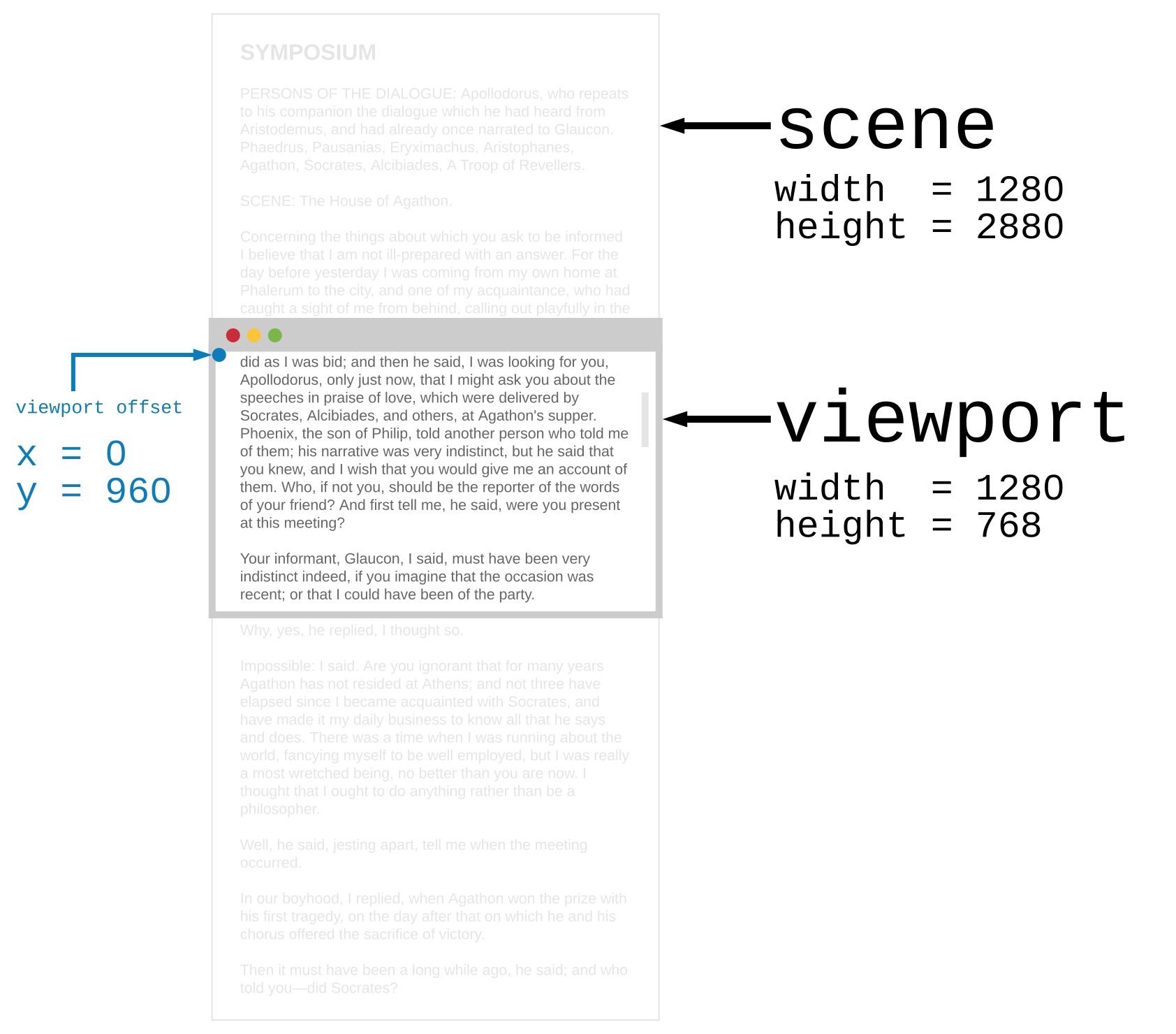\n\n","args":[],"type":"{ scene : { width : Basics.Float, height : Basics.Float }, viewport : { x : Basics.Float, y : Basics.Float, width : Basics.Float, height : Basics.Float } }"}],"values":[{"name":"blur","comment":" Find a DOM node by `id` and make it lose focus. So if you wanted a node\nlike `<input type=\"text\" id=\"search-box\">` to lose focus you could say:\n\n import Browser.Dom as Dom\n import Task\n\n type Msg = NoOp\n\n unfocusSearchBox : Cmd Msg\n unfocusSearchBox =\n Task.attempt (\\_ -> NoOp) (Dom.blur \"search-box\")\n\nNotice that this code ignores the possibility that `search-box` is not used\nas an `id` by any node, failing silently in that case. It would be better to\nlog the failure with whatever error reporting system you use.\n","type":"String.String -> Task.Task Browser.Dom.Error ()"},{"name":"focus","comment":" Find a DOM node by `id` and focus on it. So if you wanted to focus a node\nlike `<input type=\"text\" id=\"search-box\">` you could say:\n\n import Browser.Dom as Dom\n import Task\n\n type Msg = NoOp\n\n focusSearchBox : Cmd Msg\n focusSearchBox =\n Task.attempt (\\_ -> NoOp) (Dom.focus \"search-box\")\n\nNotice that this code ignores the possibility that `search-box` is not used\nas an `id` by any node, failing silently in that case. It would be better to\nlog the failure with whatever error reporting system you use.\n","type":"String.String -> Task.Task Browser.Dom.Error ()"},{"name":"getElement","comment":" Get position information about specific elements. Say we put\n`id \"jesting-aside\"` on the seventh paragraph of the text. When we call\n`getElement \"jesting-aside\"` we would get the following information:\n\n\n\nThis can be useful for:\n\n- **Scrolling** — Pair this information with `setViewport` to scroll\nspecific elements into view. This gives you a lot of control over where exactly\nthe element would be after the viewport moved.\n\n- **Drag and Drop** — As of this writing, `touchmove` events do not tell\nyou which element you are currently above. To figure out if you have dragged\nsomething over the target, you could see if the `pageX` and `pageY` of the\ntouch are inside the `x`, `y`, `width`, and `height` of the target element.\n\n**Note:** This corresponds to JavaScript’s [`getBoundingClientRect`][gbcr],\nso **the element’s margins are included in its `width` and `height`**.\nWith scrolling, maybe you want to include the margins. With drag-and-drop, you\nprobably do not, so some folks set the margins to zero and put the target\nelement in a `<div>` that adds the spacing. Just something to be aware of!\n\n[gbcr]: https://developer.mozilla.org/en-US/docs/Web/API/Element/getBoundingClientRect\n","type":"String.String -> Task.Task Browser.Dom.Error Browser.Dom.Element"},{"name":"getViewport","comment":" Get information on the current viewport of the browser.\n\n\n\nIf you want to move the viewport around (i.e. change the scroll position) you\ncan use [`setViewport`](#setViewport) which change the `x` and `y` of the\nviewport.\n","type":"Task.Task x Browser.Dom.Viewport"},{"name":"getViewportOf","comment":" Just like `getViewport`, but for any scrollable DOM node. Say we have an\napplication with a chat box in the bottow right corner like this:\n\n\n\nThere are probably a whole bunch of messages that are not being shown. You\ncould scroll up to see them all. Well, we can think of that chat box is a\nviewport into a scene!\n\n\n\nThis can be useful with [`setViewportOf`](#setViewportOf) to make sure new\nmessages always appear on the bottom.\n\nThe viewport size *does not* include the border or margins.\n\n**Note:** This data is collected from specific fields in JavaScript, so it\nmay be helpful to know that:\n\n- `scene.width` = [`scrollWidth`][sw]\n- `scene.height` = [`scrollHeight`][sh]\n- `viewport.x` = [`scrollLeft`][sl]\n- `viewport.y` = [`scrollTop`][st]\n- `viewport.width` = [`clientWidth`][cw]\n- `viewport.height` = [`clientHeight`][ch]\n\nNeither [`offsetWidth`][ow] nor [`offsetHeight`][oh] are available. The theory\nis that (1) the information can always be obtained by using `getElement` on a\nnode without margins, (2) no cases came to mind where you actually care in the\nfirst place, and (3) it is available through ports if it is really needed.\nIf you have a case that really needs it though, please share your specific\nscenario in an issue! Nicely presented case studies are the raw ingredients for\nAPI improvements!\n\n[sw]: https://developer.mozilla.org/en-US/docs/Web/API/Element/scrollWidth\n[sh]: https://developer.mozilla.org/en-US/docs/Web/API/Element/scrollHeight\n[st]: https://developer.mozilla.org/en-US/docs/Web/API/Element/scrollTop\n[sl]: https://developer.mozilla.org/en-US/docs/Web/API/Element/scrollLeft\n[cw]: https://developer.mozilla.org/en-US/docs/Web/API/Element/clientWidth\n[ch]: https://developer.mozilla.org/en-US/docs/Web/API/Element/clientHeight\n[ow]: https://developer.mozilla.org/en-US/docs/Web/API/Element/offsetWidth\n[oh]: https://developer.mozilla.org/en-US/docs/Web/API/Element/offsetHeight\n","type":"String.String -> Task.Task Browser.Dom.Error Browser.Dom.Viewport"},{"name":"setViewport","comment":" Change the `x` and `y` offset of the browser viewport immediately. For\nexample, you could make a command to jump to the top of the page:\n\n import Browser.Dom as Dom\n import Task\n\n type Msg = NoOp\n\n resetViewport : Cmd Msg\n resetViewport =\n Task.perform (\\_ -> NoOp) (Dom.setViewport 0 0)\n\nThis sets the viewport offset to zero.\n\nThis could be useful with `Browser.application` where you may want to reset\nthe viewport when the URL changes. Maybe you go to a “new page”\nand want people to start at the top!\n","type":"Basics.Float -> Basics.Float -> Task.Task x ()"},{"name":"setViewportOf","comment":" Change the `x` and `y` offset of a DOM node’s viewport by ID. This\nis common in text messaging and chat rooms, where once the messages fill the\nscreen, you want to always be at the very bottom of the message chain. This\nway the latest message is always on screen! You could do this:\n\n import Browser.Dom as Dom\n import Task\n\n type Msg = NoOp\n\n jumpToBottom : String -> Cmd Msg\n jumpToBottom id =\n Dom.getViewportOf id\n |> Task.andThen (\\info -> Dom.setViewportOf id 0 info.scene.height)\n |> Task.perform (\\_ -> NoOp)\n\nSo you could call `jumpToBottom \"chat-box\"` whenever you add a new message.\n\n**Note 1:** What happens if the viewport is placed out of bounds? Where there\nis no `scene` to show? To avoid this question, the `x` and `y` offsets are\nclamped such that the viewport is always fully within the `scene`. So when\n`jumpToBottom` sets the `y` offset of the viewport to the `height` of the\n`scene` (i.e. too far!) it relies on this clamping behavior to put the viewport\nback in bounds.\n\n**Note 2:** The example ignores when the element ID is not found, but it would\nbe great to log that information. It means there may be a bug or a dead link\nsomewhere!\n","type":"String.String -> Basics.Float -> Basics.Float -> Task.Task Browser.Dom.Error ()"}],"binops":[]},{"name":"Browser.Events","comment":" In JavaScript, information about the root of an HTML document is held in\nthe `document` and `window` objects. This module lets you create event\nlisteners on those objects for the following topics: [animation](#animation),\n[keyboard](#keyboard), [mouse](#mouse), and [window](#window).\n\nIf there is something else you need, use [ports][] to do it in JavaScript!\n\n[ports]: https://guide.elm-lang.org/interop/ports.html\n\n# Animation\n@docs onAnimationFrame, onAnimationFrameDelta\n\n# Keyboard\n@docs onKeyPress, onKeyDown, onKeyUp\n\n# Mouse\n@docs onClick, onMouseMove, onMouseDown, onMouseUp\n\n# Window\n@docs onResize, onVisibilityChange, Visibility\n\n","unions":[{"name":"Visibility","comment":" Value describing whether the page is hidden or visible.\n","args":[],"cases":[["Visible",[]],["Hidden",[]]]}],"aliases":[],"values":[{"name":"onAnimationFrame","comment":" An animation frame triggers about 60 times per second. Get the POSIX time\non each frame. (See [`elm/time`](/packages/elm/time/latest) for more info on\nPOSIX times.)\n\n**Note:** Browsers have their own render loop, repainting things as fast as\npossible. If you want smooth animations in your application, it is helpful to\nsync up with the browsers natural refresh rate. This hooks into JavaScript's\n`requestAnimationFrame` function.\n","type":"(Time.Posix -> msg) -> Platform.Sub.Sub msg"},{"name":"onAnimationFrameDelta","comment":" Just like `onAnimationFrame`, except message is the time in milliseconds\nsince the previous frame. So you should get a sequence of values all around\n`1000 / 60` which is nice for stepping animations by a time delta.\n","type":"(Basics.Float -> msg) -> Platform.Sub.Sub msg"},{"name":"onClick","comment":" Subscribe to mouse clicks anywhere on screen. Maybe you need to create a\ncustom drop down. You could listen for clicks when it is open, letting you know\nif someone clicked out of it:\n\n import Browser.Events as Events\n import Json.Decode as D\n\n type Msg = ClickOut\n\n subscriptions : Model -> Sub Msg\n subscriptions model =\n case model.dropDown of\n Closed _ ->\n Sub.none\n\n Open _ ->\n Events.onClick (D.succeed ClickOut)\n","type":"Json.Decode.Decoder msg -> Platform.Sub.Sub msg"},{"name":"onKeyDown","comment":" Subscribe to get codes whenever a key goes down. This can be useful for\ncreating games. Maybe you want to know if people are pressing `w`, `a`, `s`,\nor `d` at any given time. Check out how that works in [this example][example].\n\n**Note:** Check out [this advice][note] to learn more about decoding key codes.\nIt is more complicated than it should be.\n\n[note]: https://github.com/elm/browser/blob/1.0.0/notes/keyboard.md\n[example]: https://github.com/elm/browser/blob/1.0.0/examples/wasd.md\n","type":"Json.Decode.Decoder msg -> Platform.Sub.Sub msg"},{"name":"onKeyPress","comment":" Subscribe to key presses that normally produce characters. So you should\nnot rely on this for arrow keys.\n\n**Note:** Check out [this advice][note] to learn more about decoding key codes.\nIt is more complicated than it should be.\n\n[note]: https://github.com/elm/browser/blob/1.0.0/notes/keyboard.md\n","type":"Json.Decode.Decoder msg -> Platform.Sub.Sub msg"},{"name":"onKeyUp","comment":" Subscribe to get codes whenever a key goes up. Often used in combination\nwith [`onVisibilityChange`](#onVisibilityChange) to be sure keys do not appear\nto down and never come back up.\n","type":"Json.Decode.Decoder msg -> Platform.Sub.Sub msg"},{"name":"onMouseDown","comment":" Subscribe to get mouse information whenever the mouse button goes down.\n","type":"Json.Decode.Decoder msg -> Platform.Sub.Sub msg"},{"name":"onMouseMove","comment":" Subscribe to mouse moves anywhere on screen. You could use this to implement\ndrag and drop.\n\n**Note:** Unsubscribe if you do not need these events! Running code on every\nsingle mouse movement can be very costly, and it is recommended to only\nsubscribe when absolutely necessary.\n","type":"Json.Decode.Decoder msg -> Platform.Sub.Sub msg"},{"name":"onMouseUp","comment":" Subscribe to get mouse information whenever the mouse button goes up.\nOften used in combination with [`onVisibilityChange`](#onVisibilityChange)\nto be sure keys do not appear to down and never come back up.\n","type":"Json.Decode.Decoder msg -> Platform.Sub.Sub msg"},{"name":"onResize","comment":" Subscribe to any changes in window size.\n\nIf you wanted to always track the current width, you could do something [like\nthis](TODO).\n\n**Note:** This is equivalent to getting events from [`window.onresize`][resize].\n\n[resize]: https://developer.mozilla.org/en-US/docs/Web/API/GlobalEventHandlers/onresize\n","type":"(Basics.Int -> Basics.Int -> msg) -> Platform.Sub.Sub msg"},{"name":"onVisibilityChange","comment":" Subscribe to any visibility changes, like if the user switches to a\ndifferent tab or window. When the user looks away, you may want to:\n\n- Stop polling a server for new information.\n- Pause video or audio.\n- Pause an image carousel.\n\nThis may also be useful with [`onKeyDown`](#onKeyDown). If you only listen for\n[`onKeyUp`](#onKeyUp) to end the key press, you can miss situations like using\na keyboard shortcut to switch tabs. Visibility changes will cover those tricky\ncases, like in [this example][example]!\n\n[example]: https://github.com/elm/browser/blob/1.0.0/examples/wasd.md\n","type":"(Browser.Events.Visibility -> msg) -> Platform.Sub.Sub msg"}],"binops":[]},{"name":"Browser.Navigation","comment":" This module helps you manage the browser’s URL yourself. This is the\ncrucial trick when using [`Browser.application`](Browser#application).\n\nThe most important function is [`pushUrl`](#pushUrl) which changes the\naddress bar *without* starting a page load.\n\n\n## What is a page load?\n\n 1. Request a new HTML document. The page goes blank.\n 2. As the HTML loads, request any `<script>` or `<link>` resources.\n 3. A `<script>` may mutate the document, so these tags block rendering.\n 4. When *all* of the assets are loaded, actually render the page.\n\nThat means the page will go blank for at least two round-trips to the servers!\nYou may have 90% of the data you need and be blocked on a font that is taking\na long time. Still blank!\n\n\n## How does `pushUrl` help?\n\nThe `pushUrl` function changes the URL, but lets you keep the current HTML.\nThis means the page *never* goes blank. Instead of making two round-trips to\nthe server, you load whatever assets you want from within Elm. Maybe you do\nnot need any round-trips! Meanwhile, you retain full control over the UI, so\nyou can show a loading bar, show information as it loads, etc. Whatever you\nwant!\n\n\n# Navigate within Page\n@docs Key, pushUrl, replaceUrl, back, forward\n\n# Navigate to other Pages\n@docs load, reload, reloadAndSkipCache\n\n","unions":[{"name":"Key","comment":" A navigation `Key` is needed to create navigation commands that change the\nURL. That includes [`pushUrl`](#pushUrl), [`replaceUrl`](#replaceUrl),\n[`back`](#back), and [`forward`](#forward).\n\nYou only get access to a `Key` when you create your program with\n[`Browser.application`](Browser#application), guaranteeing that your program is\nequipped to detect these URL changes. If `Key` values were available in other\nkinds of programs, unsuspecting programmers would be sure to run into some\n[annoying bugs][bugs] and learn a bunch of techniques the hard way!\n\n[bugs]: https://github.com/elm/browser/blob/1.0.0/notes/navigation-in-elements.md\n","args":[],"cases":[]}],"aliases":[],"values":[{"name":"back","comment":" Go back some number of pages. So `back 1` goes back one page, and `back 2`\ngoes back two pages.\n\n**Note:** You only manage the browser history that *you* created. Think of this\nlibrary as letting you have access to a small part of the overall history. So\nif you go back farther than the history you own, you will just go back to some\nother website!\n","type":"Browser.Navigation.Key -> Basics.Int -> Platform.Cmd.Cmd msg"},{"name":"forward","comment":" Go forward some number of pages. So `forward 1` goes forward one page, and\n`forward 2` goes forward two pages. If there are no more pages in the future,\nthis will do nothing.\n\n**Note:** You only manage the browser history that *you* created. Think of this\nlibrary as letting you have access to a small part of the overall history. So\nif you go forward farther than the history you own, the user will end up on\nwhatever website they visited next!\n","type":"Browser.Navigation.Key -> Basics.Int -> Platform.Cmd.Cmd msg"},{"name":"load","comment":" Leave the current page and load the given URL. **This always results in a\npage load**, even if the provided URL is the same as the current one.\n\n gotoElmWebsite : Cmd msg\n gotoElmWebsite =\n load \"https://elm-lang.org\"\n\nCheck out the [`elm/url`][url] package for help building URLs. The\n[`Url.absolute`][abs] and [`Url.relative`][rel] functions can be particularly\nhandy!\n\n[url]: /packages/elm/url/latest\n[abs]: /packages/elm/url/latest/Url#absolute\n[rel]: /packages/elm/url/latest/Url#relative\n\n","type":"String.String -> Platform.Cmd.Cmd msg"},{"name":"pushUrl","comment":" Change the URL, but do not trigger a page load.\n\nThis will add a new entry to the browser history.\n\nCheck out the [`elm/url`][url] package for help building URLs. The\n[`Url.Builder.absolute`][abs] and [`Url.Builder.relative`][rel] functions can \nbe particularly handy!\n\n[url]: /packages/elm/url/latest\n[abs]: /packages/elm/url/latest/Url-Builder#absolute\n[rel]: /packages/elm/url/latest/Url-Builder#relative\n\n**Note:** If the user has gone `back` a few pages, there will be “future\npages” that the user can go `forward` to. Adding a new URL in that\nscenario will clear out any future pages. It is like going back in time and\nmaking a different choice.\n","type":"Browser.Navigation.Key -> String.String -> Platform.Cmd.Cmd msg"},{"name":"reload","comment":" Reload the current page. **This always results in a page load!**\nThis may grab resources from the browser cache, so use\n[`reloadAndSkipCache`](#reloadAndSkipCache)\nif you want to be sure that you are not loading any cached resources.\n","type":"Platform.Cmd.Cmd msg"},{"name":"reloadAndSkipCache","comment":" Reload the current page without using the browser cache. **This always\nresults in a page load!** It is more common to want [`reload`](#reload).\n","type":"Platform.Cmd.Cmd msg"},{"name":"replaceUrl","comment":" Change the URL, but do not trigger a page load.\n\nThis *will not* add a new entry to the browser history.\n\nThis can be useful if you have search box and you want the `?search=hats` in\nthe URL to match without adding a history entry for every single key stroke.\nImagine how annoying it would be to click `back` thirty times and still be on\nthe same page!\n","type":"Browser.Navigation.Key -> String.String -> Platform.Cmd.Cmd msg"}],"binops":[]}]