# One True Path
A general-purpose library for working with curves and paths.
The primary aim is SVG paths, but the types and functions in this package can also be
used for animations or other graphics backends (webgl, canvas).
Additionally, this package is meant to serve as an interchange format between packages.
## Curve
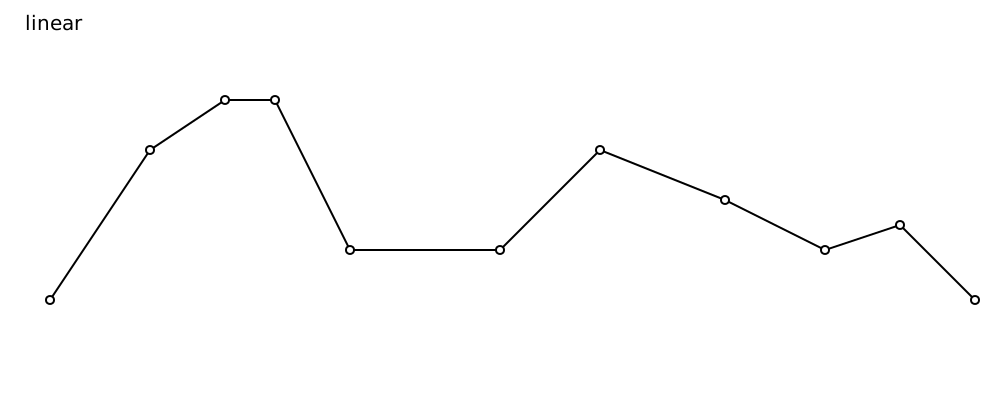
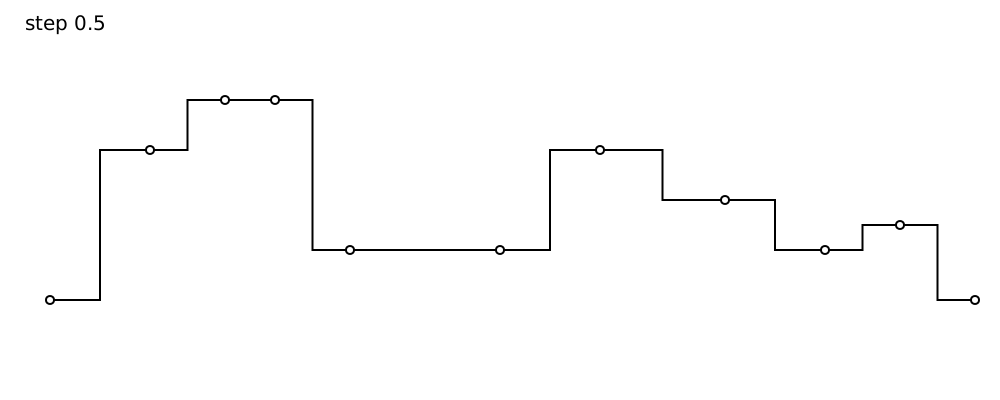
The nicest module to use is the `Curve` module. It contains helpers for making all sorts of curves with different interpolation modes (how to connect points).
For instance linear
 or stepped
 The code for drawing the letter H looks like this:
```elm
import SubPath exposing SubPath
import Curve
import Svg exposing (Svg)
import Svg.Attributes exposing
(width, height, viewBox, fill, stroke)
hShape : SubPath
hShape =
Curve.linearClosed
[ ( 0.3, 0.2 )
, ( 0.4, 0.2 )
, ( 0.4, 0.45 )
, ( 0.6, 0.45 )
, ( 0.6, 0.2 )
, ( 0.7, 0.2 )
, ( 0.7, 0.8 )
, ( 0.6, 0.8 )
, ( 0.6, 0.55 )
, ( 0.4, 0.55 )
, ( 0.4, 0.8 )
, ( 0.3, 0.8 )
]
logo : Svg msg
logo =
Svg.svg [ width "50", height "50", viewBox "0 0 1 1" ]
[ SubPath.element hShape
[ fill "none", stroke "black" ]
]
```
## SubPath
When you need more control and want to move/rotate/scale or connect curves, the subpath module lets you do that.
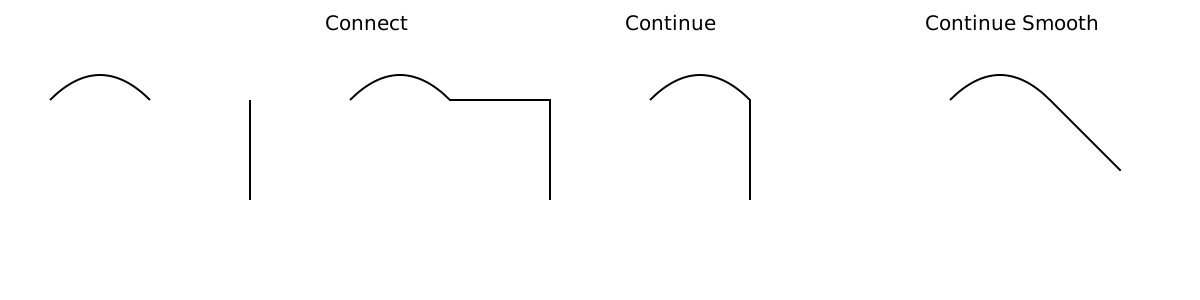 * `connect:` draws a straight line connecting two subpaths (end to start)
* `continue:` make the start and end point of two subpaths coincide
* `continueSmooth:` make the start and end point of two subpaths coincide, and rotate to make the transition smooth.
A `SubPath` can be `ArcLengthParameterized`, to sample the curve, animate along it or simply get its curve length.
*[full source](https://github.com/folkertdev/one-true-path-experiment/blob/master/examples/EvenlySpaced.elm)*
Finally, a piece of svg path syntax can be parsed into a list of `SubPath`s
```elm
import Path
import SubPath
pathAsString =
"""
M 213.1,6.7
c -32.4-14.4-73.7,0-88.1,30.6
C 110.6,4.9,67.5-9.5,36.9,6.7
C 2.8,22.9-13.4,62.4,13.5,110.9
C 33.3,145.1,67.5,170.3,125,217
c 59.3-46.7,93.5-71.9,111.5-106.1
C 263.4,64.2,247.2,22.9,213.1,6.7
z
"""
path =
Path.parse pathAsString
|> Result.toMaybe
|> Maybe.andThen List.head
```
## Segment
The `Segment` module is ideal for more advanced mathematical operations or for conversion between formats.
A `Segment` is a mathematical shape: a single line segment, quadratic or cubic curve, or elliptical arc.
A subpath can be transformed into a list of `Segment`s.
`Segment` is a unifying wrapper around the equivalent `OpenSolid` shapes. If you really need full control, you can
access the `OpenSolid` values and use that package to modify your geometry.
## Others
The `Path` module is a convenience for when you have a list of `SubPath`s and want to render them into one `path` element.
The `LowLevel.Command` module is meant for package authors. It allows more control over the generated svg instructions, but
is pretty cumbersome to work with. Try to stay away from it.
## Writing svg to a file
You can use the [elm-static-html-lib](https://www.npmjs.com/package/elm-static-html-lib) js/typescript package for that. If you only want
the path string, use `SubPath.toString` in combination with `Html.text`.
## Styling
That's not part of this package, but I'm looking into it. The julia [Compose.jl](https://github.com/GiovineItalia/Compose.jl) library has some interesting ideas.