[{"name":"Geometry.Svg","comment":" Draw 2D `elm-geometry` values as SVG.\n\n\n## A note on unit conversions\n\nSince plain `Svg` values do not track what units or coordinate systems were used\nto create them (unlike `elm-geometry` values such as `Point2d`s, `Rectangle2d`s\netc.), you lose some type safety when using the functions in this package to\nconvert from `elm-geometry` values to SVG. For example, the following doesn't\nmake sense (since the units don't match up) but will compile just fine since\nthe return value of the `Svg.lineSegment2d` function has no way of indicating\nthat it's in units of meters, not pixels:\n\n Svg.translateBy (Vector2d.pixels 300 400) <|\n Svg.lineSegment2d []\n (LineSegment.from\n (Point2d.meters 10 10)\n (Point2d.meters 20 20)\n )\n\nAlso note that because of how `elm-geometry` and `elm-units` works, something\nlike\n\n Svg.lineSegment2d [] <|\n LineSegment2d.from\n (Point2d.inches 1 2)\n (Point2d.inches 3 4)\n\nwill actually create a SVG element like\n\n \n\nsince all values get converted to and stored internally as base units (meters or\npixels). You can avoid this issue by using the [`at`](#at) or [`at_`](#at_)\nfunctions to explicitly apply a conversion from (in this example) inches to\non-screen pixels:\n\n let\n lineSegment =\n LineSegment2d.from\n (Point2d.inches 1 2)\n (Point2d.inches 3 4)\n\n resolution =\n pixels 96 |> Quantity.per (Length.inches 1)\n in\n Svg.at resolution (Svg.lineSegment2d [] lineSegment)\n\nwhich will result in something like\n\n \n \n \n\nIf you want to let the compiler check whether your units make sense, you could\nchange the above code to directly scale the line segment first and _then_\ndraw it:\n\n Svg.lineSegment2d [] <|\n LineSegment2d.at resolution lineSegment\n\nThis will result in simply\n\n \n\nwhich should be visually identical to the `` version but will let the Elm\ncompiler check whether the given conversion factor is valid to apply to the\ngiven line segment. The downside to this approach is that _changing_ the\nresolution/scale factor, for example when zooming, then transforms the actual\ngeometry before rendering it to SVG instead of rendering the same geometry to\nSVG and just changing what transformation is applied to it. For large, complex\ngeometry, transforming the geometry itself is likely to be expensive, while just\nchanging a transformation should be cheap.\n\n\n## Reading this documentation\n\nFor the examples, assume that the following imports are present:\n\n import Svg exposing (Svg)\n import Svg.Attributes as Attributes\n import Geometry.Svg as Svg\n import Angle\n import Pixels exposing (pixels)\n\nAlso assume that any necessary `elm-geometry` modules/types have been imported\nusing the following format:\n\n import Point2d exposing (Point2d)\n\nAll examples use a Y-up coordinate system instead of SVG's Y-down (window)\ncoordinate system; they were all rendered with a final [`relativeTo`](#relativeTo)\ncall to flip the example 'upside down' for display.\n\n\n# Geometry\n\nThese functions turn `elm-geometry` 2D values into SVG elements with geometric\nattributes such as `points` and `transform` set appropriately. Each function\nalso accepts a list of additional SVG attributes such as `fill` or `stroke` that\nshould be added to the resulting element.\n\n@docs lineSegment2d, triangle2d, polyline2d, polygon2d, rectangle2d, arc2d, ellipticalArc2d, circle2d, ellipse2d, quadraticSpline2d, cubicSpline2d, boundingBox2d\n\n\n# Transformations\n\nThese functions allow you to use all the normal `elm-geometry` 2D transformations on\narbitrary fragments of SVG. For example,\n\n Svg.mirrorAcross Axis2d.x\n (Svg.lineSegment2d [] lineSegment)\n\ndraws a line segment as SVG and then mirrors that SVG fragment. This is visually\nthe same as\n\n Svg.lineSegment2d []\n (LineSegment2d.mirrorAcross Axis2d.x lineSegment)\n\nwhich instead mirrors the line segment first and then draws the mirrored line\nsegment as SVG.\n\nIn the above example only a single SVG element was transformed, but all of these\ntransformation functions work equally well on arbitrarily complex fragments of\nSVG such as nested groups of elements of different types:\n\n Svg.rotateAround Point2d.origin\n (Angle.degrees 30)\n (Svg.g [ Attributes.stroke \"blue\" ]\n [ Svg.lineSegment2d [] lineSegment\n , Svg.circle2d [] someCircle\n , Svg.g [ Attributes.fill \"orange\" ]\n [ Svg.triangle2d [] firstTriangle\n , Svg.triangle2d [] secondTriangle\n ]\n ]\n )\n\nIf the transformation changes frequently (an animated rotation angle, for\nexample) while the geometry itself remains constant, using an SVG transformation\ncan be more efficient since the geometry itself does not have to be recreated\n(the SVG virtual DOM only has to update a transformation matrix).\n\n@docs scaleAbout, rotateAround, translateBy, mirrorAcross\n\n\n# Unit conversions\n\n@docs at, at_\n\n\n# Coordinate conversions\n\nThese functions allow `elm-geometry` coordinate conversion transformations to be\napplied to arbitrary SVG elements. Note that the same caveats as unit\nconversions apply: you'll have to be careful to verify yourself that the\ncoordinate conversions actually make sense, since the compiler will be unable to\ncheck for you.\n\n@docs relativeTo, placeIn\n\n","unions":[],"aliases":[],"values":[{"name":"arc2d","comment":" Draw an `Arc2d` as an SVG `` with the given attributes.\n\n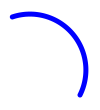\n\n arc : Svg msg\n arc =\n Svg.arc2d\n [ Attributes.stroke \"blue\"\n , Attributes.strokeWidth \"5\"\n ]\n (Point2d.pixels 150 50\n |> Arc2d.sweptAround\n (Point2d.pixels 100 100)\n (Angle.degrees 90)\n )\n\n","type":"List.List (Svg.Attribute msg) -> Arc2d.Arc2d units coordinates -> Svg.Svg msg"},{"name":"at","comment":" Take some SVG that is assumed to be defined in `units1` and convert it to\none defined in `units2`, given a conversion factor defined as `units2` per\n`units1`. This is equivalent to a multiplication by that conversion factor. For\nexample, you could create an SVG element in units of meters and then scale it to\na certain on-screen size:\n\n let\n pixelsPerMeter =\n pixels 10 |> Quantity.per (Length.meters 1)\n in\n Svg.at pixelsPerMeter <|\n Svg.lineSegment2d [] <|\n LineSegment2d.from\n (Point2d.meters 1 2)\n (Point2d.meters 3 4)\n\nNote that you can mix and match what specific units you use as long as the\nunderlying units match up. For example, something like this would work out since\nboth `centimeters` and `feet` both have the same underlying units (meters):\n\n let\n onePixelPerCentimeter =\n pixels 1 |> Quantity.per (Length.centimeters 1)\n in\n Svg.at onePixelPerCentimeter <|\n Svg.lineSegment2d [] <|\n LineSegment2d.from\n (Point2d.feet 1 2)\n (Point2d.feet 3 4)\n\nThis will result in something like:\n\n \n \n \n\n(One foot is 30.48 centimeters or 0.3048 meters.)\n\n","type":"Quantity.Quantity Basics.Float (Quantity.Rate units2 units1) -> Svg.Svg msg -> Svg.Svg msg"},{"name":"at_","comment":" Similar to `at`, but if you have an 'inverse' rate instead. For example:\n\n let\n metersPerPixels =\n Length.millimeters 1 |> Quantity.per (pixels 1)\n in\n Svg.at_ metersPerPixel <|\n Svg.lineSegment2d [] <|\n LineSegment2d.from\n (Point2d.centimeters 1 2)\n (Point2d.centimeters 3 4)\n\nThis would be equivalent to\n\n let\n pixelsPerMeter =\n pixels 1 |> Quantity.per (Length.millimeters 1)\n in\n Svg.at pixelsPerMeter <|\n Svg.lineSegment2d [] <|\n LineSegment2d.from\n (Point2d.centimeters 1 2)\n (Point2d.centimeters 3 4)\n\n","type":"Quantity.Quantity Basics.Float (Quantity.Rate units1 units2) -> Svg.Svg msg -> Svg.Svg msg"},{"name":"boundingBox2d","comment":" Draw a bounding box as an SVG `` with the given attributes.\n","type":"List.List (Svg.Attribute msg) -> BoundingBox2d.BoundingBox2d units coordinates -> Svg.Svg msg"},{"name":"circle2d","comment":" Draw a `Circle2d` as an SVG `` with the given attributes.\n\n\n\n circle : Svg msg\n circle =\n Svg.circle2d\n [ Attributes.fill \"orange\"\n , Attributes.stroke \"blue\"\n , Attributes.strokeWidth \"2\"\n ]\n (Circle2d.withRadius (pixels 10)\n (Point2d.pixels 150 150)\n )\n\n","type":"List.List (Svg.Attribute msg) -> Circle2d.Circle2d units coordinates -> Svg.Svg msg"},{"name":"cubicSpline2d","comment":" Draw a cubic spline as an SVG `` with the given attributes.\n\n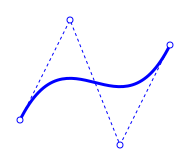\n\n cubicSpline : Svg msg\n cubicSpline =\n let\n firstControlPoint =\n Point2d.pixels 50 50\n\n secondControlPoint =\n Point2d.pixels 100 150\n\n thirdControlPoint =\n Point2d.pixels 150 25\n\n fourthControlPoint =\n Point2d.pixels 200 125\n\n spline =\n CubicSpline2d.fromControlPoints\n firstControlPoint\n secondControlPoint\n thirdControlPoint\n fourthControlPoint\n\n controlPoints =\n [ firstControlPoint\n , secondControlPoint\n , thirdControlPoint\n , fourthControlPoint\n ]\n\n drawPoint point =\n Svg.circle2d [] <|\n Circle2d.withRadius (pixels 3) point\n in\n Svg.g [ Attributes.stroke \"blue\" ]\n [ Svg.cubicSpline2d\n [ Attributes.strokeWidth \"3\"\n , Attributes.strokeLinecap \"round\"\n , Attributes.fill \"none\"\n ]\n spline\n , Svg.polyline2d\n [ Attributes.strokeWidth \"1\"\n , Attributes.fill \"none\"\n , Attributes.strokeDasharray \"3 3\"\n ]\n (Polyline2d.fromVertices controlPoints)\n , Svg.g [ Attributes.fill \"white\" ]\n (List.map drawPoint controlPoints)\n ]\n\n","type":"List.List (Svg.Attribute msg) -> CubicSpline2d.CubicSpline2d units coordinates -> Svg.Svg msg"},{"name":"ellipse2d","comment":" Draw an `Ellipse2d` as an SVG `` with the given attributes.\n\n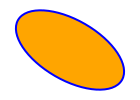\n\n ellipse : Svg msg\n ellipse =\n Svg.ellipse2d\n [ Attributes.fill \"orange\"\n , Attributes.stroke \"blue\"\n , Attributes.strokeWidth \"2\"\n ]\n (Ellipse2d.with\n { centerPoint = Point2d.pixels 150 150\n , xDirection = Direction2d.degrees -30\n , xRadius = pixels 60\n , yRadius = pixels 30\n }\n )\n\n","type":"List.List (Svg.Attribute msg) -> Ellipse2d.Ellipse2d units coordinates -> Svg.Svg msg"},{"name":"ellipticalArc2d","comment":" Draw an `EllipticalArc2d` as an SVG `` with the given attributes.\n\n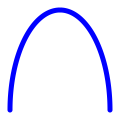\n\n ellipticalArc : Svg msg\n ellipticalArc =\n Svg.ellipticalArc2d\n [ Attributes.stroke \"blue\"\n , Attributes.fill \"none\"\n , Attributes.strokeWidth \"5\"\n , Attributes.strokeLinecap \"round\"\n ]\n (EllipticalArc2d.with\n { centerPoint = Point2d.pixels 100 10\n , xDirection = Direction2d.x\n , xRadius = pixels 50\n , yRadius = pixels 100\n , startAngle = Angle.degrees 0\n , sweptAngle = Angle.degrees 180\n }\n )\n\n","type":"List.List (Svg.Attribute msg) -> EllipticalArc2d.EllipticalArc2d units coordinates -> Svg.Svg msg"},{"name":"lineSegment2d","comment":" Draw a `LineSegment2d` as an SVG `` with the given attributes.\n\n\n\n lineSegment : Svg msg\n lineSegment =\n Svg.lineSegment2d\n [ Attributes.stroke \"blue\"\n , Attributes.strokeWidth \"5\"\n ]\n (LineSegment2d.from\n (Point2d.pixels 100 100)\n (Point2d.pixels 200 200)\n )\n\n","type":"List.List (Svg.Attribute msg) -> LineSegment2d.LineSegment2d units coordinates -> Svg.Svg msg"},{"name":"mirrorAcross","comment":" Mirror arbitrary SVG across a given axis.\n\n\n\n mirrored : Svg msg\n mirrored =\n let\n horizontalAxis =\n Axis2d.through (Point2d.pixels 0 220)\n Direction2d.x\n\n horizontalSegment =\n LineSegment2d.along horizontalAxis\n (pixels 50)\n (pixels 250)\n\n angledAxis =\n Axis2d.through (Point2d.pixels 0 150)\n (Direction2d.degrees -10)\n\n angledSegment =\n LineSegment2d.along angledAxis\n (pixels 50)\n (pixels 250)\n in\n Svg.g []\n [ polygon\n , Svg.mirrorAcross horizontalAxis polygon\n , Svg.mirrorAcross angledAxis polygon\n , Svg.g\n [ Attributes.strokeWidth \"0.5\"\n , Attributes.stroke \"black\"\n , Attributes.strokeDasharray \"3 3\"\n ]\n [ Svg.lineSegment2d [] horizontalSegment\n , Svg.lineSegment2d [] angledSegment\n ]\n ]\n\n","type":"Axis2d.Axis2d units coordinates -> Svg.Svg msg -> Svg.Svg msg"},{"name":"placeIn","comment":" Take SVG defined in local coordinates relative to a given reference frame,\nand return that SVG expressed in global coordinates.\n\nThis can be useful for taking a chunk of SVG and 'stamping' it in different\npositions with different orientations:\n\n\n\n placed : Svg msg\n placed =\n let\n vertices =\n [ Point2d.origin\n , Point2d.pixels 40 0\n , Point2d.pixels 50 25\n , Point2d.pixels 10 25\n ]\n\n stamp =\n Svg.polygon2d\n [ Attributes.fill \"orange\"\n , Attributes.stroke \"blue\"\n , Attributes.strokeWidth \"2\"\n ]\n (Polygon2d.singleLoop vertices)\n\n frames =\n [ Frame2d.atPoint (Point2d.pixels 25 25)\n , Frame2d.atPoint (Point2d.pixels 100 25)\n , Frame2d.atPoint (Point2d.pixels 175 25)\n |> Frame2d.rotateBy (Angle.degrees 20)\n , Frame2d.atPoint (Point2d.pixels 25 150)\n , Frame2d.atPoint (Point2d.pixels 100 100)\n |> Frame2d.rotateBy (Angle.degrees 20)\n , Frame2d.atPoint (Point2d.pixels 150 150)\n |> Frame2d.rotateBy (Angle.degrees -30)\n ]\n in\n Svg.g []\n (frames\n |> List.map\n (\\frame -> Svg.placeIn frame stamp)\n )\n\n","type":"Frame2d.Frame2d units coordinates defines -> Svg.Svg msg -> Svg.Svg msg"},{"name":"polygon2d","comment":" Draw a `Polygon2d` as an SVG `` with the given attributes.\n\n\n\n polygon : Svg msg\n polygon =\n Svg.polygon2d\n [ Attributes.stroke \"blue\"\n , Attributes.fill \"orange\"\n , Attributes.strokeWidth \"3\"\n ]\n (Polygon2d.withHoles\n [ [ Point2d.pixels 150 185\n , Point2d.pixels 165 160\n , Point2d.pixels 135 160\n ]\n ]\n [ Point2d.pixels 100 200\n , Point2d.pixels 120 150\n , Point2d.pixels 180 150\n , Point2d.pixels 200 200\n ]\n )\n\n","type":"List.List (Svg.Attribute msg) -> Polygon2d.Polygon2d units coordinates -> Svg.Svg msg"},{"name":"polyline2d","comment":" Draw a `Polyline2d` as an SVG `` with the given attributes.\n\n\n\n polyline : Svg msg\n polyline =\n Svg.polyline2d\n [ Attributes.stroke \"blue\"\n , Attributes.fill \"none\"\n , Attributes.strokeWidth \"5\"\n , Attributes.strokeLinecap \"round\"\n , Attributes.strokeLinejoin \"round\"\n ]\n (Polyline2d.fromVertices\n [ Point2d.pixels 100 100\n , Point2d.pixels 120 200\n , Point2d.pixels 140 100\n , Point2d.pixels 160 200\n , Point2d.pixels 180 100\n , Point2d.pixels 200 200\n ]\n )\n\n","type":"List.List (Svg.Attribute msg) -> Polyline2d.Polyline2d units coordinates -> Svg.Svg msg"},{"name":"quadraticSpline2d","comment":" Draw a quadratic spline as an SVG `` with the given attributes.\n\n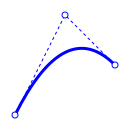\n\n quadraticSpline : Svg msg\n quadraticSpline =\n let\n firstControlPoint =\n Point2d.pixels 50 50\n\n secondControlPoint =\n Point2d.pixels 100 150\n\n thirdControlPoint =\n Point2d.pixels 150 100\n\n spline =\n QuadraticSpline2d.fromControlPoints\n firstControlPoint\n secondControlPoint\n thirdControlPoint\n\n controlPoints =\n [ firstControlPoint\n , secondControlPoint\n , thirdControlPoint\n ]\n\n drawPoint point =\n Svg.circle2d [] <|\n Circle2d.withRadius (pixels 3) point\n\n in\n Svg.g [ Attributes.stroke \"blue\" ]\n [ Svg.quadraticSpline2d\n [ Attributes.strokeWidth \"3\"\n , Attributes.strokeLinecap \"round\"\n , Attributes.fill \"none\"\n ]\n spline\n , Svg.polyline2d\n [ Attributes.strokeWidth \"1\"\n , Attributes.fill \"none\"\n , Attributes.strokeDasharray \"3 3\"\n ]\n (Polyline2d.fromVertices controlPoints)\n , Svg.g [ Attributes.fill \"white\" ]\n (List.map drawPoint controlPoints)\n ]\n\n","type":"List.List (Svg.Attribute msg) -> QuadraticSpline2d.QuadraticSpline2d units coordinates -> Svg.Svg msg"},{"name":"rectangle2d","comment":" Draw a `Rectangle2d` as an SVG `` with the given attributes.\n\n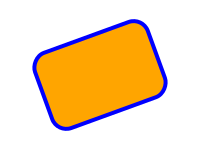\n\n rectangle : Svg msg\n rectangle =\n let\n axes =\n Frame2d.atPoint (Point2d.pixels 150 150)\n |> Frame2d.rotateBy (Angle.degrees 20)\n in\n Svg.rectangle2d\n [ Attributes.stroke \"blue\"\n , Attributes.fill \"orange\"\n , Attributes.strokeWidth \"4\"\n , Attributes.rx \"15\"\n , Attributes.ry \"15\"\n ]\n (Rectangle2d.centeredOn axes\n ( pixels 120, pixels 80 )\n )\n\n","type":"List.List (Svg.Attribute msg) -> Rectangle2d.Rectangle2d units coordinates -> Svg.Svg msg"},{"name":"relativeTo","comment":" Convert SVG expressed in global coordinates to SVG expressed in coordinates\nrelative to a given reference frame. Using `relativeTo` can be useful for\ntransforming between model space and screen space - SVG coordinates start in the\ntop left, so positive Y is down, while in mathematical/geometric contexts\npositive Y is usually up.\n\nFor example, you might develop an SVG scene in a coordinate system where X and Y\neach range from 0 to 300 and positive Y is up. To turn this into a 300x300 SVG\ndrawing, first define the top-left SVG frame (coordinate system) in terms of\nthe model coordinate system:\n\n topLeftFrame =\n Frame2d.atPoint (Point2d.pixels 0 300)\n |> Frame2d.reverseY\n\n(As expressed in the model frame, the top-left SVG frame is at the point\n(0, 300) and its Y direction is equal to the global negative Y direction.) If\n`scene` is an SVG element representing your scene, you could then transform it\ninto top-left SVG window coordinates and render the result to HTML with\n\n Svg.svg\n [ Attributes.width \"300\"\n , Attributes.height \"300\"\n ]\n [ Svg.relativeTo topLeftFrame scene ]\n\nNote however that if you do this, any text you added will come out upside down!\nIf, like me, you really prefer to use a Y-up coordinate system when drawing,\nyou could write a little helper function that rendered text at a particular\npoint and then flipped it upside down (mirrored it across a horizontal axis) so\nthat your final `relativeTo` would flip it back to right side up. Something\nlike:\n\n drawText :\n List (Svg.Attribute msg)\n -> Point2d units coordinates\n -> String\n -> Svg msg\n drawText givenAttributes position content =\n let\n { x, y } =\n Point2d.unwrap position\n\n positionAttributes =\n [ Svg.Attributes.x (String.fromFloat x)\n , Svg.Attributes.y (String.fromFloat y)\n ]\n in\n Svg.text_ (positionAttributes ++ givenAttributes)\n [ Svg.text content ]\n |> Svg.mirrorAcross\n (Axis2d.through position Direction2d.x)\n\n","type":"Frame2d.Frame2d units coordinates defines -> Svg.Svg msg -> Svg.Svg msg"},{"name":"rotateAround","comment":" Rotate arbitrary SVG around a given point by a given angle.\n\n\n\n rotated : Svg msg\n rotated =\n let\n angles =\n Parameter1d.steps 9 <|\n Quantity.interpolateFrom\n (Angle.degrees 0)\n (Angle.degrees 270)\n\n referencePoint =\n Point2d.pixels 200 150\n\n referenceCircle =\n Svg.circle2d [ Attributes.fill \"black\" ] <|\n (Circle2d.withRadius (pixels 3)\n referencePoint\n )\n\n rotatedCircle : Float -> Svg msg\n rotatedCircle angle =\n Svg.rotateAround referencePoint angle circle\n in\n Svg.g [] <|\n referenceCircle\n :: List.map rotatedCircle angles\n\n","type":"Point2d.Point2d units coordinates -> Angle.Angle -> Svg.Svg msg -> Svg.Svg msg"},{"name":"scaleAbout","comment":" Scale arbitrary SVG around a given point by a given scale.\n\n\n\n scaled : Svg msg\n scaled =\n let\n scales =\n [ 1.0, 1.5, 2.25 ]\n\n referencePoint =\n Point2d.pixels 100 100\n\n referencePoint =\n Svg.circle2d [ Attributes.fill \"black\" ] <|\n Circle2d.withRadius (pixels 3)\n referencePoint\n\n scaledCircle : Float -> Svg msg\n scaledCircle scale =\n Svg.scaleAbout referencePoint scale circle\n in\n Svg.g []\n (referencePoint\n :: List.map scaledCircle scales\n )\n\nNote how _everything_ is scaled, including the stroke width of the circles. This\nmay or may not be what you want; if you wanted the same stroke width on all\ncircles, you could instead scale the `Circle2d` values themselves using\n`Circle2d.scaleAbout` and then draw the scaled circles with a specific stroke\nwidth using `Svg.circle2d`.\n\n","type":"Point2d.Point2d units coordinates -> Basics.Float -> Svg.Svg msg -> Svg.Svg msg"},{"name":"translateBy","comment":" Translate arbitrary SVG by a given displacement.\n\n\n\n translated : Svg msg\n translated =\n Svg.g []\n [ polyline\n , polyline\n |> Svg.translateBy (Vector2d.pixels 0 40)\n , polyline\n |> Svg.translateBy (Vector2d.pixels 5 -60)\n ]\n\n","type":"Vector2d.Vector2d units coordinates -> Svg.Svg msg -> Svg.Svg msg"},{"name":"triangle2d","comment":" Draw a `Triangle2d` as an SVG `` with the given attributes.\n\n\n\n triangle : Svg msg\n triangle =\n Svg.triangle2d\n [ Attributes.stroke \"blue\"\n , Attributes.strokeWidth \"10\"\n , Attributes.strokeLinejoin \"round\"\n , Attributes.fill \"orange\"\n ]\n (Triangle2d.fromVertices\n ( Point2d.pixels 100 100\n , Point2d.pixels 200 100\n , Point2d.pixels 100 200\n )\n )\n\n","type":"List.List (Svg.Attribute msg) -> Triangle2d.Triangle2d units coordinates -> Svg.Svg msg"}],"binops":[]}]