elm-knobs

A way to easily tweak values interactively within a running Elm app, using a panel of input controls that map to those values, which we call “knobs” here. While not in use, they recede to an icon in the lower-left corner.
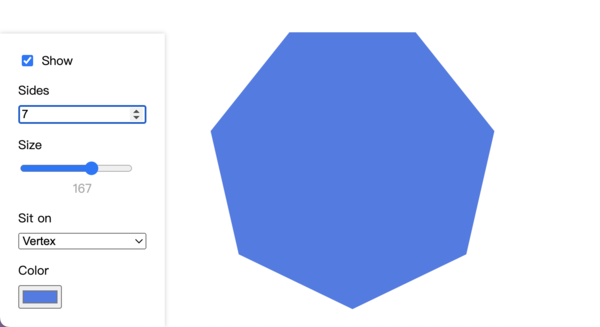
Sometimes it's hard to find the right value for something in your design, and having actual controls in the browser that instantly update the view helps tremendously in the development process. It also enables non-technical people to explore how things change when different values are used, with immediate feedback.
Since its intended use case is aiding the development process and facilitating rough prototypes, visual customization is not a priority, but you can still define your own CSS styles to customize how it looks.
Here's a very basic yet complete example of using elm-knobs:
module BasicExample exposing (main)

import Browser
import Html
import Knob exposing (Knob)


main =
    Browser.sandbox
        { init = init
        , view = view
        , update = update
        }


type alias Model =
    -- Put the knob in the model:
    { knob : Knob Int }


type
    Msg
    -- Create a message for knob updates:
    = KnobUpdated (Knob Int)


init =
    -- Initialize the knob:
    { knob =
        Knob.int
            { step = 1
            , initial = 0
            }
    }


update msg model =
    case msg of
        -- Update the knob state:
        KnobUpdated knobState ->
            { knob = knobState }


view model =
    Html.div []
        -- Use the knob value within the view:
        [ Html.text (String.fromInt (Knob.value model.knob))

        -- Display the knob controls:
        , Knob.view KnobUpdated model.knob
        , Knob.styles
        ]
The picture at the top of this page is a more involved example, though. You can take a look at it in the Github repo, or play with it directly in your browser thanks to the magic of Elm Editor (opens latest version of the code.)
Not exactly what you were looking for?
For a more complete package that does much more than elm-knobs, at the cost of setup complexity, try jamesgary/elm-config-ui.
Also check out avh4/elm-debug-controls, a library with some overlap with this one, and whose source code inspired my approach to building this library.