Tepa.Dom
This module allows you to manipulate the DOM in various ways.
It covers:
- Focus and blur input elements.
- Get the width and height of elements.
- Get the x and y coordinates of elements.
- Figure out the scroll position.
- Change the scroll position!
See the Browser.Dom documentation for more detailed notes.
Focus
Find a DOM node by id and make it lose focus. So if you wanted a node
like <input type="text" id="search-box" /> to lose focus you could say:
import Tepa exposing (Promise)
import Tepa.Dom as Dom


unfocusSearchBox : Promise m (Result Dom.Error ())
unfocusSearchBox =
    Dom.blur "search-box"
In scenario testing, it also simulates the blur event with an empty event object.
This is the TEPA version of Browser.Dom.blur.
Many functions in this module look up DOM nodes up by their id. If you
ask for an id that is not in the DOM, you will get this error.
This is the TEPA version of Browser.Dom.Error.
Get Viewport
Get information on the current viewport of the browser.
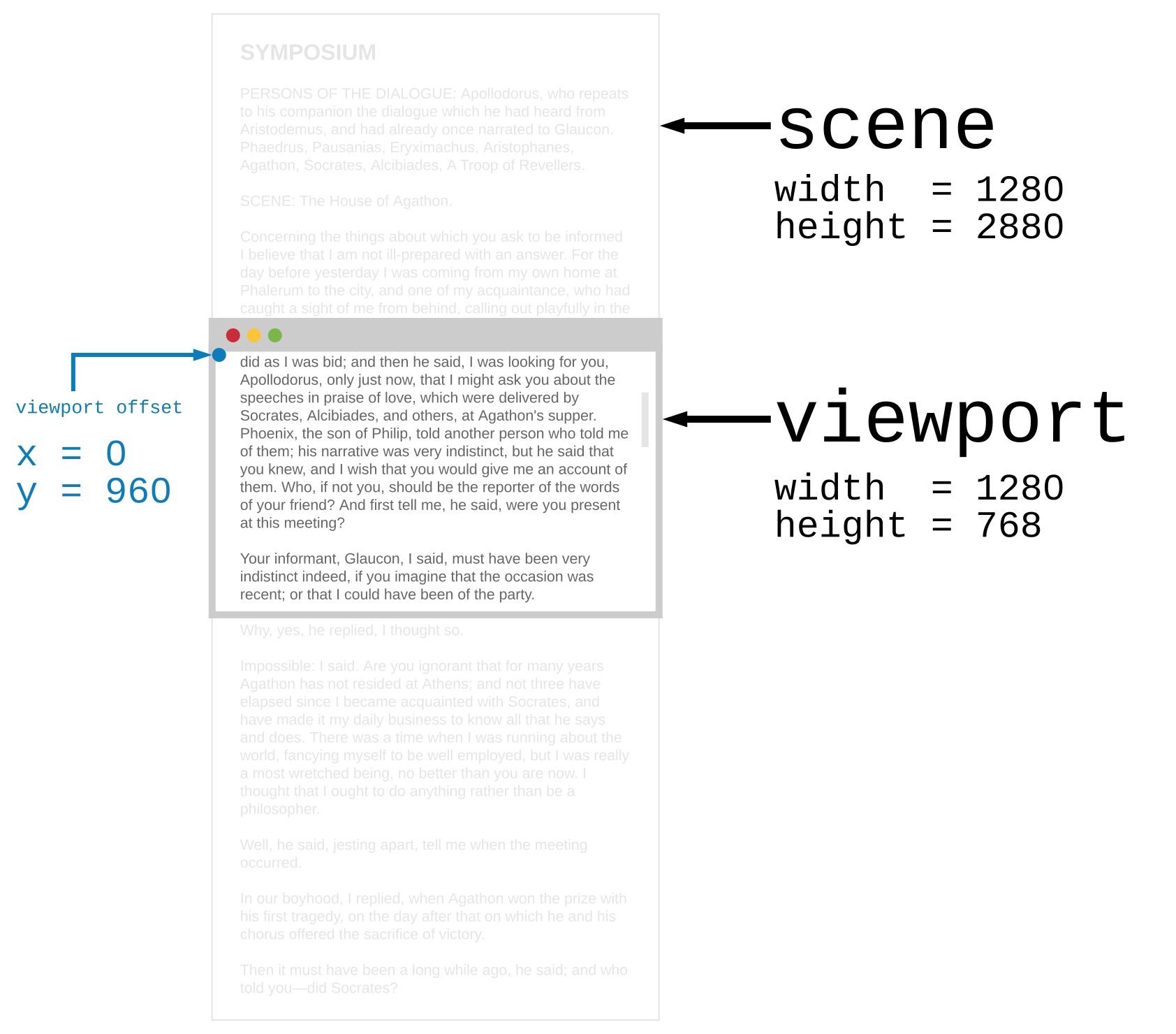
(Source: Browser.Dom module document)
If you want to move the viewport around (i.e. change the scroll position) you
can use setViewport which change the x and y of the
viewport.
In scenario testing, it always resolves to Viewport of all values zero.
This is the TEPA version of Browser.Dom.getViewport.
Same as Browser.Dom.Viewport
All the information about the current viewport.
(Source: Browser.Dom module document)
Just like currentViewport, but for any scrollable DOM node.
See Browser.Dom.getViewportOf for detail and real use cases.
This is the TEPA version of Browser.Dom.getViewportOf.
Set Viewport
Change the x and y offset of the browser viewport immediately. For
example, you could make a command to jump to the top of the page:
import Tepa exposing (Promise)
import Tepa.Dom as Dom


resetViewport : Promise m ()
resetViewport =
    Dom.setViewport 0 0
This sets the viewport offset to zero.
In scenario testing, it has no effects.
This is the TEPA version of Browser.Dom.setViewport.
Change the x and y offset of a DOM node’s viewport by ID. This
is common in text messaging and chat rooms, where once the messages fill the
screen, you want to always be at the very bottom of the message chain. This
way the latest message is always on screen! You could do this:
import Tepa exposing (Promise)
import Tepa.Dom as Dom


jumpToBottom : String -> Promise m (Result Dom.Error ())
jumpToBottom id =
    Tepa.bindAndThen (Dom.currentViewportOf id) <|
        \res ->
            case res of
                Err err ->
                    Tepa.succeed res


                Ok info ->
                    Dom.setViewportOf id 0 info.scene.height
So you could call jumpToBottom "chat-box" whenever you add a new message.
See Browser.Dom.setViewportOf for more detailed notes.
In scenario testing, it also simulates the scroll event with an empty event object on the target node.
This is the TEPA version of Browser.Dom.setViewportOf.
Position
Get position information about specific elements.
See Browser.Dom.getElement for detail and real use cases.
In scenario testing, it always resolves to Element of all values zero.
This is the TEPA version of Browser.Dom.getElement.
Same as Browser.Dom.Element
A bunch of information about the position and size of an element relative to the overall scene.

(Source: Browser.Dom module document)
Find a DOM node by
idand focus on it. So if you wanted to focus a node like<input type="text" id="search-box" />you could say:In scenario testing, it also simulates the focus event with an empty event object.
This is the TEPA version of
Browser.Dom.focus.