Elm-Webapp
A setup for writing http based, client-server app in elm, inspired wholly by Lamdera
1. Message passing
Client and Server communicate with each other using regular Elm custom type values.
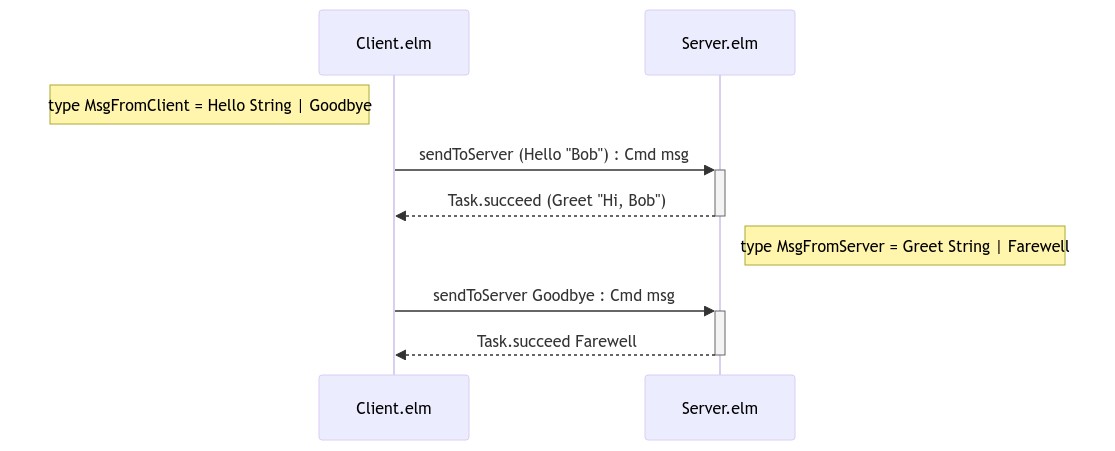
elm-webapp will encode and decode these values to transmit them over HTTP. Websocket is possible but the code there is less robust.
Though elm-webapp does NOT manage the versioning & migration of MsgFromClient and MsgFromServer, the initial generated type definition does come with ClientServerVersionMismatch value which is leveraged to know that the client/server is out of sync and present a "Please reload this browser page" message to the end user.
2. Bring Your Own Data Persistence
elm-webapp does NOT persist the "model" of the server (aka serverState), unlike Lamdera. While you can still write code that update the model of Server, note that the values are only held in memory and is lost when the Server process exits. Doing so is still worthwhile during development though, enabling quick iteration of the app without messing with db & schema
You CAN have Server.elm instead
- make regular HTTP requests to query and mutate persisted data on DynamoDB (e.g. the-sett/elm-aws-core, choonkeat/elm-aws)
- make regular GraphQL HTTP requests to Hasura to query and mutate persisted data in a PostgreSQL database (e.g. graphql-to-elm, dillonkearns/elm-graphql)
Getting started
npx elm-webapp element hello-appThis will create a skeleton file directory structure
hello-app
├── Makefile
├── index.js
└── src
    ├── Client.elm
    ├── Server.elm
    ├── Protocol.elm
    └── Protocol
        └── Auto.elm

1 directory, 5 files
The above command generates a Client of Browser.element. To generate a Browser.document or Browser.application instead, use either commands
npx elm-webapp document hello-app
npx elm-webapp application hello-app
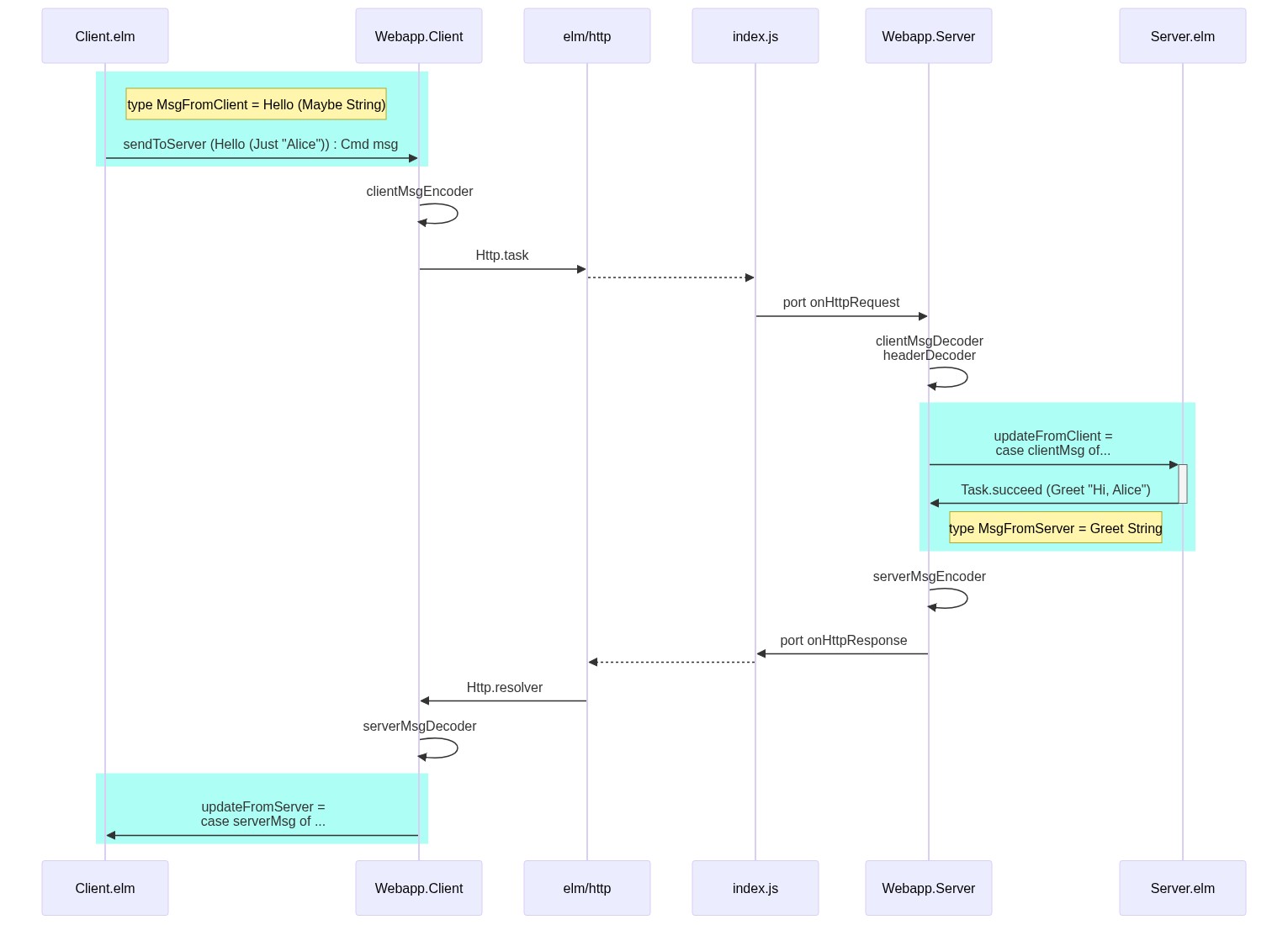
While app developers only get involved in the cyan boxes on the extreme left and right, here's a rough overview of how the pieces are put together end-to-end:
src/Client.elm
In this file, we see
webapp =
    Webapp.Client.element
        { element =
            { init = init
            , view = view
            , update = update
            , subscriptions = subscriptions
            }
☝️ This record is where we provide our standard Browser.element, Browser.document, or Browser.application
        , ports =
            { websocketConnected = \_ -> Sub.none -- websocketConnected
            , websocketIn = \_ -> Sub.none -- websocketIn
            }
☝️ Here's where you can connect a WebSocket port implementation to communicate with src/Server.elm. Uncomment to enable.
By default, elm-webapp is wired up to communicate with src/Server.elm through regular http POST /api/elm-webapp
        , protocol =
            { updateFromServer = updateFromServer
            , clientMsgEncoder = Protocol.Auto.encodeProtocolMsgFromClient
            , serverMsgDecoder =
                Json.Decode.oneOf
                    [ Protocol.Auto.decodeProtocolMsgFromServer
                    , Json.Decode.map Protocol.ClientServerVersionMismatch Json.Decode.value
                    ]
            , errorDecoder = Json.Decode.string
            , httpEndpoint = Protocol.httpEndpoint
            }
        }
☝️ This section wires up the necessary functions to coordinate with src/Server.elm
updateFromServer
updateFromServer : MsgFromServer -> Model -> ( Model, Cmd Msg )is the entry point where we handle MsgFromServer values from src/Server.elm. We usually do a case ... of statement inside, much like how we write our standard update function
main
main =
    webapp.element
that gives us our main function for the client.
sendToServer
sendToServer : Protocol.MsgFromClient -> Cmd Msg
sendToServer =
    webapp.sendToServer >> Task.attempt OnMsgFromServer
sends MsgFromClient values to our server whereby the server must respond with a MsgFromServer that we've wired to handle in updateFromServer (see above). This happens over http post by default, and over websockets if enabled (see above)
This is how we achieve a seamless and type-safe way for Client-Server communication.
src/Server.elm
serves our Client frontend app by default, and can respond to values from Client.sendToServer or regular http requests.
main : Program Flags ServerState RequestContext Msg String MsgFromServer
main =
    Webapp.Server.worker
        { worker =
            { init = init
            , update = update
            , subscriptions = subscriptions
            }
☝️ This record is where we provide our standard Platform.worker
        , ports =
            { writeResponse = writeResponse
            , onHttpRequest = onHttpRequest
            , onWebsocketEvent = \_ -> Sub.none -- onWebsocketEvent
            , writeWebsocketMessage = \_ _ _ -> Cmd.none -- writeWebsocketMessage
            }
☝️ Here's where we've connected our httpserver with Elm ports. You can connect a WebSocket server Elm port too; uncomment to enable.
        , protocol =
            { routeDecoder = routeDecoder
            , updateFromRoute = updateFromRoute
            , updateFromClient = updateFromClient
            , serverMsgEncoder = Protocol.Auto.encodeProtocolMsgFromServer
            , clientMsgDecoder = Protocol.Auto.decodeProtocolMsgFromClient
            , headerDecoder = headerDecoder
            , errorEncoder = Json.Encode.string
            , httpEndpoint = Protocol.httpEndpoint
            }
        }
☝️ This section wires up the necessary functions to coordinate with src/Client.elm
updateFromClient
updateFromClient : RequestContext -> Time.Posix -> MsgFromClient -> ServerState -> ( ServerState, Task String MsgFromServer )is called whenever the Client sends a value over with its sendToServer. We usually do a case ... of statement inside, much like how we write our standard update function
updateFromRoute
updateFromRoute : ( Method, RequestContext, Maybe Route ) -> Time.Posix -> Request -> ServerState -> ( ServerState, Cmd Msg )is the catch-all handler for http request; called whenever Server has to handle a http request that isn't handled by updateFromClient. e.g. oauth redirect path.
Note that ServerState is simply Model you see in standard Elm apps; named differently.
headerDecoder
headerDecoder : ServerState -> Json.Decode.Decoder RequestContextis applied to http request headers and gives us a more meaningfully categorised RequestContext . e.g. we can decode the Authorization header and determine if the JWT value gives us a valid LoggedInUser Email or an AnonymousUser
This difference can be put into good use when we handle updateFromClient or updateFromRoute
Other files
index.jsboots up oursrc/Server.elm- by default,node.jsrunshttp.createServerand let Elm handles http request and write responses via Elm ports - if envLAMBDAis set,lambda.jswill instead setup a callback so we can handle http request inside AWS Lambda behind an API Gateway. - other possible integrations arecloudflare-workers.jsor evendeno-deploy.js- PRs are extremely welcome to improve the robustness of these integrations 🙇♂️src/Protocol.elmholds the types shared between Server and Client.- encoders & decoders are auto-generated in
src/Protocol/Auto.elm; also see gotchas regarding imported types - we're using
elm-auto-encoder-decoderinelm-webapponly for convenience; you can switch it out for your own encoders & decoders. BUT if you continue usingelm-auto-encoder-decoder, don't use them anywhere else (e.g. as encoder to save in db, exposed as part of your external api, etc...). Main reason being that the serialized format could change future releases ofelm-auto-encoder-decoderand thus MUST NOT be relied on.
- encoders & decoders are auto-generated in
How do I...
- Support OAuth login? See https://github.com/choonkeat/elm-webapp-oauth-example#readme
License
Copyright © 2021 Chew Choon Keat
Distributed under the MIT license.