Cli.Option
Build command-line options as string values, with validation and transformation.
This module treats all CLI input as strings. Use validateMap to parse
strings into typed values, oneOf for enumerated values, and
validate for custom validation.
For typed options with JSON schema generation, see Cli.Option.Typed.
Here is the terminology used for building up Command-Line parsers with this library.
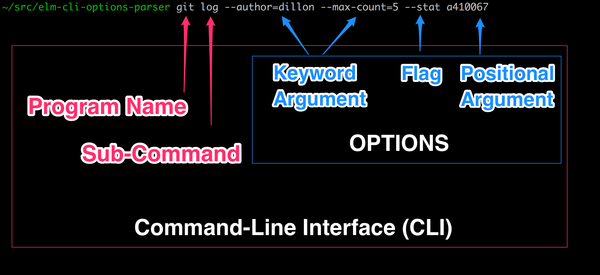
See the README and the examples folder for more in-depth examples of building
and using Cli.Options.
Positional Arguments
Keyword Arguments
A keyword argument that may be omitted.
Example: --output main.js or --output=main.js
Parses to: Just "main.js" (or Nothing if omitted)
Option.optionalKeywordArg "output"A keyword argument that must be provided.
Example: --name my-app or --name=my-app
Parses to: "my-app"
Option.requiredKeywordArg "name"A keyword argument that can be provided multiple times.
Example: --header "Auth: token" --header "Accept: json"
Parses to: ["Auth: token", "Accept: json"]
Option.keywordArgList "header"Flags
A flag with no argument.
Example: --debug in elm make --debug
Parses to: True (or False if omitted)
Option.flag "debug"Ending Options
See note in Cli.OptionsParser docs.
An optional positional argument.
Must be used with OptionsParser.withOptionalPositionalArg
(not OptionsParser.with).
Example: <revision> in git log [<revision>]
Parses to: Just "abc123" (or Nothing if omitted)
Option.optionalPositionalArg "revision"Collect all remaining positional arguments as a list.
Must be used with OptionsParser.withRestArgs
(not OptionsParser.with), and must be the last option in the pipeline.
Example: <files>... in elm-test [<files>...]
Parses to: ["tests/First.elm", "tests/Second.elm"] (or [] if none provided)
Option.restArgs "files"Transformations
Mutually Exclusive Values
Mutually exclusive option values.
type ReportFormat
    = Json
    | Junit
    | Console


type alias CliOptions =
    { reportFormat : ReportFormat
    , testFiles : List String
    }


program : Program.Config CliOptions
program =
    Program.config
        |> Program.add
            (OptionsParser.build CliOptions
                |> with
                    (Option.optionalKeywordArg "report"
                        |> Option.withDefault "console"
                        |> Option.oneOf
                            [ "json" => Json
                            , "junit" => Junit
                            , "console" => Console
                            ]
                    )
                |> OptionsParser.withRestArgs (Option.restArgs "TESTFILES")
            )
Now when you run it, you get the following in your help text:
$ ./elm-test --help
elm-test [--report <json|junit|console>] <TESTFILES>...
And if you run it with an unrecognized value, you get a validation error:
$ ./elm-test --report xml
Validation errors:

`report` failed a validation. Must be one of [json, junit, console]
Value was:
"xml"
Validation
Validations allow you to guarantee that if you receive the data in Elm, it meets a set of preconditions. If it doesn't, the User will see an error message describing the validation error, which option it came from, and the value the option had.
Note that failing a validation will not cause the next OptionsParser in
your Cli.Program.Config to be run. Instead,
if the OptionsParser is a match except for validation errors, you will get an
error message regardless.
Example:
capitalizedNameRegex =
    "[A-Z][A-Za-z]*"


validateParser =
    OptionsParser.build (\a b -> ( a, b ))
        |> with
            (Option.requiredKeywordArg "name"
                |> Option.validate (Cli.Validate.regex capitalizedNameRegex)
            )
        |> with
            (Option.optionalKeywordArg "age"
                |> Option.validateMapIfPresent String.toInt
            )


{-
   $ ./validation --name Mozart --age 262
   Mozart is 262 years old


   $ ./validation --name Mozart --age "Two-hundred and sixty-two"
   Validation errors:


   `age` failed a validation. could not convert string 'Two-hundred and sixty-two' to an Int
   Value was:
   Just "Two-hundred and sixty-two"
-}
See Cli.Validate for some validation helpers that can be used in conjunction
with the following functions.
Run a validation. (See an example in the Validation section above, or
in the examples folder).
Run a validation if the value is Just someValue. Or do nothing if the value is Nothing.
(See an example in the Validation section above, or in the examples folder).
Transform the value through a map function. If it returns Ok someValue then
the Option will be transformed into someValue. If it returns Err someError
then the User of the Command-Line Interface will see someError with details
about the Option that had the validation error.
(See an example in the Validation section above, or
in the examples folder).
Same as validateMap if the value is Just someValue. Does nothing if
the value is Nothing.
(See an example in the Validation section above, or
in the examples folder).
Mapping/Defaults
Transform an option's value. Use this for infallible transformations.
For transformations that can fail, use validateMap instead
so the user gets a helpful error message.
Option.requiredKeywordArg "name"
    |> Option.map String.toUpper


Option.requiredKeywordArg "output"
|> Option.map (\path -> path ++ "/index.html")Useful for using a custom union type for a flag instead of a Bool.
import Cli.Option as Option
import Cli.OptionsParser as OptionsParser
import Cli.Program as Program


type Verbosity
    = Quiet
    | Verbose


type alias CliOptions =
    { verbosity : Verbosity
    }


programConfig : Program.Config CliOptions
programConfig =
    Program.config
        |> Program.add
            (OptionsParser.build CliOptions
                |> OptionsParser.with
                    (Option.flag "verbose"
                        |> Option.mapFlag
                            { present = Verbose
                            , absent = Quiet
                            }
                    )
)Provide a default value for an optional Option. Turns a Maybe value
into a plain value.
Option.optionalKeywordArg "greeting"
    |> Option.withDefault "Hello"
If --greeting is omitted, the option's value will be "Hello" instead of Nothing.
Metadata
Add a description to an option. This will be shown in help text.
Option.requiredKeywordArg "name"
|> Option.withDescription "Your name for the greeting"Set a custom display name (metavar) for a keyword argument's value placeholder in help text and usage synopsis.
By default, the keyword arg name is uppercased (e.g., --output-dir <OUTPUT_DIR>).
Use this to provide a more descriptive placeholder.
Option.requiredKeywordArg "output-dir"
    |> Option.withDisplayName "PATH"
-- Shows as: --output-dir <PATH>Add a custom error message for when a required option is missing.
This only works on required options (requiredPositionalArg, requiredKeywordArg).
Option.requiredPositionalArg "repository"
    |> Option.withMissingMessage "You must specify a repository to clone."
Types
The type returned by the builder functions below. Use with OptionsParser.with.
Phantom type marker for beginning options.
BeginningOptions can only be used with OptionsParser.with.
Phantom type marker for optional positional arg options.
OptionalPositionalArgOptions can only be used with OptionsParser.withOptionalPositionalArg.
Phantom type marker for rest args options.
RestArgsOptions can only be used with OptionsParser.withRestArgs.
A positional argument that must be provided.
Example:
src/Main.elminelm make src/Main.elmParses to:"src/Main.elm"