Test.PagesProgram
Write pure tests for your elm-pages Route Modules. These tests will not actually perform
any HTTP requests or outside interactions (from BackendTask, or from a Route's init/update function). For any
BackendTask that can't be simulated (i.e. outside world interactions like HTTP requests),
you pass in the fake data to simulate the real world result using the Test.BackendTask API.
Because the test framework simulates the core pieces of the browser and elm-pages runtime, including cookies, URL state, and navigation, your tests realistically check end-to-end behavior deterministically and efficiently:
BackendTaskdata loading and actions, with simulated responses forBackendTask.HttpandBackendTask.CustomPages.Formsubmissions, including concurrent submissions- Optimistic UI via
Pages.ConcurrentSubmission- assert on the view while fetchers are still in-flight Server.SessionandServer.SetCookie- cookies persist across navigations and form submissions within a testServer.Responseredirects are followed automatically, with cookie propagation- Server-rendered Error Page responses are rendered and can be tested like any other page
- Client-side TEA interactions via
SimulatedEffect-Effect.sendMsgdispatches through the update cycle
Quick start
Say you have a route that fetches GitHub stars via a BackendTask:
-- app/Route/Index.elm
type alias Data =
    { stars : Int }


data : BackendTask FatalError Data
data =
    BackendTask.Http.getJson "https://api.github.com/repos/dillonkearns/elm-pages"
        (Decode.field "stargazers_count" Decode.int)
        |> BackendTask.allowFatal
        |> BackendTask.map Data


view app _ _ =
    { title = "Home"
    , body = [ Html.text ("Stars: " ++ String.fromInt app.data.stars) ]
    }
Like a regular elm-test suite, you build named tests with
test and group them with describe. Each test
takes a starting TestApp.ProgramTest and a List of Step
values; the framework runs the steps and finalizes the test for you.
The exposed value is a Test.PagesProgram.Test, and elm-pages
discovers it by name (typically suite).
module MyTests exposing (suite)


import Json.Encode as Encode
import Test.BackendTask as BackendTaskTest
import Test.Html.Selector as Selector
import Test.PagesProgram as PagesProgram
import TestApp


suite : PagesProgram.Test
suite =
    PagesProgram.describe "GitHub stars"
        [ PagesProgram.test "renders the star count from the API"
            (TestApp.start "/" BackendTaskTest.init)
            [ PagesProgram.simulateHttpGet
                "https://api.github.com/repos/dillonkearns/elm-pages"
                (Encode.object [ ( "stargazers_count", Encode.int 9999 ) ])
            , PagesProgram.ensureViewHas [ Selector.text "Stars: 9999" ]
            ]
        ]
The TestApp module is generated by elm-pages, you just import it
and then use it to begin your test program pipelines. Tests can be
run via the elm-pages test CLI or viewed in the
visual test runner through the dev server.
You can run tests headlessly (via elm-test) or view them in the visual test runner in the browser.
npx elm-pages test

## Or view it in your dev server
npx elm-pages dev
open http://localhost:1234/_tests
Visual Test Runner
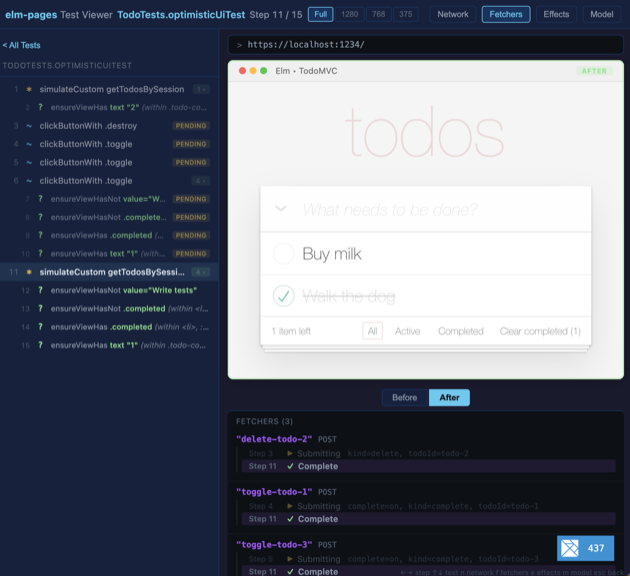
The visual test runner lets you time travel through each step of a test in the browser. While the test run itself is pure (no HTTP requests to the outside world, etc.), the view is rendered with your full Vite configuration so any styles are applied as they would be in your dev server or production build.
The visual test runner also includes inspectors for the network requests, form fetcher state, model, and other tools that let you inspect what's going on with your app during any given step.
A single step in a test pipeline - a click, a form fill, a
simulated HTTP response, an assertion, and so on. Steps are opaque
values; build them with the helpers in this module
(clickButton, ensureViewHas,
simulateHttpGet, and friends).
Use group and withinFind to nest a list of
steps inside a labelled scope.
incrementSteps : List (PagesProgram.Step model msg)
incrementSteps =
    [ PagesProgram.ensureViewHas [ Selector.text "Count: 0" ]
    , PagesProgram.clickButton "+"
    , PagesProgram.ensureViewHas [ Selector.text "Count: 1" ]
    ]
Building test suites
Build a named test tree just like elm-test. test names a
single test from a starting ProgramTest and a list of steps;
describe groups related tests under a shared heading.
Use toTest when you want to run the same tree through plain
elm-test without the elm-pages wrapper CLI;
toNamedSnapshots flattens the tree for the visual
runner.
Name a single test from a starting ProgramTest and a list of
Steps. The framework runs the steps and finalizes the test
for you.
suite : PagesProgram.Test
suite =
    PagesProgram.test "lists published posts"
        (TestApp.start "/blog" baseSetup)
        [ PagesProgram.ensureViewHas [ Selector.text "Hello, World" ] ]
Unlike module-level binding names, the string can be a full sentence
and is what shows up in elm-test output and in the visual runner
sidebar.
Group related tests under a shared heading.
suite : PagesProgram.Test
suite =
    PagesProgram.describe "Blog"
        [ PagesProgram.test "lists published posts" blogIndexListsPostsTest
        , PagesProgram.test "hides drafts from the index" draftsHiddenTest
        ]
describe blocks can nest arbitrarily.
Convert a named Test.PagesProgram.Test tree into an
elm-explorations/test Test.
elm-pages test works with Test.PagesProgram.Test directly. Use
toTest when you want to plug the same tree into a plain elm-test
runner without the elm-pages wrapper CLI.
import Test
import Test.PagesProgram as PagesProgram


suite : Test.Test
suite =
PagesProgram.toTest myTestsFlatten a named test tree into named snapshot sequences.
The visual test runner renders this list directly: each entry's name is
the slash-joined path of enclosing describe labels and the leaf
test name (e.g. "Blog / lists published posts").
snapshotNames : List String
snapshotNames =
    myTests
        |> PagesProgram.toNamedSnapshots
        |> List.map Tuple.first
Other runners
Use these when you don't want to wrap a single test in test -
for example, in plain elm-test \() -> ... bodies or when feeding the
visual runner directly. runSteps is the lower-level
primitive used to thread a list of steps through a ProgramTest
without finalizing it; the generated TestApp module uses it to bake
extras like a model inspector into its start.
Run a list of Steps against a starting ProgramTest and
finalize the result as an Expect.Expectation. Use this when writing
tests in plain elm-test style:
import Expect
import Test exposing (Test, test)
import Test.PagesProgram as PagesProgram


suite : Test
suite =
    test "renders the greeting" <|
        \() ->
            PagesProgram.expect
                (TestApp.start "/" BackendTaskTest.init)
[ PagesProgram.ensureViewHas [ Selector.text "Hello" ] ]Run a list of Steps against a starting ProgramTest and
return the recorded snapshots. Use this when feeding the visual test
runner directly without going through test:
import Test.PagesProgram as PagesProgram
import Test.PagesProgram.Viewer as Viewer


main : Program Viewer.Flags Viewer.Model Viewer.Msg
main =
    Viewer.app
        [ ( "Counter increments"
          , PagesProgram.snapshots startCounter
                [ PagesProgram.clickButton "+"
                , PagesProgram.ensureViewHas [ Selector.text "Count: 1" ]
                ]
          )
]Run a list of Steps against a ProgramTest, returning
the new ProgramTest. Use this when you need to apply steps without
finalizing the test (e.g., to bake setup into the result of a custom
start); end-of-test finalization is what test,
expect, and snapshots do for you.
PagesProgram.runSteps
    [ PagesProgram.simulateHttpGet "https://api.example.com/counter" counterDataResponse
    , PagesProgram.ensureViewHas [ Selector.text "Count: 0" ]
    ]
(TestApp.start "/counter" BackendTaskTest.init)Apply a single Step to a ProgramTest. Equivalent to
runSteps with a singleton list. Useful when threading a
Step value through a chain that already returns ProgramTest. End-user
tests should prefer test / expect over chaining
directly.
PagesProgram.expect
    (TestApp.start "/" BackendTaskTest.init
        |> PagesProgram.applyStep
            (PagesProgram.withModelInspector Debug.toString)
    )
    [ PagesProgram.ensureViewHas [ Selector.text "Hello" ] ]
Simulating user input
Test.ProgramTest follows a philosophy (inspired by elm-program-test)
of driving the browser in a way that mirrors how a user would interact
with your elm-pages app.
That gives us confidence that the scenarios in our automated tests match the real user experience. It also helps keep us honest about making our apps accessible and usable.
Simulate clicking a button with the given text. Finds the first <button>
element whose text content matches, simulates a click event, and passes the
resulting message through update.
PagesProgram.expect (TestApp.start "/" BackendTaskTest.init)
    [ PagesProgram.clickButton "+1"
    , PagesProgram.ensureViewHas [ Selector.text "1" ]
]Like clickButton, but finds the button by CSS selectors
instead of text content. Useful for icon buttons (SVGs, empty buttons) that
have no text. Composes with withinFind to scope interactions.
import Test.Html.Selector as Selector exposing (class, tag)


-- Within the "Buy milk" todo, click its toggle checkbox
PagesProgram.expect (TestApp.start "/" setup)
    [ PagesProgram.withinFind
        [ tag "li", Selector.containing [ attribute (Attr.value "Buy milk") ] ]
        [ PagesProgram.clickButtonWith [ class "toggle" ] ]
    ]
If the button is inside a <form>, the form submit event is simulated
(setting useFetcher correctly for concurrent forms). Otherwise a click
event is simulated.
Simulate clicking a link with the given text. The href is read
from the rendered view automatically, just like a real browser.
PagesProgram.expect (TestApp.start "/" BackendTaskTest.init)
    [ PagesProgram.clickLink "About"
    , PagesProgram.ensureBrowserUrl
        (\url -> url |> String.contains "/about" |> Expect.true "")
]Simulate typing text into an input field.
For elm-pages forms, pass the form ID (from Form.options) and the field
name (from Form.field):
PagesProgram.expect (TestApp.start "/feedback" BackendTaskTest.init)
    [ PagesProgram.fillIn "feedback-form" "message" "Hello!"
    , PagesProgram.clickButton "Submit Feedback"
    ]
For plain inputs, pass the element's id attribute and label text:
PagesProgram.fillIn "email" "Email address" "[email protected]"Pass empty string as the first argument to find inputs nested inside
<label> elements without an explicit id:
PagesProgram.fillIn "" "Username" "alice"Fill in a textarea with the given content. Finds the first <textarea>
element in the view (or within the current within scope) and simulates
an input event.
PagesProgram.fillInTextarea "Hello, world!"Simulate checking or unchecking a checkbox. The checkbox is found by its label text, just like a user would identify it on screen.
Supports two common HTML patterns:
A separate
<label for="id">pointing to an<input id="id" />A
<label>wrapping both the checkbox and the label text
PagesProgram.expect (TestApp.start "/" BackendTaskTest.init)
    [ PagesProgram.check "I agree to the terms" True
    , PagesProgram.ensureViewHas [ Selector.text "Terms accepted" ]
]Select an option from a dropdown <select> element. The framework
finds the <select> by its label text and the <option> by its display
text -- just what the user sees, no IDs or internal values needed.
PagesProgram.expect (TestApp.start "/" BackendTaskTest.init)
    [ PagesProgram.selectOption "Favorite Color" "Blue"
    , PagesProgram.ensureViewHas [ Selector.text "Selected: blue" ]
]Simulate the user pressing Enter while focus is on the matched element. Faithful to the browser's default-action behavior:
- Fires
keydownwithkey: "Enter"on the matched element. AnyonKeyDownhandler runs. - If the matched element sits inside a
<form>, dispatches the form'ssubmitevent afterward (mirroring the browser default for Enter inside a form's text input). If the input isn't in a form, step 2 is skipped.
This is the right primitive for "submit a form that has no submit button" — the dominant TodoMVC / inline-edit pattern.
PagesProgram.expect myTest
    [ PagesProgram.fillIn "new-todo" "new-todo" "Buy milk"
    , PagesProgram.pressEnter [ Selector.id "new-todo" ]
    , PagesProgram.ensureViewHas [ Selector.text "Buy milk" ]
]Dispatch a keydown event with the given key (e.g., "Enter",
"Escape", "ArrowDown") on the first element matching selectors.
Low-level primitive — fires keydown and stops there. No browser
default-action emulation. If you want the "Enter pressed inside a form
submits the form" behavior, use pressEnter instead.
If the matched element has no onKeyDown handler, this is a no-op
(no error). That mirrors the browser: a keydown without a listener
just bubbles past silently.
PagesProgram.expect myTest
    [ PagesProgram.fillIn "search" "search" "elm-pages"
    , PagesProgram.pressKey "Escape" [ Selector.id "search" ]
    , PagesProgram.ensureViewHas [ Selector.text "Search cleared" ]
]Simulate a DOM event on a targeted element. This is the escape hatch
for events not covered by clickButton, fillIn, etc.
The first argument narrows the query to find the target element.
The second argument is the event to simulate (from Test.Html.Event).
import Test.Html.Event as Event


PagesProgram.expect myTest
    [ PagesProgram.simulateDomEvent
        (Query.find [ Selector.id "my-input" ])
        Event.focus
    ]
View assertions
Assert that the rendered view contains elements matching all the given selectors. The test continues after this assertion - use it inline within a step list.
PagesProgram.expect myTest
    [ PagesProgram.ensureViewHas [ Selector.text "Welcome" ]
    , PagesProgram.ensureViewHas [ Selector.id "main-content" ]
]Assert that the rendered view does NOT contain elements matching the given selectors.
PagesProgram.expect myTest
[ PagesProgram.ensureViewHasNot [ Selector.text "Error" ] ]Assert on the rendered view using a custom assertion function.
PagesProgram.expect myTest
    [ PagesProgram.ensureView
        (\query ->
            query
                |> Query.find [ Selector.tag "h1" ]
                |> Query.has [ Selector.text "Title" ]
        )
    ]
Scoping
Scope interactions and assertions to a specific part of the DOM.
The first argument narrows the query via Query.find, and the second is
the interaction to perform within that scope.
PagesProgram.expect myTest
    [ PagesProgram.withinFind
        [ Selector.class "todo-count" ]
        [ PagesProgram.ensureViewHas [ Selector.text "2" ] ]
    ]
The scope label appears in assertion labels, e.g.,
ensureViewHas text "2" (within .todo-count).
The scope container is also highlighted with a dashed border in the preview.
The scope is reset after the inner steps run; nest withinFind calls to
drill into child scopes.
Grouping
Group a sequence of test steps under a named label. The visual test runner renders groups as collapsible sections in the command log sidebar.
PagesProgram.expect myTest
    [ PagesProgram.group "Log in"
        [ PagesProgram.fillIn "email" "Email" "[email protected]"
        , PagesProgram.fillIn "password" "Password" "secret"
        , PagesProgram.clickButton "Log In"
        ]
    , PagesProgram.group "Create todos"
        [ PagesProgram.fillIn "new-todo" "description" "Buy milk"
        , PagesProgram.clickButton "Add"
        ]
    ]
Suite overview thumbnails
Mark the most recent snapshot as the representative thumbnail for
this test in the suite overview. By default the overview picks the
last snapshot (or the failing snapshot if the test fails); use
represent after the assertion you want featured.
PagesProgram.test "adds a Café Latte to the bag"
    (TestApp.start "/menu" BackendTaskTest.init)
    [ PagesProgram.clickButton "Add to bag"
    , PagesProgram.ensureViewHas [ Selector.class "bag-count", Selector.text "1" ]
    , PagesProgram.represent
    ]
If the test fails, the failing step always wins regardless of any
represent calls — failures are forced visible.
Navigation
Assert on the current browser URL. Use with framework-driven tests
started with generated TestApp.start, where navigation is tracked by the Platform.
PagesProgram.expect (TestApp.start "/hello" BackendTaskTest.init)
    [ PagesProgram.ensureBrowserUrl
        (\url -> url |> Expect.equal "https://localhost:1234/hello")
]Assert on the browser URL history. The history is a list of URLs
visited during the test, most recent first. Use with framework-driven
tests started with generated TestApp.start.
PagesProgram.expect (TestApp.start "/" BackendTaskTest.init)
    [ PagesProgram.navigateTo "/about"
    , PagesProgram.ensureBrowserHistory
        (\history ->
            history
                |> List.length
                |> Expect.equal 2
        )
    ]
Simulating BackendTask responses
When a BackendTask makes an HTTP request or calls a custom port, the
test pauses until you provide a simulated response. These functions work
regardless of where the BackendTask originated -- route data loading,
form actions, or BackendTask effects returned from update.
Provide a simulated JSON response for a pending HTTP GET request.
Works for any pending BackendTask.Http request -- route data loading,
form actions, or BackendTask effects returned from update.
TestApp.start "/" BackendTaskTest.init
    |> PagesProgram.simulateHttpGet
        "https://api.example.com/user"
        (Encode.object [ ( "name", Encode.string "Alice" ) ])
|> PagesProgram.ensureViewHas [ Selector.text "Alice" ]Simulate a pending HTTP POST request resolving with the given JSON response body.
Simulate an HTTP error (network error or timeout) on a pending request.
Use with Test.BackendTask.HttpError:
import Test.BackendTask as BackendTaskTest exposing (HttpError(..))


TestApp.start "/" BackendTaskTest.init
|> PagesProgram.simulateHttpError "GET" "https://api.example.com/data" NetworkErrorSimulate a pending BackendTask.Custom.run call resolving with the given
JSON response. Provide the port name and the JSON value the port would return.
TestApp.start "/" setup
    |> PagesProgram.simulateCustom "getTodos"
        (Encode.list todoEncoder myTodos)
    |> PagesProgram.ensureViewHas [ Selector.text "Buy milk" ]
Asserting on pending requests
Assert that a GET request to the given URL is currently pending.
Use this before simulateHttpGet to verify the right request was made.
TestApp.start "/" BackendTaskTest.init
    |> PagesProgram.ensureHttpGet "https://api.example.com/user"
|> PagesProgram.simulateHttpGet "https://api.example.com/user" responseAssert that a POST request to the given URL is currently pending.
TestApp.start "/" BackendTaskTest.init
    |> PagesProgram.ensureHttpPost "https://api.example.com/submit"
|> PagesProgram.simulateHttpPost "https://api.example.com/submit" responseAssert that a BackendTask.Custom.run call with the given port name
is currently pending.
TestApp.start "/" BackendTaskTest.init
    |> PagesProgram.ensureCustom "getTodos"
    |> PagesProgram.simulateCustom "getTodos" response
Subscriptions and incoming ports
Register a simulated subscriptions function. The function is called with
the current model each time simulateIncomingPort is used, so subscriptions
can be model-dependent (e.g., only listen when connected).
import Test.PagesProgram.SimulatedSub as SimulatedSub


PagesProgram.expect myTest
    [ PagesProgram.withSimulatedSubscriptions
        (\model ->
            if model.isConnected then
                SimulatedSub.port_ "websocketData"
                    (Decode.string |> Decode.map GotMessage)


            else
                SimulatedSub.none
        )
]Simulate data arriving through an incoming port. The test framework
evaluates the subscription function (registered via withSimulatedSubscriptions)
with the current model, finds matching port subscriptions, decodes the value,
and dispatches the resulting message through update.
PagesProgram.simulateIncomingPort "websocketData"
    (Encode.string "hello from server")
Fails if:
withSimulatedSubscriptionswas not called- The program is not currently subscribed to the named port
- The value does not match the port's decoder
Snapshots
Snapshots record the rendered view at each step of the test pipeline.
The browser visual test runner (elm-pages dev at /_tests) uses them
to let you step through test execution in the browser.
A snapshot of the program state at a point in the test pipeline.
You don't need to inspect this directly -- pass snapshots to
Test.PagesProgram.Viewer.app to view
them in the browser.
Enable model state inspection in snapshots. Pass Debug.toString
(or any model -> String function) once at the starting ProgramTest,
and every snapshot recorded in the run will include the model state.
This is configuration on the starting program, not a step in the test
list - call it on the value passed as the first argument to
test / expect / snapshots:
PagesProgram.test "increments"
    (TestApp.start "/counter" BackendTaskTest.init
        |> PagesProgram.withModelInspector Debug.toString
    )
    [ PagesProgram.clickButton "+1"
    , PagesProgram.ensureViewHas [ Selector.text "Count: 1" ]
    ]
Since published packages cannot use Debug.toString directly, you must
pass it from your own test code.
Starting a test
The generated TestApp module in your project wraps start with
your app's config, so a typical test file writes:
suite : PagesProgram.Test
suite =
    PagesProgram.describe "Home"
        [ PagesProgram.test "renders the greeting"
            (TestApp.start "/my-page" BackendTaskTest.init)
            [ PagesProgram.ensureViewHas [ Selector.text "Hello" ] ]
        ]
For tests that don't need a full elm-pages route module, use
fromConfig with a lightweight { data, init, update,
view } record instead.
Start a full-fidelity elm-pages test by driving Pages.Internal.Platform
directly. The generated TestApp module wraps this with your app's
Main.config, so the typical usage is:
PagesProgram.expect
    (TestApp.start "/" BackendTaskTest.init)
    [ PagesProgram.ensureViewHas [ Selector.text "Hello" ] ]
Where the generated TestApp.start is PagesProgram.start Main.config.
You can seed the initial incoming request through Test.BackendTask
using withRequestCookie,
withRequestHeader, and
withRequestTime.
BackendTask resolution uses the Test.BackendTask virtual filesystem, so
file reads, env vars, time, and other auto-resolvable BackendTasks work
out of the box. File writes in actions automatically update the virtual FS,
and subsequent data resolution sees the updated files.
Build a ProgramTest from a lightweight { data, init, update, view }
record, without going through the generated TestApp module. Useful for
tests of components or for the documentation/examples in this package
that demonstrate the test API without a full elm-pages route module.
For application code with a real elm-pages route, prefer start
through the generated TestApp module.
import BackendTask
import Html
import Test.PagesProgram as PagesProgram


blogPage : { data : BackendTask.BackendTask err (), init : () -> ( {}, List a ), update : msg -> {} -> ( {}, List a ), view : () -> {} -> { title : String, body : List (Html.Html msg) } }
blogPage =
    { data = BackendTask.succeed ()
    , init = \() -> ( {}, [] )
    , update = \_ model -> ( model, [] )
    , view = \_ _ -> { title = "Blog", body = [ Html.text "Hello" ] }
    }


test : PagesProgram.Test
test =
    PagesProgram.test "renders the greeting"
        (PagesProgram.fromConfig blogPage)
[ PagesProgram.ensureViewHas [] ]Modules
- Head
- Head.Seo
- ApiRoute
- Pages.Form
- UrlPath
- Pages.PageUrl
- FatalError
- Pages.Url
- BackendTask
- BackendTask.Glob
- BackendTask.Http
- BackendTask.Random
- BackendTask.Time
- BackendTask.File
- FilePath
- BackendTask.Custom
- BackendTask.Env
- BackendTask.Stream
- BackendTask.Do
- Server.Request
- Server.Session
- Server.SetCookie
- Server.Response
- PagesMsg
- Pages.Manifest
- Pages.FormData
- Pages.Manifest.Category
- Pages.Flags
- Pages.Fetcher
- Pages.Navigation
- Pages.ConcurrentSubmission
- Scaffold.Route
- Scaffold.Form
- Pages.Script
- Pages.Script.Spinner
- Pages.Internal.Platform
- Pages.Internal.Platform.Cli
- Pages.Internal.Platform.GeneratorApplication
- Pages.Internal.ResponseSketch
- Pages.Internal.Router
- Pages.Internal.RoutePattern
- Pages.Internal.NotFoundReason
- Pages.Internal.DbRequest
- Tui
- Tui.Attribute
- Tui.Effect
- Tui.Input
- Tui.Screen
- Tui.Screen.Advanced
- Tui.Sub
- Test.Tui
- Test.BackendTask
- Test.BackendTask.Time
- Test.PagesProgram
- Test.PagesProgram.CookieJar
- Test.PagesProgram.Session
- Test.PagesProgram.SimulatedEffect
- Test.PagesProgram.SimulatedSub
- Test.PagesProgram.Viewer
An in-progress elm-pages program test. Create one with
start(orfromConfigfor ad-hoc programs) and pass it totestalong with a list ofStepvalues describing the user interactions and assertions.