Cube
Definition
Constructors
A solved cube with the initial orientation, so the up face has UpColor etc.
Modifiers
Apply the given moves of the algorithm to the cube. Reminder that this again depends on the orientation of the cube how the turns will be applied, though problems with this aren't expected to arise often given "normal use".
Behaves exactly like applyAlgorithm except the cube always finishes in the same orientation it started
Displayers
The different supported angles to display a cube from
The display angle where the U, F, and R faces can be seen
The display angle where the U, B, and L faces can be seen
Display a 3x3 cube from one of several angles, and with or without the faces annotated with their respective face letters (e.g U R B).
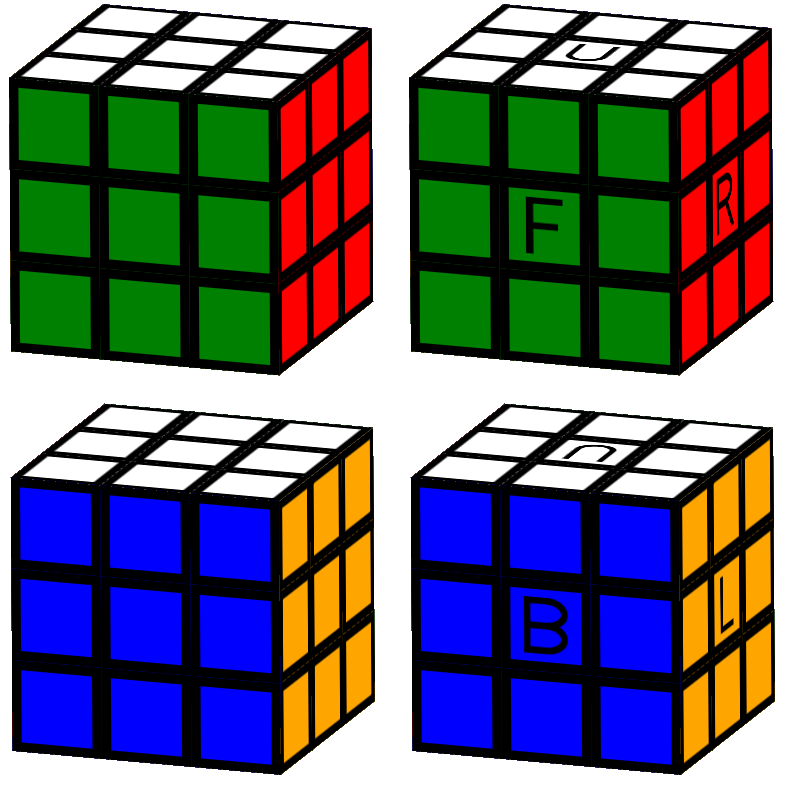
With Animation
Check out the example on Github to see how the different functions interact with each other
Display a cube that can animate turns being applied to it. You can also specify which angle to see it from and whether to annotate the faces just like on view
The function that can handle the opaque animation message type and output the next animation state and any commands the package needs to have run for it
The animation state describing the animation of an algorithm. Set this in your model while viewAnimatable is being used and AnimationMsg is being handled and your cube will animate on screen
The animation state describing a static cube with no animated turns applied to it
Pause an animation either to stop it completely or to unpause it later
Continue a paused animation. This won't have any effect if the animation is not paused
A helper function that given an animation state will tell you which turn is currently being animated if any
An opaque type that describes the internal state this package uses to manage the animation of turns on a cube
An opaque type describing the internal messages this package uses to manage the animation of a cube
Algorithm Helpers
Some algorithm functionality such as whether two algorithms are equivalent can only be determined in the context of having a cube, so they belong here and not in the Algorithm module.
Check that two algorithms produce the exact same result when applied to a cube. They also have to end at the exact same orientation, so while you may very rarely want this, you are probably looking for algorithmResultAreEquivalentIndependentOfFinalRotation
Checks that two algorithms produce the exact same result, but they are allowed to leave the cube in different orientations / rotations and still be considered equivalent
This type represents a 3x3 Rubik's Cube that can be displayed. That means that encoded in the model is also the orientation of the whole cube. This means that a cube with yellow facing upwards is not the same as a cube in the same state with the green face facing upwards.
You can use the helper functions below to manipulate and display the cube. You could for example do something like this: