SubPath
Types
Construction
Construct a subpath
subpath (moveTo (0,0)) [ lineTo [ (10,10), (10, 20) ] ]An empty subpath
Conversion
Construct an svg path element from a Path with the given attributes
Svg.svg []
[ SubPath.element mySubPath [ stroke "black" ] ]Convert a subpath into SVG path notation
import LowLevel.Command exposing (moveTo, lineTo)


line : SubPath
line = subpath (moveTo (0,0)) [ lineTo [ (10,10), (10, 20) ] ]


SubPath.toString line --> "M0,0 L10,10 10,20"Convert a subpath to its Segments
subpath (moveTo (0,0)) [ lineTo [ (10, 10), (20, 10) ] ]
    |> toSegments
--> [ line (0,0) (10,10) , line (10, 10) (20, 10) ]Convert a list of segments to a path
In the conversion, the starting point of a segment is discarded: It is assumed that for every two adjacent segments in the list, the first segment's end point is the second segment's starting point
import Segment exposing (line)
import LowLevel.Command exposing (moveTo, lineTo)


[ line (0,0) (10,10) , line (10, 10) (20, 10) ]
    |> fromSegments
--> subpath (moveTo (0,0)) [ lineTo [ (10, 10)], lineTo [ (20, 10) ] ]deconstruct a subpath into its components
Composition
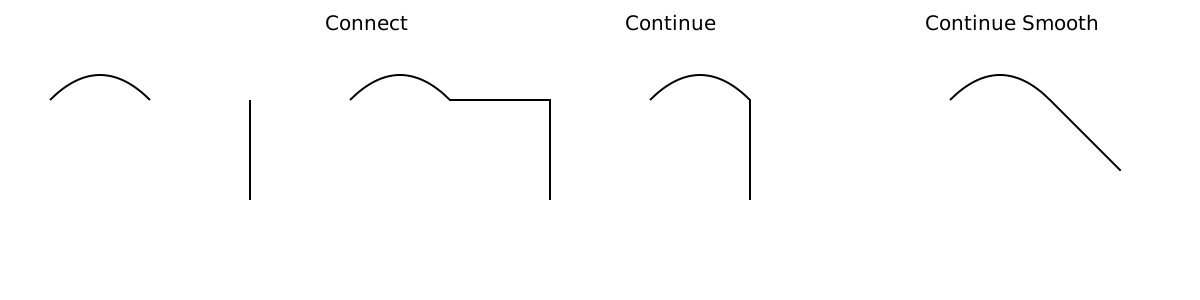
import Curve


curve : SubPath
curve =
    Curve.quadraticBezier ( 0, 0 )
        [ ( ( 0.5, -0.5 ), ( 1.0, 0 ) ) ]


down : SubPath
down =
    Curve.linear [ ( 0, 0 ), ( 0, 1 ) ]


curve
    |> connect down
    |> SubPath.toString
    --> "M0,0 Q0.5,-0.5 1,0 L0,0 L0,1"


curve
    |> continue down
    |> SubPath.toString
    --> "M0,0 Q0.5,-0.5 1,0 L1,1"


curve
    |> continueSmooth down
    |> SubPath.toString
    --> "M0,0 Q0.5,-0.5 1,0 L1.707106781187,0.707106781187"


close curve
    |> SubPath.toString
--> "M0,0 Q0.5,-0.5 1,0 Z"Start the second subpath where the first one ends
Join two subpaths, connecting them with a straight line
Start the second subpath where the first one ends, and rotate it to continue smoothly
Append a ClosePath at the end of the subpath (if none is present)
Mapping
Reverse a subpath
The direction of a subpath can be important if you want to use SVG fills.
mySubPath : SubPath
mySubPath =
    subpath (moveTo (0,0))
        [ lineTo [ (10, 10)], lineTo [ (20, 10) ] ]


mySubPath
    |> reverse
    |> reverse
--> mySubPathTry to merge adjacent instructions
This conversion is costly (timewise), but can shorten a subpath considerably, meaning other functions are faster.
Additionally, the toString output can become shorter.
Translate the subpath by a vector
Rotate a subpath around its starting point by an angle (in radians).
Scale the subpath in the x and y direction
For more complex scaling operations, define a transformation matrix and use mapCoordinate.
Map over all the 2D coordinates in a subpath
Map over each drawto with the CursorState available.
The CursorState contains the subpath start position and the current cursor position at the current DrawTo
Conversion
Converting a svg-path-lowlevel subpath into a one-true-path subpath. Used in parsing
Beware that the moveto is always interpreted as Absolute.
Converting a one-true-path subpath into a svg-path-lowlevel subpath. Used in toString
Type representing a subpath
A subpath is one moveto command followed by an arbitrary number of drawto commands.