SubPath
SubPath is the fundamental type in this package.
In most cases it should be created with functions from the Curve module.
import Curve
import SubPath exposing (connect)
import Svg
import Svg.Attributes exposing (fill)


right =
    Curve.linear [ ( 0, 0 ), ( 1, 0 ) ]


down =
    Curve.linear [ ( 0, 0 ), ( 0, 1 ) ]
This module has several functions for composing subpaths
topRightCorner =
    right
        |> connect down


bottomLeftCorner
    down
        |> connect right


square =
    topRightCorner
        |> connect (reverse bottomLeftCorner)
        |> close
And can generate svg elements
view : Svg msg
view =
    Svg.svg [] [ SubPath.element square [ fill "none" ] ]
Types
Construction
Construct a subpath
Always try to use a function from Curve over manual subpath construction!
import LowLevel.Command exposing (moveTo, lineTo)


SubPath.with (moveTo (0,0)) [ lineTo [ (10,10), (10, 20) ] ]Conversion
Construct an svg path element from a Path with the given attributes
Svg.svg []
[ SubPath.element mySubPath [ stroke "black" ] ]Convert a subpath into SVG path notation
import Curve


line : SubPath
line = Curve.linear [ (0,0), (10,10), (10, 20) ]


SubPath.toString line --> "M0,0 L10,10 10,20"toString with options
Formatting options
Set the maximum number of decimal places in the output
import Curve


line : SubPath
line = Curve.linear [ (0, 0), (1/3, 1/7) ]


SubPath.toString line
    --> "M0,0 L0.3333333333333333,0.14285714285714285"


SubPath.toStringWith [ decimalPlaces 3 ] line
--> "M0,0 L0.333,0.143"Join adjacent instructions where possible This can save a few characters, but more importantly makes comparison of subpaths (based on the ouput string) more reliable.
import Curve


right : SubPath
right = Curve.linear [ (0, 0), (1, 0) ]


down : SubPath
down = Curve.linear [ (0, 0), (0, 1) ]


line : SubPath
line =
    right
        |> continue down


SubPath.toString line
    --> "M0,0 L1,0 L1,1"


SubPath.toStringWith [ mergeAdjacent ] line
--> "M0,0 L1,0 1,1"Reverse a subpath
The direction of a subpath can be important if you want to use SVG fills. Another use is in composing subpaths:
arrowHead : ( Float, Float ) -> Float -> SubPath
arrowHead location angle =
    let
        line =
            Curve.linear [ ( 0, 0 ), ( 10, 0 ) ]
                |> SubPath.translate location


        a =
            SubPath.rotate (angle - (pi + pi / 4)) line


        b =
            SubPath.rotate (angle + (pi + pi / 4)) line
    in
    SubPath.reverse a
|> SubPath.continue bTry to merge adjacent instructions
This conversion is costly (timewise), but can shorten a subpath considerably, meaning other functions are faster.
Additionally, the toString output can become shorter.
Composition
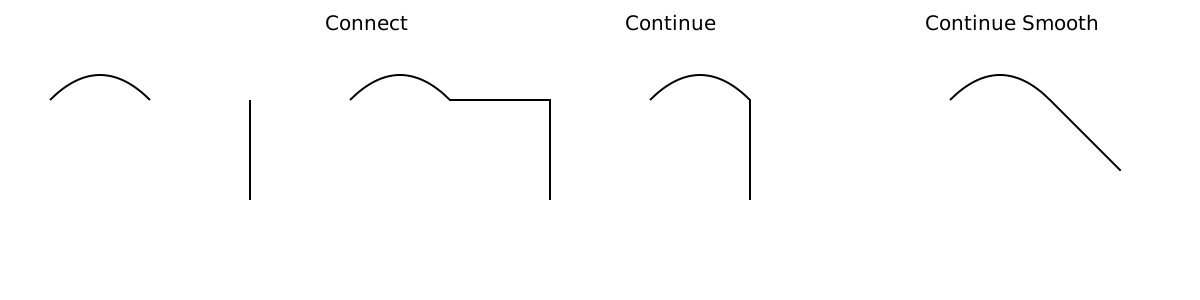
import Curve


curve : SubPath
curve =
    Curve.quadraticBezier ( 0, 0 )
        [ ( ( 0.5, -0.5 ), ( 1.0, 0 ) ) ]


down : SubPath
down =
    Curve.linear [ ( 0, 0 ), ( 0, 1 ) ]


curve
    |> connect down
    |> SubPath.toString
    --> "M0,0 Q0.5,-0.5 1,0 L0,0 L0,1"


curve
    |> continue down
    |> SubPath.toString
    --> "M0,0 Q0.5,-0.5 1,0 L1,1"


curve
    |> continueSmooth down
    |> SubPath.toString
    --> "M0,0 Q0.5,-0.5 1,0 L1.707106781187,0.707106781187"


close curve
    |> SubPath.toString
--> "M0,0 Q0.5,-0.5 1,0 Z"Start the second subpath where the first one ends, and rotate it to continue smoothly
Mapping
Rotate a subpath around its starting point by an angle (in radians).
Scale the subpath in the x and y direction
For more complex scaling operations, define a transformation matrix and use mapCoordinate.
Map over all the 2D coordinates in a subpath
Map over each drawto with the CursorState available.
The CursorState contains the subpath start position and the current cursor position at the current DrawTo
Arc Length Parameterization
The arc length parameterization is a way of expressing a curve in terms of its arc length. For instance, pointAlong expects a distance, and returns the 2D coordinate reached
when walked that distance along the curve.
This is great for calculating the total length of your subpath (for instance to style based on the length) and to get evenly spaced points on the subpath.
The arc length parameterization as a binary tree of segments.
Build an arc length parameterization from a subpath.
For calculating the parameterization, approximations are used. To bound the error that approximations introduce,
you can supply a tolerance: Operations (arcLength, pointOn, ect.) are at most tolerance away from the truth.
tolerance =
    1.0e-4


parameterized =
arcLengthParameterized tolerance mySubPathNote: keep the scale of your curve in mind. if the length of the curve is 100, then an
toleranceof0.1is probably enough for the difference not to be visible.Using a much smaller
tolerancecan really slow down your page.
Find the total arc length of an elliptical arc. This will be accurate to within the tolerance given when calling arcLengthParameterized.
import Curve


Curve.linear [ (0,0), (100, 0) ]
    |> arcLengthParameterized 1e-4
    |> arcLength
--> 100Evenly splits the curve into count segments, giving their length along the curve
Similar to evenlySpaced, but also gives the start and end point of the curve
evenlySpacedPoints : Int -> ArcLengthParameterized -> List ( Float, Float )
evenlySpacedPoints count parameterized =
    evenlySpacedWithEndpoints count parameterized
|> List.filterMap (pointAlong parameterized)Find n evenly spaced points on an arc length parameterized subpath
Includes the start and end point.
import Curve


curve : ArcLengthParameterized
curve =
    Curve.linear [ (0,0), (10, 0) ]
        |> arcLengthParameterized 1e-4


evenlySpacedPoints 1 curve
    --> [ (5, 0) ]


evenlySpacedPoints 2 curve
    --> [ (0, 0), (10, 0) ]


evenlySpacedPoints 5 curve
--> [(0,0),(2.5,0),(5,0),(7.5,0),(10,0)]A point at some distance along the curve.
import Curve


parameterized : ArcLengthParameterized
parameterized =
    Curve.quadraticBezier (0,0) [ ( (5,0), (10, 0) ) ]
        |> arcLengthParameterized 1e-4


pointAlong parameterized (arcLength parameterized / 2)
--> Just (5, 0)The tangent along the curve
import Curve


parameterized : ArcLengthParameterized
parameterized =
    Curve.quadraticBezier (0,0) [ ( (5,0), (10, 0) ) ]
        |> parameterized 1e-4


tangentAlong parameterized (arcLength parameterized / 2)
--> Just (1, 0)Find the arc length at some parameter value.
Find the parameter value at some arc length
Conversion
Convert a subpath to its Segments
import Curve
import Segment exposing (line)


Curve.linear [ (0,0), (10,10), (20, 10) ]
    |> toSegments
--> [ line (0,0) (10,10) , line (10, 10) (20, 10) ]Convert a list of segments to a path
In the conversion, the starting point of a segment is discarded: It is assumed that for every two adjacent segments in the list, the first segment's end point is the second segment's starting point
import Curve
import Segment exposing (line)


[ line (0,0) (10,10) , line (10, 10) (20, 10) ]
    |> fromSegments
    |> SubPath.toStringWith [ mergeAdjacent ]
--> SubPath.toString <| Curve.linear [ (0,0), (10,10), (20, 10) ]Converting a svg-path-lowlevel subpath into a one-true-path subpath. Used in parsing
Beware that the moveto is always interpreted as Absolute.
Converting a one-true-path subpath into a svg-path-lowlevel subpath. Used in toString
A subpath is one moveto command followed by an arbitrary number of drawto commands.
Note: Equality with the default
==function in unreliable forSubPath. The easiest way to check for equality is to useSubPath.toStringon both arguments.If you need more "fuzzy" equality use
toStringWith, for instance: