elm-treeview

A customizable ELM treeview component.
Example
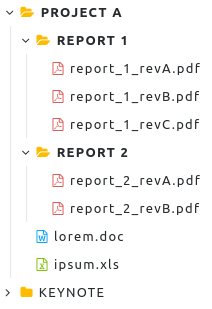
Basic example with defaut options:
import Html
import Treeview

styles : Styles
styles =
  [ T.Style "folder" ("folder yellow", "folder-open yellow") ""
  , T.Style "archive" ("file-archive-o", "file-archive-o") ""
  , T.Style "word" ("file-word-o", "file-word-o") "blue"
  , T.Style "image" ("file-image-o", "file-image-o") ""
  , T.Style "pdf" ("file-pdf-o", "file-pdf-o") "red"
  , T.Style "powerpoint" ("file-powerpoint-o", "file-powerpoint-o") "orange"
  , T.Style "excel" ("file-excel-o", "file-excel-o") "green"
  ]

model : Model
model =
  [ T.node "pA" "Project A" "folder" False <| Just [
      T.node "pAg1" "Report 1" "folder" False <| Just [
        T.node "pAg1f1" "report_1_revA.pdf" "pdf" True Nothing,
        T.node "pAg1f2" "report_1_revB.pdf" "pdf" True Nothing,
        T.node "pAg1f3" "report_1_revC.pdf" "pdf" True Nothing
      ],
      T.node "pAg2" "Report 2" "folder" False <| Just [
        T.node "pAg2f1" "report_2_revA.pdf" "pdf" True Nothing,
        T.node "pAg2f2" "report_2_revB.pdf" "pdf" True Nothing
      ],
      T.node "pAf1" "lorem.doc" "word" True Nothing,
      T.node "pAf2" "ipsum.xls" "excel" True Nothing
    ],
    T.node "pB" "Keynote" "folder" False <| Just [
      T.node "pBf1" "workshop_part1.ppt" "powerpoint" True Nothing,
      T.node "pBf2" "workshop_part2.ppt" "powerpoint" True Nothing,
      T.node "pBf3" "image1.png" "image" True Nothing,
      T.node "pBf4" "image2.ppt" "image" True Nothing,
      T.node "pBf5" "image3.ppt" "image" True Nothing,
      T.node "pBf6" "image4.ppt" "image" True Nothing
    ]
  ]

config : T.Config
config = T.default styles


main : Program Never T.Model T.Msg
main =
  Html.beginnerProgram
    { model = model
    , view = T.view config
    , update = T.update
    }
With search input:
config : T.Config
config =
  let
    d = T.default styles
  in
    {d | search = { enable = True}}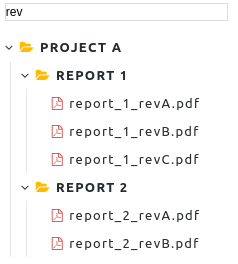
With checkbox selection:
config : T.Config
config =
  let
    d = T.default styles
  in
    {d | checkbox = { enable = True, multiple = True, cascade = True}}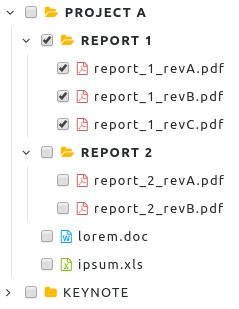
Theme
See the treeview.scss file in the styles folder to customize the theme.
Options
| Name | Type | Default | Description |
|---|---|---|---|
checkbox.enable | Bool | False | Activate the checkbox selection for each node. |
checkbox.multiple | Bool | False | Multiple nodes can be selected. |
checkbox.cascade | Bool | False | Enable the cascading selection (the children node will selected if the parent is selected). |
search.enable | Bool | False | Activate the search toolbar. |
sort | Sort | None | Sort the nodes: Asc = ascending, Desc = descending. |
look.theme | String | "" | Apply the theme. |
look.styles | [Styles] | [] | Define the styles (CSS class and icons) for nodes. |
Documentation
See documentation here.
Usage
To run the examples:
$ cd examples
$ npm i
$ npm run dev
Open localhost:8080.
TODO
- updated for ELM 0.19.x
- search toolbar
- checkbox
- [ ] ajax
- interface for JS
- other themes
- contextual menu
- unit test
Contributing
Feedback and contributions are very welcome.
License
This project is licensed under MIT.