UiExplorer
Create an app that lets you browse and interact with UI you've created.
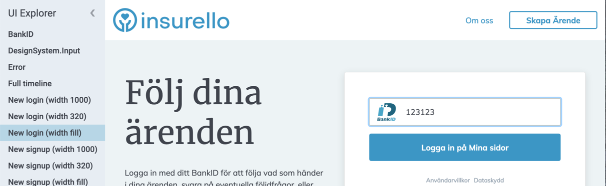 In this image, the panel to the left is called the sidebar and the page selected in it is shown in the remaining space to the right.
Note that this package is built primarily for UI created with elm-ui:
- elm-ui-explorer v1.x and v2.x:
mdgriffith/elm-ui. - elm-ui-explorer v3.x+:
insurello/elm-ui
It's recommended to use elm-ui-explorer v2.1.1 if you aren't Insurello.
You can still use elm/html with Element.html though.
Application
The default application configuration.
{ flagsDecoder = Decode.succeed ()
, layoutOptions = []
, layoutAttributes = []
, relativeUrlPath = []
, title = Element.text "UI explorer"
}These are settings we can change when creating our UI explorer application.
flagsDecoderlets us parse json flags we pass to our app. This gets passed along to the init function in our pages (or the view function if you're creating a static page).layoutOptionsandlayoutAttributesare used in our app's Element.layoutWith to control things like the default font or focusStyle.relativeUrlPathsets the relative path to pages.relativeUrlPath = []makes the page link look like this https://localhost/MyPage, andrelativeUrlPath = [ ui, here ]produces https://localhost/ui/here/MyPage
Pages
A "page" is something you can select in the sidebar to display when the app is running. Pages can contain a single widget, tables showing every variation of your button components, or an entire login page. It's up to you!
The first page in your UI explorer. This is the default page if the user doesn't specify a url path.
import Element
import UiExplorer


pages =
    UiExplorer.firstPage
        "My first page"
(UiExplorer.static (\_ _ -> Element.text "Hi!"))Additional pages in your UI explorer.
You have to start with firstPage before chaining the result to nextPages.
Each page must also have a unique name.
import Element
import UiExplorer


pages =
    UiExplorer.firstPage
        "My first page"
        (UiExplorer.static (\_ _ -> Element.text "Hi!"))
        |> UiExplorer.nextPage
            "My second page"
(UiExplorer.static (\_ _ -> Element.none))If your list of pages on the sidebar is starting to get too long, you can group some of them together with groupPages.
import MyPages
import UiExplorer


flatPages =
    UiExplorer.firstPage "Login" MyPage.login
        |> UiExplorer.nextPage "About us" MyPage.aboutUs
        |> UiExplorer.nextPage "Fonts" MyPage.fonts
        |> UiExplorer.nextPage "Colors" MyPage.colors
        |> UiExplorer.nextPage "Basic components" MyPage.basicComponents
        |> UiExplorer.nextPage "Homepage" MyPage.homepage


nowItsGrouped =
    UiExplorer.firstPage "Login" MyPage.login
        |> UiExplorer.nextPage "About us" MyPage.aboutUs
        |> UiExplorer.groupPages "Building blocks"
            (UiExplorer.nextPage "Fonts" MyPage.fonts
                >> UiExplorer.nextPage "Colors" MyPage.colors
                >> UiExplorer.nextPage "Basic components" MyPage.basicComponents
            )
        |> UiExplorer.nextPage "Homepage" MyPage.homepage
Two things to note:
- Normally pages need unique names, but with groups it's okay to have two pages use the same name so long as they are in different groups.
- Due to
firstPagehaving a different type signature fromnextPage, you can't place the first page in a group. If this is a problem, create an issue on github explaining your use case.
A page that doesn't change or react to user input. It's just a view function.
Get the relative paths to all the pages you've defined.
pages =
    UiExplorer.firstPage "First page" (UiExplorer.static (\_ _ -> Element.none))
        |> UiExplorer.nextPage "Second page" (UiExplorer.static (\_ _ -> Element.none))


paths =
    -- [ "/First%20page", "/Second%20page" ]
    getPagePaths [] pages


pathWithSubdomain =
    -- [ "/subdomain/First%20page", "/subdomain/Second%20page" ]
getPagePaths [ "subdomain" ] pagesAll the functions you need for wiring together an interactive page. It's basically just Browser.element.
import MyCoolUi
import UiExplorer


loginPage =
    { init = MyCoolUi.loginInit
    , update = MyCoolUi.loginUpdate
    , view = \pageSize model -> MyCoolUi.loginView model
    , subscriptions = always Sub.none
    }


pages =
UiExplorer.firstPage "Login Form" loginPageThe size of the page your UI gets placed in.
This is not the same as Browser.Events.resize since the UI explorer displays a sidebar that can take up some of the window space.
Here we create our UI explorer app.
Note that we didn't add type signatures for
pagesandmainin the example. If we did, we'd have to update it every time we add a new page and the type signatures would get messy. Instead it's best to just let the compiler infer it automatically.