BoxDrawing
Basic Elements
Creates animated pictures using box-drawing characters.
For example, to draw a rectangle that expands like this:
╔═══╗
║   ║ ⇨
╚═══╝
  ⇩
You can write
import BoxDrawing exposing (..)


main =
    animation
        ( 150, 40 )
        (\counter ->
            [ rectangle
                (min 150 counter)
                (min 40 counter)
                double
            ]
        )
The first argument is the canvas size, the second is a function that gets an Int and returns a list of Shape.
The Int is a counter that increases by one 60 times per second making the drawing expand.
Transforms a list of Shape into a String using box-drawing characters.
This is what is used internally by picture and animation.
Use render instead of picture and animation if you want to embed this library in a larger application so that you can control your "Elm Architecture".
These two examples are equivalent:
Example with picture
import BoxDrawing exposing (..)


main =
    picture ( 5, 3 ) <|
        [ rectangle 5 3 double ]
Example with render
import BoxDrawing exposing (..)
import Html


main =
    Html.pre []
        [ Html.text <|
            render ( 5, 3 )
                [ rectangle 5 3 double ]
]Move shapes around the canvas.
move takes, in order, the horizontal and vertical quantity of how many characters the object should move.
Remember that the coordinates (0, 0) are at the top left corner of the screen.
Positive quantities move objects toward the bottom right corner.
Groups shapes together. Particularly useful when you need to move shapes of the same amount:
import BoxDrawing exposing (..)


main : Program () () ()
main =
    picture ( 17, 3 ) <|
        [ rectangle 7 3 single
        , arrow 4 horizontal single standard
            |> move 6 1
        , group
            [ box 7 3 double ' '
            , words "box" |> move 2 1
            ]
            |> move 10 0
        ]
Result:
┌─────┐   ╔═════╗
│     ├──>║ box ║
└─────┘ ╚═════╝The size of the canvas
Shapes
Make lines:
import BoxDrawing exposing (..)


main =
    picture ( 10, 1 ) <|
        [ line 10 horizontal double ]
Result:
════════You give in order:
- The length
- The
Direction - The
Weight
Direction can be
horizontal⇨vertical⇩diagonalUp⬀diagonalDown⬂
Weight can be
nonesingle─double═
Make arrows:
import BoxDrawing exposing (..)


main =
    picture ( 10, 1 ) <|
        [ arrow 10 horizontal double standard ]
Result:
═══════>An arrow is similar to a line but with a point at the end.
You give in order:
- The length
- The
Direction - The
Weight - The
ArrowDirection
ArrowDirection can be
standard══>reversed<══
Make rectangles:
import BoxDrawing exposing (..)


main =
    picture ( 5, 3 ) <|
        [ rectangle 5 3 double ]
Result:
╔═══╗
║   ║
╚═══╝
You give in order:
- The width
- The height
- The
Weight
Make boxes:
import BoxDrawing exposing (..)


main =
    box ( 5, 3 ) <|
        [ rectangle 5 3 double '▒' ]
Result:
╔═══╗
║▒▒▒║
╚═══╝
You give in order:
- The width
- The height
- The
Weight - A filling
Char
A box is similar to a rectangle but it also fills the inner area with a Char. Useful if you want to cover something underneath. For example:
Overlapping rectangles
main =
    picture ( 6, 4 ) <|
        [ rectangle 5 3 single
        , rectangle 5 3 double |> move 1 1
        ]
Result :
┌───┐
│╔══╪╗
└╫──┘║
 ╚═══╝
Overlapping boxes
main =
    picture ( 6, 4 ) <|
        [ rectangle 5 3 single
        , box 5 3 double ' ' |> move 1 1
        ]
Result:
┌───┐
│╔══╧╗
└╢   ║
╚═══╝Print words:
import BoxDrawing exposing (..)


main =
    picture ( 13, 1 ) <|
        [ words "Hello, World!" ]
Result:
Hello, World!Print paragraphs:
import BoxDrawing exposing (..)


main =
    picture ( 13, 1 ) <|
        [ paragraph "Hello,\nWorld!" ]
Result:
Hello,
World!Make labels. Labels are boxes with text inside:
import BoxDrawing exposing (..)


main =
    picture ( 17, 3 ) <|
        [ label " Hello, World! " single ]
Result:
┌───────────────┐
│ Hello, World! │
└───────────────┘The building block of your pictures.
Animations
Moves shapes.
Useful to move shapes during an animation.
counter: AnIntthat increase (tick) 60 times per seconddelay: Delay in number of ticks before the movement startsspeed: Smaller number: faster speed. Bigger number: slower speedoffset: Offsetfrom: Initial valueto: Final value
Find examples of usage in the Robot animation:
Alternates two values.
For example, if you want to make the eye of a robot blinking:
import BoxDrawing exposing (..)


main : Program () Int ()
main =
    animation
        ( 13, 7 )
        (\counter ->
            -- Head
            [ rectangle 11 7 double |> move 1 0


            -- Hears
            , rectangle 2 2 single |> move 11 2
            , rectangle 2 2 single |> move 0 2


            -- Unibrow
            , words "~~~/~~~" |> move 3 1


            -- Eyes
            , words
                (blinking
                    { speed = 5
                    , valueA = " _   _ "
                    , valueB = " o   O "
                    , counter = counter
                    , modBy = 30
                    , delay = 0
                    , offset = 0
                    }
                )
                |> move 3 2


            -- Nose
            , words "   └   " |> move 3 3


            -- Mouth
            , words " _   _ " |> move 3 4
            , words " └───┘ " |> move 3 5
            ]
        )
Result:
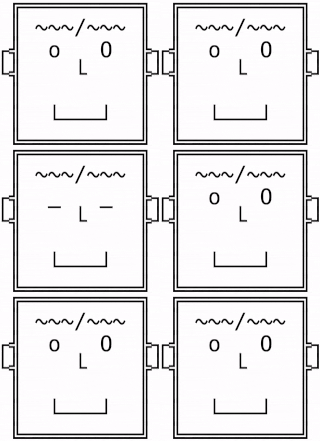
Attributes
Weight
──────══════Direction
══════║
║
║ /
/
/\
\
\Arrow Direction
───><───Encoders and Decoders
To serialize a list of shapes.
Useful if you want to send a list of shapes via HTTP requests or to save them in the local storage.
The minified versions have a smaller footprint but are less human-readable.
The minified versions output a smaller but less less human-readable.
Creates a picture using box-drawing characters.
For example, to get this:
You can write
The first argument is the canvas size, the second is a list of
Shape.The (0, 0) coordinates are at the top left corner of the screen. Positive quantities move objects toward the bottom right corner.
If you see gaps between characters, you need to adjust the style, for example, in CSS: