A value associated with http-equiv or name depending on the context. For
meta.
Element.Attributes
This module is a mirror of Html.Attributes
Some attributes have been added.
The only modification to the existing library is that style has been renamed inlineStyle to avoid collision with Style.style.
Since this is a style library, you shouldn't need it very often.
Style Element Attributes
These are the new attributes that generally have to do with layout.
Apply a style variation.
el MyButton [ vary Disabled True ] (text "My Disabled Button!")Alignment
Alignment attributes are incredibly useful for adjusting your layout.
When applied to layout elements like row and grid, alignment will affect the alignment of the children.
When applied to singular elements like el, alignment will affect the alignment of that individual element.
Sizing
Length
Spacing ++ Padding
Spacing allows a layout to set the distance between the children in the layout.
So this layout:
row [ spacing 10, padding 10 ]
    [ el Box [] empty
    , el Box [] empty
    , el Box [] empty
    ]
Is rendered into something like this:
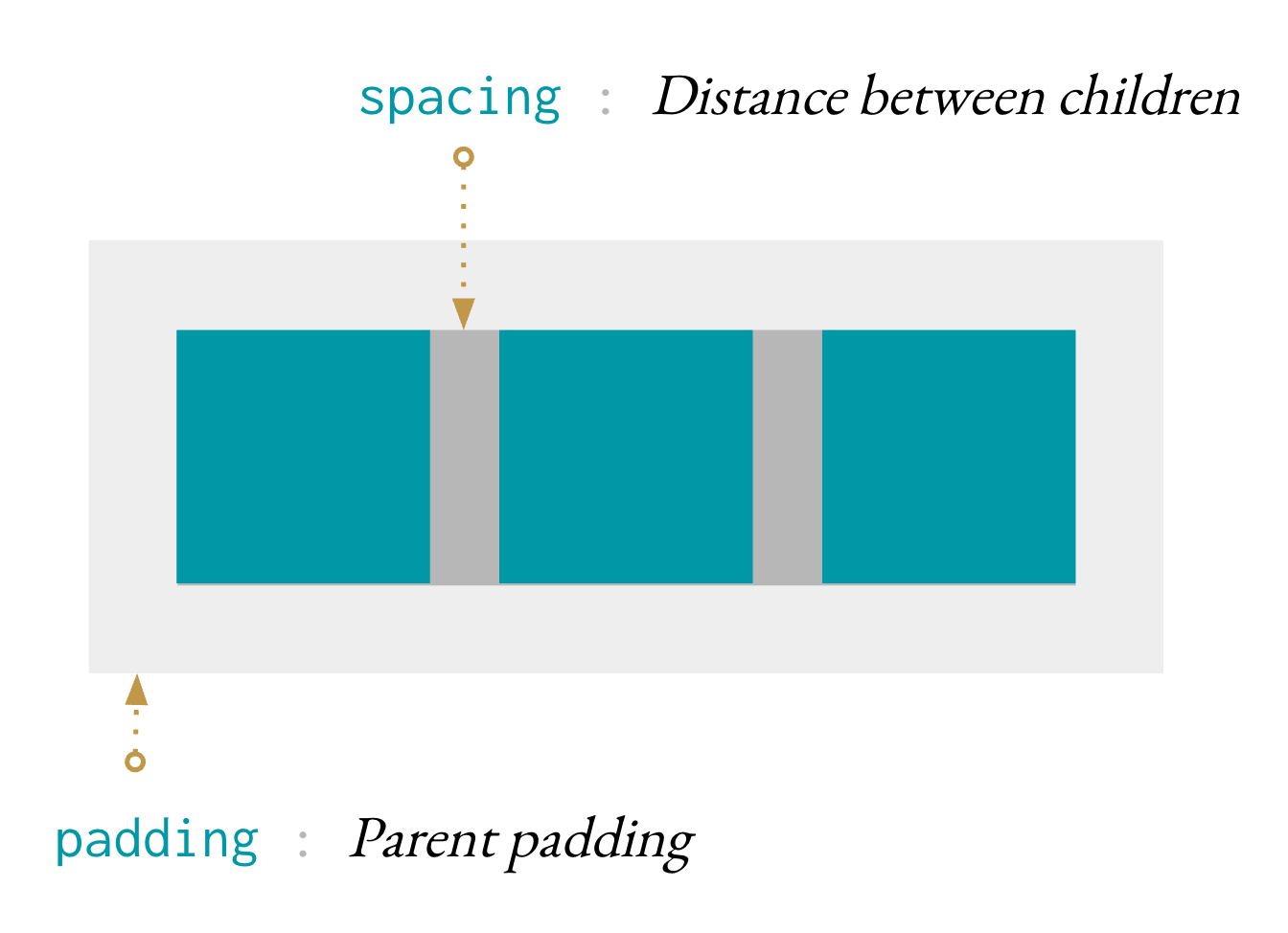
Set the spacing between children in a layout.
Set the horizontal and vertical spacing separately.
This is generally only useful in a textLayout or a grid.
Set horizontal and vertical padding.
Positioning
Adjust the position of the element.
Scrollbars
Turn on scrollbars if content overflows.
Turn on scrollbars if content overflows vertically.
Turn on scrollbars if content overflows horizontally.
Overflow
Clip content that overflows.
Conversion
Convert an existing Html.Attribute to an Element.Attribute.
This is useful for working with any library that returns a Html.Attribute.
Normal Html.Attributes
Helper functions for HTML attributes. They are organized roughly by
category. Each attribute is labeled with the HTML tags it can be used with, so
just search the page for video if you want video stuff.
If you cannot find what you are looking for, go to the Custom Attributes section to learn how to create new helpers.
Primitives
Specify a list of styles.
myStyle : Attribute msg
myStyle =
    inlineStyle
        [ ( "backgroundColor", "red" )
        , ( "height", "90px" )
        , ( "width", "100%" )
        ]


greeting : Html msg
greeting =
    div [ myStyle ] [ text "Hello!" ]
There is no Html.Styles module because best practices for working with HTML
suggest that this should primarily be specified in CSS files. So the general
recommendation is to use this function lightly.
Create properties, like saying domNode.className = 'greeting' in
JavaScript.
import Json.Encode as Encode


class : String -> Attribute variation msg
class =
    Html.Attributes.class
Read more about the difference between properties and attributes here.
Create attributes, like saying domNode.setAttribute('class', 'greeting')
in JavaScript.
class : String -> Attribute variation msg
class =
    Html.Attributes.class
Read more about the difference between properties and attributes here.
Transform the messages produced by an Attribute.
Super Common Attributes
Often used with CSS to style elements with common properties.
This function makes it easier to build a space-separated class attribute. Each class can easily be added and removed depending on the boolean value it is paired with. For example, maybe we want a way to view notices:
viewNotice : Notice -> Html msg
viewNotice notice =
    div
        [ classList
            [ ( "notice", True )
            , ( "notice-important", notice.isImportant )
            , ( "notice-seen", notice.isSeen )
            ]
        ]
[ text notice.content ]Often used with CSS to style a specific element. The value of this attribute must be unique.
Text to be displayed in a tooltip when hovering over the element.
Inputs
Defines the type of a button, input, embed, object, script,
source, style, or menu.
Defines a default value which will be displayed in a button, option,
input, li, meter, progress, or param.
Defines an initial value which will be displayed in an input when that
input is added to the DOM. Unlike value, altering defaultValue after the
input element has been added to the DOM has no effect.
Indicates whether an input of type checkbox is checked.
Provides a hint to the user of what can be entered into an input or
textarea.
Defines which option will be selected on page load.
Input Helpers
List of types the server accepts, typically a file type.
For form and input.
List of supported charsets in a form.
The URI of a program that processes the information submitted via a form.
Indicates whether a form or an input can have their values automatically
completed by the browser.
The element should be automatically focused after the page loaded.
For button, input, keygen, select, and textarea.
Indicates whether the user can interact with a button, fieldset,
input, keygen, optgroup, option, select or textarea.
How form data should be encoded when submitted with the POST method.
Options include: application/x-www-form-urlencoded, multipart/form-data, and
text/plain.
Indicates the action of an input or button. This overrides the action
defined in the surrounding form.
Associates an input with a datalist tag. The datalist gives some
pre-defined options to suggest to the user as they interact with an input.
The value of the list attribute must match the id of a datalist node.
For input.
Defines the maximum number of characters allowed in an input or
textarea.
Defines the minimum number of characters allowed in an input or
textarea.
Defines which HTTP method to use when submitting a form. Can be GET
(default) or POST.
Indicates whether multiple values can be entered in an input of type
email or file. Can also indicate that you can select many options.
Name of the element. For example used by the server to identify the fields
in form submits. For button, form, fieldset, iframe, input, keygen,
object, output, select, textarea, map, meta, and param.
This attribute indicates that a form shouldn't be validated when
submitted.
Defines a regular expression which an input's value will be validated
against.
Indicates whether an input or textarea can be edited.
Indicates whether this element is required to fill out or not.
For input, select, and textarea.
For input specifies the width of an input in characters.
For select specifies the number of visible options in a drop-down list.
The element ID described by this label or the element IDs that are used
for an output.
Indicates the element ID of the form that owns this particular button,
fieldset, input, keygen, label, meter, object, output,
progress, select, or textarea.
Input Ranges
Indicates the maximum value allowed. When using an input of type number or
date, the max value must be a number or date. For input, meter, and progress.
Indicates the minimum value allowed. When using an input of type number or
date, the min value must be a number or date. For input and meter.
Add a step size to an input. Use step "any" to allow any floating-point
number to be used in the input.
Input Text Areas
Defines the number of columns in a textarea.
Defines the number of rows in a textarea.
Indicates whether the text should be wrapped in a textarea. Possible
values are "hard" and "soft".
Links and Areas
The URL of a linked resource, such as a, area, base, or link.
Specify where the results of clicking an a, area, base, or form
should appear. Possible special values include:
- _blank — a new window or tab
- _self — the same frame (this is default)
- _parent — the parent frame
- _top — the full body of the window
You can also give the name of any frame you have created.
Indicates that clicking an a and area will download the resource
directly.
Indicates that clicking an a and area will download the resource
directly, and that the downloaded resource with have the given filename.
Two-letter language code of the linked resource of an a, area, or link.
Specifies a hint of the target media of a a, area, link, source,
or style.
Specify a URL to send a short POST request to when the user clicks on an
a or area. Useful for monitoring and tracking.
Specifies the relationship of the target object to the link object.
For a, area, link.
Maps
When an img is a descendent of an a tag, the ismap attribute
indicates that the click location should be added to the parent a's href as
a query string.
Specify the hash name reference of a map that should be used for an img
or object. A hash name reference is a hash symbol followed by the element's name or id.
E.g. "#planet-map".
Declare the shape of the clickable area in an a or area. Valid values
include: default, rect, circle, poly. This attribute can be paired with
coords to create more particular shapes.
A set of values specifying the coordinates of the hot-spot region in an
area. Needs to be paired with a shape attribute to be meaningful.
Embedded Content
The URL of the embeddable content. For audio, embed, iframe, img,
input, script, source, track, and video.
Alternative text in case an image can't be displayed. Works with img,
area, and input.
Audio and Video
The audio or video should play as soon as possible.
Indicates whether the browser should show playback controls for the audio
or video.
Indicates whether the audio or video should start playing from the
start when it's finished.
Control how much of an audio or video resource should be preloaded.
A URL indicating a poster frame to show until the user plays or seeks the
video.
Indicates that the track should be enabled unless the user's preferences
indicate something different.
Specifies the kind of text track.
A two letter language code indicating the language of the track text data.
iframes
A space separated list of security restrictions you'd like to lift for an
iframe.
Make an iframe look like part of the containing document.
An HTML document that will be displayed as the body of an iframe. It will
override the content of the src attribute if it has been specified.
Ordered Lists
Indicates whether an ordered list ol should be displayed in a descending
order instead of a ascending.
Defines the first number of an ordered list if you want it to be something besides 1.
Tables
Specifies the horizontal alignment of a caption, col, colgroup,
hr, iframe, img, table, tbody, td, tfoot, th, thead, or
tr.
The colspan attribute defines the number of columns a cell should span.
For td and th.
Defines the number of rows a table cell should span over.
For td and th.
A space separated list of element IDs indicating which th elements are
headers for this cell. For td and th.
Specifies the scope of a header cell th. Possible values are: col, row,
colgroup, rowgroup.
Header Stuff
Indicates that the script should be executed asynchronously.
Declares the character encoding of the page or script. Common values include:
- UTF-8 - Character encoding for Unicode
- ISO-8859-1 - Character encoding for the Latin alphabet
For meta and script.
Indicates that a script should be executed after the page has been
parsed.
This attribute is an indicator that is paired with the content attribute,
indicating what that content means. httpEquiv can take on three different
values: content-type, default-style, or refresh. For meta.
Defines the script language used in a script.
Indicates that a style should only apply to its parent and all of the
parents children.
Less Common Global Attributes
Attributes that can be attached to any HTML tag but are less commonly used.
Defines a keyboard shortcut to activate or add focus to the element.
Indicates whether the element's content is editable.
Defines the text direction. Allowed values are ltr (Left-To-Right) or rtl (Right-To-Left).
Defines whether the element can be dragged.
Indicates that the element accept the dropping of content on it.
Defines the language used in the element.
Indicates whether spell checking is allowed for the element.
Overrides the browser's default tab order and follows the one specified instead.
Key Generation
A challenge string that is submitted along with the public key in a keygen.
Specifies the type of key generated by a keygen. Possible values are:
rsa, dsa, and ec.
Miscellaneous
Contains a URI which points to the source of the quote or change in a
blockquote, del, ins, or q.
Indicates the date and time associated with the element.
For del, ins, time.
Indicates whether this date and time is the date of the nearest article
ancestor element. For time.
Specifies the URL of the cache manifest for an html tag.
Remove the element from the view.