Palette.Cubehelix
Are you looking to generate a color scheme in which none of the colors "pop"? Then this may be the tool for you!

Professor Dave Green (whose name, given the context, makes me very happy! Please also see these testimonials.) developed this method of generating even-intensity color schemes for use in astronomy. He called this method "cubehelix" based on its relationship to the RGB color solid (a cube!). If you're curious (what cube?? what about the helix?!) please read more about it here, or see the paper:
Green, D. A., 2011, "A colour scheme for the display of astronomical intensity images", Bulletin of the Astronomical Society of India, 39, 289. (2011BASI...39..289G at ADS.)
Generate a palette
import Palette.Cubehelix as Cubehelix


myPalette : List Color
myPalette =
    -- This will generate 10 even-intensity colors
Cubehelix.generate 10Customize your palette
import Color exposing (Color)
import Palette.Cubehelix as Cubehelix exposing (defaultConfig)


myPalette : List Color
myPalette =
Cubehelix.generateAdvanced 10 defaultConfigThe first parameter (clamped between 0 and 256) corresponds to the number of colors you want to generate.
defaultConfig is pre-populated with the values analagous to those that Professor Green uses.
This is a great place to start to learn what different settings can get you. Try playing with one
value at a time to see how it changes the result!
{ startingColor = Color.fromHSL ( -60, 100, 0 )
, rotationDirection = BGR
, rotations = 1.5
, gamma = 1.0
}startingColor is used to derive what hue you want to start from (see HSL color space)
as well as how saturated (how far from grey) you want the colors produced to be.
The lightness of the color that you pass in is not used.
rotationDirection describes whether the helix moves towards red then green then blue, or
blue then green then red. This is easiest to visualize if you think of a cube defined by three
vectors, one each for red, green, and blue values. If that's not doing the trick,
take a look at [https://www.mrao.cam.ac.uk/~dag/CUBEHELIX/3d-default.png][https://www.mrao.cam.ac.uk/~dag/CUBEHELIX/3d-default.png](this image).
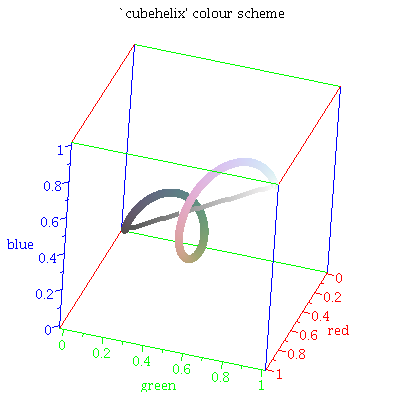
rotations describes the number of rotations the helix should make as it moves from black (Color.fromRGB (0, 0 0))
to white Color.fromRGB (255, 255, 255). rotations should be in [0, 1.5]. If it's not, it will be absolute-value-ified & clamped.
The gamma value can be used to emphasize low- or high-intensity colors. gamma will be clamped with clamp 0 2.
- Provide a 0 < gamma < 1 to emphasize low-intensity values
- Provide a 1 < gamma < 2 to emphasize high-intensity values
The helix can rotate in the red, green, blue direction, or in the blue, green, red direction. Try both and see which one you like better!
The parameter (clamped between 0 and 256) corresponds to the number of colors you want to generate.