elm-obj-file
An Elm package to encode and decode 3D geometry in the OBJ file format. Meshes are returned as TriangularMesh values, which makes them easy to render with elm-3d-scene but can also be used with any other 3D graphics system. You could even take the geometric data and use it for 3D printing, physics simulations, finite element analysis or whatever other crazy thing you want to do =)
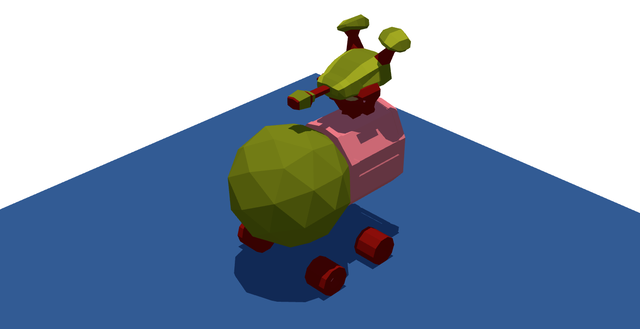
The “Pod” model by @01k rendered with elm-3d-scene. See it live here.
Make sure to check the viewer example that lets you preview OBJ files. The Nefertiti example demonstrates support for loading bumpy faces with a normal map texture.
The examples source code can be found here.
{-| Load a mesh from an HTTP request. -}
getMesh : Cmd Msg
getMesh =
    Http.get
        { url = "Pod.obj.txt"
        , expect =
            Obj.Decode.expectObj GotMesh
                Length.centimeters
                Obj.Decode.texturedFaces
        }
Note the .txt extension: this is currently required to serve files from elm reactor.
Blender Workflow
To export an OBJ file from Blender choose File - Export - Wavefront (.obj). We recommend the following settings:
- Include: only check “Objects as OBJ Objects”;
- Transform: use scale
1.00, “Y Forward” and “Z Up” to match the Blender coordinate system; - Geometry: only check “Apply Modifiers”, check “Write Normals” for
Obj.Decode.faces,Obj.Decode.texturedFacesandObj.Decode.bumpyFaces(this bypasses normal reconstruction entirely), “Include UVs” forObj.Decode.texturedTriangles,Obj.Decode.texturedFacesandObj.Decode.bumpyFaces, optionally check “Write Materials” if you want to decode material names, and check “Smooth Groups” if you want normal reconstruction to reproduce Blender's sharp edges without exporting explicit normals.
Blender collections are not preserved in OBJ groups. To decode individual meshes from the same file, you should rely on the object filter. The object name, that Blender produces, is a concatenation of the corresponding object and geometry. For example, the “Pod Body” object that contains “Mesh.001” can be decoded with Obj.Decode.object "Pod_Body_Mesh.001".
If you want to use the shadow generation functionality from elm-3d-scene, your mesh needs to be watertight. Blender has the 3D Print Toolbox add-on, that lets you detect non manifold edges and fix them by clicking the “Make Manifold” button.
OBJ Format Support
- different combinations of positions, normal vectors and UV (texture coordinates);
- face elements
f; - line elements
l; - points elements
p; - object names
o; - group names
g; - material names
usemtl; - autogenereate tangents needed for bumpy materials
- smoothing groups
s; - free-form curves and surfaces and related data;
- miscellaneous display and rendering data attributes, e.g.
mtllib.