elm-xml-decode

XML decoder, sharing the spirit of Json.Decode. Ready for Elm 0.19.
Using jinjor/elm-xml-parser as its parser component, which is based on elm/parser.
Related Works
eeue56/elm-xml was an existing full-package XML parser/decoder for Elm, though I intended to provide an alternative XML decoder which exhibits following properties:
- Provides
Decoder-based APIs, sharing the spirit ofJson.Decode - Also provides DSL-styled decoder compositions, sharing the sprits of
Json.Decode.Pipeline - Handles list of XML node with identical tags, using
ListDecodertype - Locates targeting XML nodes using "path" of tags, partially mimicking XPath
Examples
Basics:
import Xml.Decode exposing (..)

type alias Data =
    { string : String
    , integers : List Int
    }

dataDecoder : Decoder Data
dataDecoder =
    map2 Data
        (path [ "path", "to", "string", "value" ] (single string))
        (path [ "path", "to", "int", "values" ] (list int))

run dataDecoder
    """
    <root>
        <path>
            <to>
                <string>
                    <value>SomeString</value>
                </string>
                <int>
                    <values>1</values>
                    <values>2</values>
                </int>
            </to>
        </path>
    </root>
    """
--> Ok { string = "SomeString", integers = [ 1, 2 ] }
Pipeline Decoder compositions
We have map, map2 and variants, though the Pipeline style is also possible:
pipelineDecoder : Decoder Data
pipelineDecoder =
    succeed Data
        |> requiredPath [ "path", "to", "string", "value" ] (single string)
        |> requiredPath [ "path", "to", "int", "values" ] (list int)
Development
Globally install Elm Platform, elm-test,
and elm-verify-examples
$ elm-verify-examples
$ elm-test
Benchmark: Are they efficient? Are they fast?
Benchmark codes can be found in benchmarks/ directory.
Using examples in W3School.
$ cd benchmarks/
$ elm make Benchmarks.elm --optimize --output=../docs/index.html
Looking forward to see similar benchmarks from other related works!!
In Elm 0.19
Using elm-explorations/benchmark. Available here as a static web page.
It may hang for a while during JIT warming up, but keep waiting (~ a minute).
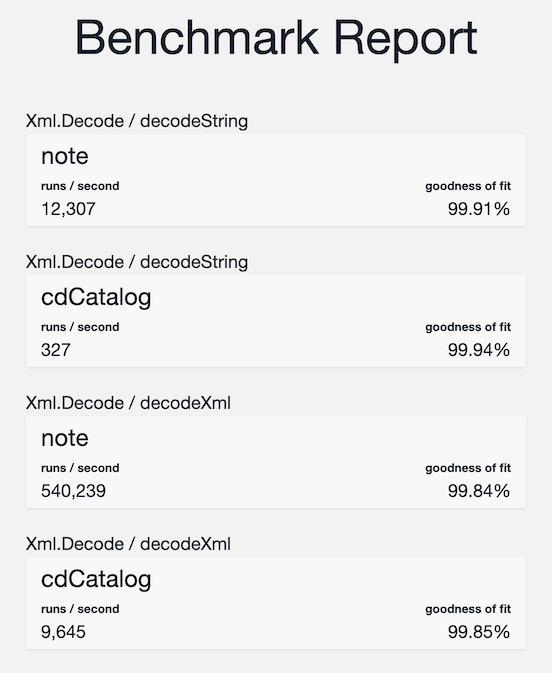
Sample result (on my MacBook Pro 2019):
- Environment
- CPU: Intel Core i7 1.7GHz
- Mem: DDR4 16GB
- macOS Mojave 10.14.6
- Google Chrome 78.0.3904.87 64bit
- Versions
- elm 0.19.1
- elm-xml-decode version: 3.1.0
- elm-benchmark 1.0.1
In Elm 0.18 (elm-xml-decode 1.x)
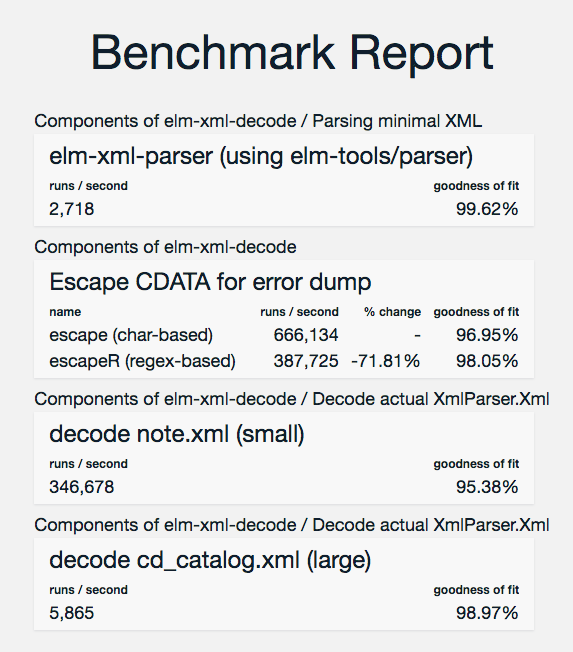
Using BrianHicks/elm-benchmark.
Sample result (on my MacBookPro early 2015):
- CPU: Core i5 2.7GHz
- Mem: DDR3 8GB 1867MHz
- macOS (was El Capitan era, IIRC)
- Google Chrome 63.0.3239.84 64bit
License
BSD-3-Clause