One True Path
The aim is to create one package that makes working with SVG paths nice and convenient.
Eventually, this package should replace (part of) the current separate implementations of SVG paths in existing packages.
I'll refer to the package here as OneTruePath, but we might want to pick a more serious name later.
Core Concepts
- Path: A list of subpaths
- SubPath: A move command followed by a list of draw commands
- Command: A lowlevel instruction (move the cursor, draw a straight line to a point)
Composition
Lines can be composed in two "obvious" ways: concatenation and layering.
concatenation happens on the subpath level, using the functions
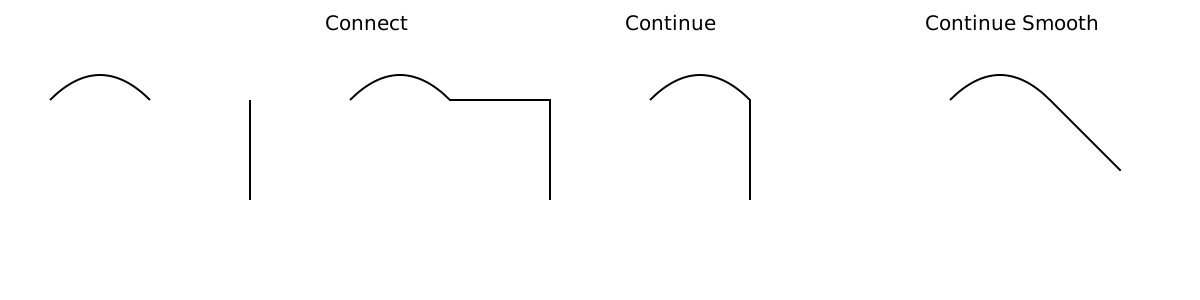
connect:draws a straight line connecting two subpaths (end to start)continue:make the start and end point of two subpaths coincidecontinueSmooth:make the start and end point of two subpaths coincide, and rotate to make the transition smooth.
layering is done with a list. SVG draws paths from left to right, so the final subpath in a path will be on top.
Using this package
Ideally, you can use the drawing functions in Curve and use the composition in SubPath and Path, then use either SubPath.element or Path.element to create svg.
import SubPath exposing SubPath
import Curve
import Svg exposing (Svg)
import Svg.Attributes exposing (width, height, viewBox, fill, stroke)

hShape : SubPath
hShape =
    [ ( 0.3, 0.2 )
    , ( 0.4, 0.2 )
    , ( 0.4, 0.45 )
    , ( 0.6, 0.45 )
    , ( 0.6, 0.2 )
    , ( 0.7, 0.2 )
    , ( 0.7, 0.8 )
    , ( 0.6, 0.8 )
    , ( 0.6, 0.55 )
    , ( 0.4, 0.55 )
    , ( 0.4, 0.8 )
    , ( 0.3, 0.8 )
    ]
        |> Curve.linearClosed

logo : Svg msg
logo =
    Svg.svg [ width "50", height "50", viewBox "0 0 1 1" ]
        [ SubPath.element hShape [ fill "none", stroke "black" ] ]
Existing svg path strings can be parsed into a nice elm data structure
import SubPath

right = "M0,0 L1,0"

down = "M0,0 L0,1"

Result.map2 (flip SubPath.continue) (SubPath.parse right) (SubPath.parse down)
    |> Result.map SubPath.toString
    |> Result.withDefault ""
    --> "M0,0 L1,0 L1,1"
The Segment module breaks down a line into four basic segment types, and exposes some mathematical functions (and the constructors, if you want to define your own fancy stuff).
The LowLevel module has that name for a reason. Unless you are making your own primitives, there is probably a better way.
If there isn't but you think there should be, please open an issue.
What about styling
That's not part of this package, but I'm looking into it. The julia Compose.jl library has some interesting ideas.