Force
This module implements a velocity Verlet numerical integrator for simulating physical forces on particles. The simulation is simplified: it assumes a constant unit time step Δt = 1 for each step, and a constant unit mass m = 1 for all particles. As a result, a force F acting on a particle is equivalent to a constant acceleration a over the time interval Δt, and can be simulated simply by adding to the particle’s velocity, which is then added to the particle’s position.
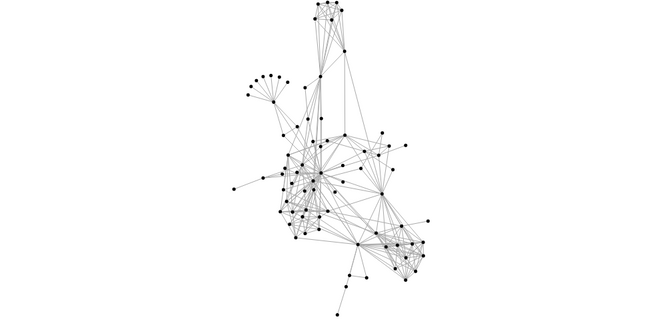
In the domain of information visualization, physical simulations are useful for studying networks and hierarchies!
Simulation
This is a convenience function for wrapping data up as Entities. The initial position of entities is arranged
in a phylotaxic pattern. Goes well with List.indexedMap.
Create a new simulation by passing a list of forces.
This holds internal state of the simulation.
Has the simulation stopped?
Resets the computation. This is useful if you need to change the parameters at runtime, such as the position or velocity of nodes during a drag operation.
You can set this to control how quickly the simulation should converge. The default value is 300 iterations.
Lower number of iterations will produce a layout quicker, but risk getting stuck in a local minimum. Higher values take longer, but typically produce better results.
This will run the entire simulation until it is completed and then returns the entities. Essentially keeps calling
tick until the simulation is done.
Note that this is fairly computationally expensive and may freeze the UI for a while if the dataset is large.
Advances the simulation a single tick, returning both updated entities and a new State of the simulation.
Forces
A force modifies nodes’ positions or velocities; in this context, a force can apply a classical physical force such as electrical charge or gravity, or it can resolve a geometric constraint, such as keeping nodes within a bounding box or keeping linked nodes a fixed distance apart.
The centering force translates nodes uniformly so that the mean position of all nodes (the center of mass) is at the given position ⟨x,y⟩. This force modifies the positions of nodes on each application; it does not modify velocities, as doing so would typically cause the nodes to overshoot and oscillate around the desired center. This force helps keep nodes in the center of the viewport, and it does not distort their relative positions.
The link force pushes linked nodes together or apart according to the desired link distance. The strength of the force is proportional to the difference between the linked nodes’ distance and the target distance, similar to a spring force.
The link distance here is 30, the strength of the force is proportional to the number of links on each side of the
present link, according to the formule: 1 / min (count souce) (count target) where count if a function that counts
links connected to those nodes.
Allows you to specify the link distance and optionally the strength. You must also specify the iterations count (the default in links is 1). Increasing the number of iterations greatly increases the rigidity of the constraint and is useful for complex structures such as lattices, but also increases the runtime cost to evaluate the force.
The many-body (or n-body) force applies mutually amongst all nodes. It can be used to simulate gravity (attraction) if the strength is positive, or electrostatic charge (repulsion) if the strength is negative.
Unlike links, which only affect two linked nodes, the charge force is global: it affects all nodes whose ids are passed to it.
The default strength is -30 simulating a repulsing charge.
This allows you to specify the strength of the many-body force.
This is the most flexible, but complex way to specify many body forces.
The first argument, let's call it theta, controls how much approximation to apply. The default value is 0.9.
To accelerate computation, this force implements the Barnes–Hut approximation which takes O(n log n) per application where n is the number of nodes. For each application, a quadtree stores the current node positions; then for each node, the combined force of all other nodes on the given node is computed. For a cluster of nodes that is far away, the charge force can be approximated by treating the cluster as a single, larger node. The theta parameter determines the accuracy of the approximation: if the ratio w / l of the width w of the quadtree cell to the distance l from the node to the cell’s center of mass is less than theta, all nodes in the given cell are treated as a single node rather than individually. Setting this to 0 will disable the optimization.
This function also allows you to set the force strength individually on each node.
The collision force simulates each node as a circle with a given radius and modifies their velocities to prevent the circles from overlapping.
Pass in the radius and a list of nodes that you would like the force to apply to.
This allows you to specify a radius for each node specifically.
Strength: Overlapping nodes are resolved through iterative relaxation. For each node, the other nodes that are anticipated to overlap at the next tick (using the anticipated positions ⟨x + vx,y + vy⟩) are determined; the node’s velocity is then modified to push the node out of each overlapping node. The change in velocity is dampened by the force’s strength such that the resolution of simultaneous overlaps can be blended together to find a stable solution. Set it to a value [0, 1], collision defaults to 1.
Iterations: collision defaults to 1 - this makes the constraint more rigid, but makes the computation slower.
The x- and y-positioning forces push nodes towards a desired position along the given dimension with a configurable strength. The strength of the force is proportional to the one-dimensional distance between the node’s position and the target position.
A positioning force along the X axis.
A positioning force along the Y axis.
A positioning force that pushes towards the nearest point on the given circle.
Force needs to compute and update positions and velocities on any objects that it is simulating. However, you can use your own data structure to manage these, as long as the individual objects expose the necessary properties. Therefore this type alias is an extensible record allowing you to avoid excessive nesting.
The
idproperty must be unique among objects, otherwise some of the colliding objects will be ignored by the simulation.Also take care when initializing the positions so that the points don't overlap.