Evg.Marker
Stamp small symbols, like arrowheads or dots, onto the ends and corners of lines.
A marker is a little reusable drawing that gets stamped at chosen points of a line, polyline, or path: at its start, at its end, or at each corner along the way. The classic example is an arrowhead at the end of a line, but a marker can be any shape you like.
import Evg
import Evg.Marker as Marker


-- A triangular arrowhead:
arrow =
    Marker.marker []
        { width = 10
        , height = 10
        , refX = 10
        , refY = 5
        }
        Marker.AutoOrientation
        (Evg.polygon [ Evg.fillStr "black" ]
            [ ( 0, 0 ), ( 10, 5 ), ( 0, 10 ) ]
        )


-- A horizontal line ending in the arrowhead:
Evg.line [ Marker.markerEnd arrow ]
    ( 20, 50 )
    ( 180, 50 )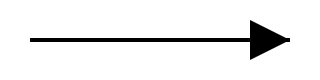
Creating Markers
Creates a marker that grows and shrinks with the thickness of the line
it decorates. A marker given width = 10 on a line drawn 2 units thick is
stamped 20 units wide, so arrowheads stay in proportion to their line. This
is usually what you want.
The record describes the marker's own little canvas. width and height
are its size, and refX and refY are the anchor point: the spot inside the
marker that lands exactly on the line's endpoint or corner. In the arrowhead
example below, the anchor (10, 5) is the arrow's tip, so the tip touches
the very end of the line.
The first argument is a list of extra attributes for the marker's canvas.
You can pass a viewBox to give the marker's content its own convenient
coordinate system, or preserveAspectRatio to control how it stretches.
-- A simple arrowhead whose tip lands
-- on the line's end:
Marker.marker []
    { width = 10, height = 10, refX = 10, refY = 5 }
    Marker.AutoOrientation
    (Evg.polygon [ Evg.fillStr "black" ]
        [ ( 0, 0 ), ( 10, 5 ), ( 0, 10 ) ]
    )


-- The same arrowhead, drawn in 0 to 100
-- coordinates for convenience:
Marker.marker [ Advanced.viewBox 0 0 100 100 ]
    { width = 10
    , height = 10
    , refX = 100
    , refY = 50
    }
    Marker.AutoOrientation
    (Evg.polygon [ Evg.fillStr "black" ]
        [ ( 0, 0 ), ( 100, 50 ), ( 0, 100 ) ]
)Creates a marker with a fixed size. Unlike marker, its size does not
follow the thickness of the line it decorates: a marker given width = 10
is always stamped 10 units wide, whether the line is hairline-thin or very
thick. Use this when markers should stay the same size across lines of
different weights.
-- A small red dot, always 8 units across:
Marker.markerUserSpace []
    { width = 8, height = 8, refX = 4, refY = 4 }
    Marker.AutoOrientation
    (Evg.circle [ Evg.fillStr "red" ]
        { r = 4, center = ( 4, 4 ) }
)Controls how the marker turns to follow the line it sits on.
AutoOrientation: the marker rotates to point along the direction the line is traveling at that point. This is what you want for arrowheads.AutoStartReverse: likeAutoOrientation, except a marker placed at the start of the line points backward, away from the line. Useful for a double-headed arrow built from one arrowhead shape.Fixed angle: the marker is always drawn turned clockwise by this many degrees, regardless of the line's direction.Fixed 0keeps it upright.
Applying Markers
Stamps a marker at the first point of a line, polyline, or path.
Evg.polyline [ Marker.markerStart dot ]
[ ( 10, 10 ), ( 90, 90 ) ]Stamps a marker at every corner of a polyline or path between the first and last points. In the example below, the dot appears only at the middle bend, not at either end.
Evg.polyline [ Marker.markerMid dot ]
    [ ( 10, 10 ), ( 50, 80 ), ( 90, 10 ) ]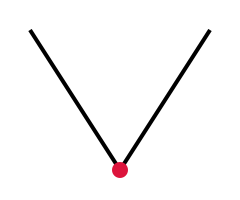
A small reusable drawing that can be stamped at the start, the corners, or the end of lines and paths. Build one with
markerormarkerUserSpace, then attach it withmarkerStart,markerMid, ormarkerEnd.