Evg.Transform
Move, rotate, resize, and slant shapes.
Transforms change where and how a shape is drawn without changing the numbers that define it. You describe the shape once, then use transforms to place it, spin it, or stretch it.
You can list several transforms on the same shape and they combine into one.
The transform listed last takes effect on the shape first. In the second
example below, the square is first rotated around the corner of the picture
and then moved into place, which is the usual recipe for rotating a shape
"in place" (though rotateAround does this in one step).
import Evg
import Evg.Transform as Transform


-- Move a square 50 units to the right:
Evg.rect [ Transform.translate 50 0 ]
    { x = 0, y = 0, width = 40, height = 40 }


-- A square rotated 45 degrees, sitting at (50, 50):
Evg.rect
    [ Transform.translate 50 50
    , Transform.rotate 45
    ]
{ x = -20, y = -20, width = 40, height = 40 }Rotates a shape clockwise by the given angle in degrees. The rotation
pivots around the top-left corner of the picture, the (0, 0) point, not
around the shape's own center. A shape far from that corner will swing
around it like the tip of a clock hand. If you want a shape to spin in
place, use rotateAround with the shape's center instead.
Transform.rotate 90 -- quarter turn clockwise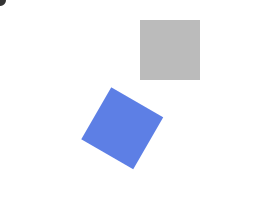
The grey square is the original and the blue square has been rotated 30 degrees around the top-left corner of the picture.
Rotates a shape clockwise by the given angle in degrees, pivoting around the point you give. Pass the shape's own center to spin it in place. This is usually what you want when "rotating a shape".
Transform.rotateAround 45 ( 50, 50 )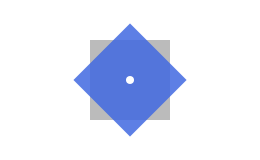
The grey square is the original and the blue square has been rotated 45 degrees around its own center, so it stays put and just turns.
Stretches or squashes a shape, with separate factors for width and
height. A factor of 1.0 means no change, 2.0 doubles that dimension,
and 0.5 halves it.
Distances from the top-left corner of the picture are scaled too, so a shape that does not touch that corner also moves as it grows or shrinks.
-- twice as wide, same height:
Transform.scale 2.0 1.0
The grey square is the original and the blue rectangle is the same square stretched to twice its width.
Grows or shrinks a shape by the same factor in both directions, keeping its proportions.
Transform.scaleUniform 0.5 -- shrink to half sizeSlants a shape sideways by the given angle in degrees, like pushing a deck of cards sideways so it leans. A square becomes a leaning parallelogram; its vertical edges tilt while its horizontal edges stay level. The further a point is from the top of the picture, the further it shifts sideways.
Transform.skewX 20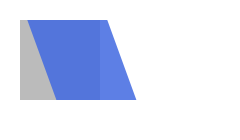
The grey square is the original and the blue parallelogram is the same square slanted 20 degrees to the side.
Slants a shape up or down by the given angle in degrees. This is the
vertical partner of skewX: a square's horizontal edges tilt while its
vertical edges stay upright, and the further a point is from the left of
the picture, the further it shifts down.
Transform.skewY 10The escape hatch: applies an arbitrary 2D transformation given as six
numbers. matrix a b c d e f moves each point (x, y) of the shape to
(a*x + c*y + e, b*x + d*y + f). Every combination of moving, rotating,
scaling, and slanting can be written this way.
Most of the time you will not need this. The other functions in this module cover the common cases with friendlier names.
Moves a shape sideways and down without changing its size or angle. Positive values move right and down, negative values move left and up.
The grey square is the original position and the blue square is the result.